
Kunena 7.0.6 & Kunena 6.4.12 – Security Updates Released
The Kunena team has announce the arrival of Kunena 7.0.6 [K 7.0.6] in stable which is now available for download as a native Joomla extension for J! 5.4.x/6.0.x. This version addresses most of the issues that were discovered in K 6.2 / K 6.3 / K 6.4 and issues discovered during the last development stages of K 7.0.
The Kunena team is also pleased to announce the twelfth version of Kunena 6.4, a native Joomla extension for Joomla! 5.0, 5.1, 5.2, 5.3, 5.4 and 6.0.
Topics that are moved into this category are generally considered to be closed. Users may want to add additional information but these topics should not be resurrected in order to discuss new problems or unrelated matters.
Question Setting Public Access Levels


15 years 3 weeks ago #95743
by sozzled
Blue Eagle vs. Crypsis reference guide
Read my blog and

Replied by sozzled on topic Re: Setting Public Access Levels
I've been discussing this issue with the team. Would it be possible for you to provide us with a screenshot that shows your group structure and category rights, please?
Blue Eagle vs. Crypsis reference guide
Read my blog and
The topic has been locked.


15 years 3 weeks ago #95747
by Siknin
Replied by Siknin on topic Re: Setting Public Access Levels
Sure. I am burned out for the night but I will provide them for you tomorrow.
The topic has been locked.
15 years 3 weeks ago #95750
by sozzled
Blue Eagle vs. Crypsis reference guide
Read my blog and
Replied by sozzled on topic Re: Setting Public Access Levels
No problem.
Blue Eagle vs. Crypsis reference guide
Read my blog and
The topic has been locked.
15 years 3 weeks ago - 15 years 3 weeks ago #95756
by Siknin
Replied by Siknin on topic Screenshots of admin set up
Here are the screen shots you asked for I will step through them.
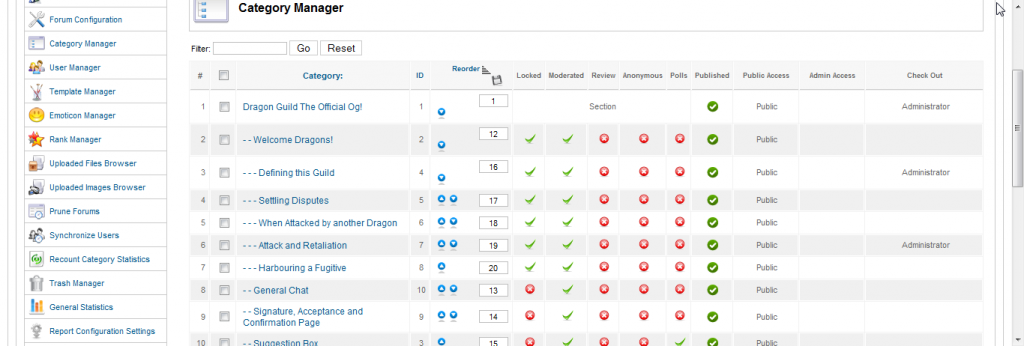
This is the admin panel showing the Kunena Category manager:
After I set up the Category it gives me the option of setting up Public access levels
this is shown in the highlighted area:

After I have set up the public access to point the category to the specified group you can go into joomla and set up the group. this is done in the following screen:

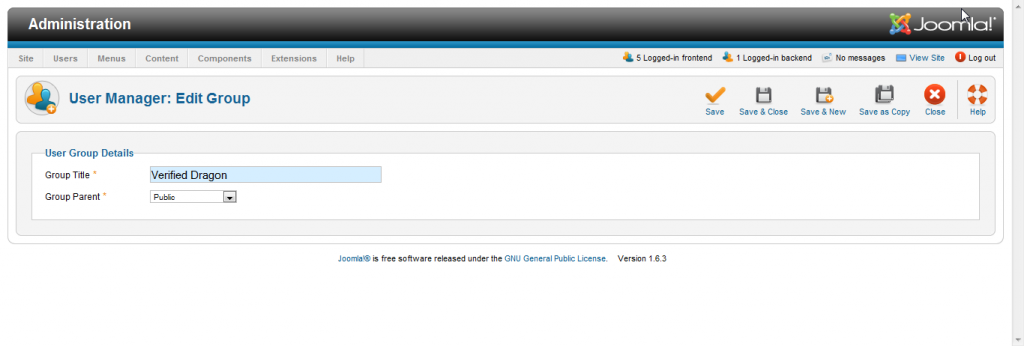
After you enter the Joomla Group manager you can edit the groups parent:
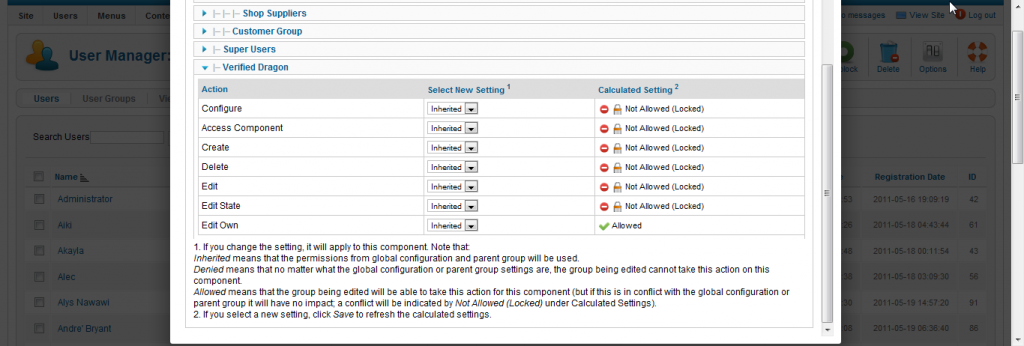
After you have set up the parent you can adjust the settings to the Group by going to user manager and selecting the option tab. This allows you to edit the following settings:
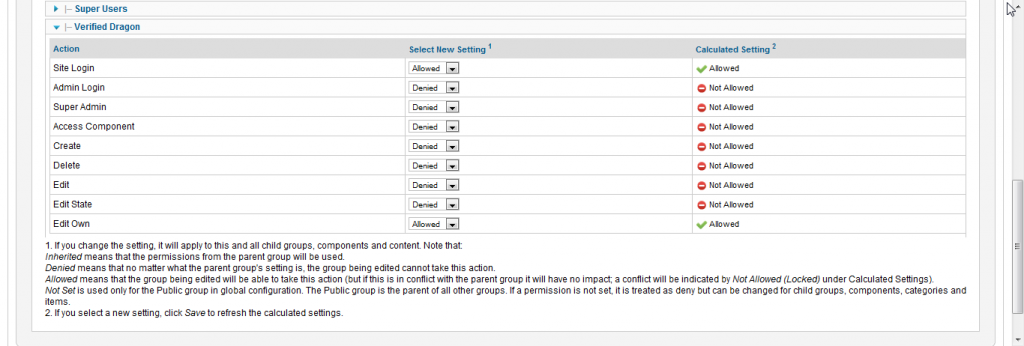
Now there are additional settings that can be selected in the global manager:
After you have completed setting up the group you can then go to your user manager andassign a user to a specific group:
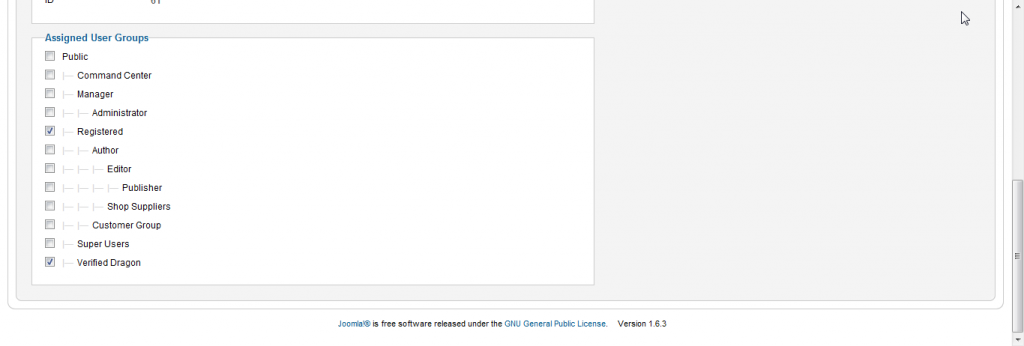
According to my understanding this should be all that is required in order to set specific groups to indvidual users and assign them to be able to see specific categories in the forums.
I am having users that are assigned to the user group tell me they can not view the forums assigned to said group while others with the exact same settings can. An hour ago I had one of the users tell me that he could now see the forum after i had done nothing to his settings. He is allowed to view it and it had been apx 6 hours since i originally assigend him to the group while others can view it immediately and some cant view at all. If there are any other questions on my set up please let me know. Once again thank you for your support.
siknin
This is the admin panel showing the Kunena Category manager:
After I set up the Category it gives me the option of setting up Public access levels
this is shown in the highlighted area:
After I have set up the public access to point the category to the specified group you can go into joomla and set up the group. this is done in the following screen:
After you enter the Joomla Group manager you can edit the groups parent:
After you have set up the parent you can adjust the settings to the Group by going to user manager and selecting the option tab. This allows you to edit the following settings:
Now there are additional settings that can be selected in the global manager:
After you have completed setting up the group you can then go to your user manager andassign a user to a specific group:
According to my understanding this should be all that is required in order to set specific groups to indvidual users and assign them to be able to see specific categories in the forums.
I am having users that are assigned to the user group tell me they can not view the forums assigned to said group while others with the exact same settings can. An hour ago I had one of the users tell me that he could now see the forum after i had done nothing to his settings. He is allowed to view it and it had been apx 6 hours since i originally assigend him to the group while others can view it immediately and some cant view at all. If there are any other questions on my set up please let me know. Once again thank you for your support.
siknin
Last edit: 15 years 3 weeks ago by Siknin. Reason: corrected screenshot
The topic has been locked.
15 years 3 weeks ago #95757
by sozzled
Blue Eagle vs. Crypsis reference guide
Read my blog and
Replied by sozzled on topic Re: Setting Public Access Levels
First reaction to your problem. It looks like your group structure is wrong. As a workaround, please move your "special groups" under "registered".
Blue Eagle vs. Crypsis reference guide
Read my blog and
The topic has been locked.
15 years 3 weeks ago #95758
by Siknin
Replied by Siknin on topic Re: Setting Public Access Levels
Ok. I selected my special categories and used registered as the Parent group. The orbs categories are default I have not yet rmoved. Ill ask a new user to try it.
The topic has been locked.
Time to create page: 0.240 seconds