


- Posts: 17
- Thank you received: 1
Kunena 7.0.6 & Kunena 6.4.12 – Security Updates Released
The Kunena team has announce the arrival of Kunena 7.0.6 [K 7.0.6] in stable which is now available for download as a native Joomla extension for J! 5.4.x/6.0.x. This version addresses most of the issues that were discovered in K 6.2 / K 6.3 / K 6.4 and issues discovered during the last development stages of K 7.0.
The Kunena team is also pleased to announce the twelfth version of Kunena 6.4, a native Joomla extension for Joomla! 5.0, 5.1, 5.2, 5.3, 5.4 and 6.0.
Topics that are moved into this category are generally considered to be closed. Users may want to add additional information but these topics should not be resurrected in order to discuss new problems or unrelated matters.
Question How to edit "Main Forum" Title & Content on entry page?
15 years 5 months ago - 15 years 5 months ago #80960
by TauxFu
How to edit "Main Forum" Title & Content on entry page? was created by TauxFu
On the entry page I am immediately greeted with the following:
Main Forum
This is the main forum section. As a level one section it serves as a container for individual boards or categories. It is also referred to as a level 1 section and is a must have for any Kunena Forum setup.
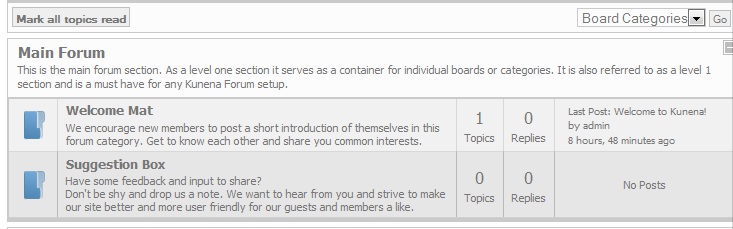
I'd like to edit that but after 10 hours of searching I still can't figure out where to do so.
It seems like a pretty quick fix if someone wouldn't mind guiding me to the right spot.
Also, the link to "private messages:" directs me to my profile, where there is no option to send or check PMs. I'm just at a loss on that one.
Main Forum
This is the main forum section. As a level one section it serves as a container for individual boards or categories. It is also referred to as a level 1 section and is a must have for any Kunena Forum setup.
I'd like to edit that but after 10 hours of searching I still can't figure out where to do so.
It seems like a pretty quick fix if someone wouldn't mind guiding me to the right spot.
Also, the link to "private messages:" directs me to my profile, where there is no option to send or check PMs. I'm just at a loss on that one.
Last edit: 15 years 5 months ago by TauxFu. Reason: To Add Screenshot
Please Log in or Create an account to join the conversation.


15 years 5 months ago #80963
by sozzled
Blue Eagle vs. Crypsis reference guide
Read my blog and

Replied by sozzled on topic Re: How to edit "Main Forum" Title & Content on entry page?
Background reading:
Sections, Categories and sub-Categories (Part 1)
Specifically, change the section description: Components » Kunena Forum » Category Manager and edit the description for the section "Main Forum".
While I have your attention, did you read my reply to the message you posted in "There was an error uploading this file to the server" installation error (again) . I am sure that other people would like to know how you solved your problem. Thanks.
Specifically, change the section description: Components » Kunena Forum » Category Manager and edit the description for the section "Main Forum".
While I have your attention, did you read my reply to the message you posted in "There was an error uploading this file to the server" installation error (again) . I am sure that other people would like to know how you solved your problem. Thanks.
Blue Eagle vs. Crypsis reference guide
Read my blog and
The following user(s) said Thank You: TauxFu
Please Log in or Create an account to join the conversation.
15 years 5 months ago #80965
by TauxFu
Replied by TauxFu on topic Re: How to edit "Main Forum" Title & Content on entry page?
Ha! That was the easiest thing evah! :woohoo:
Thank you so much.
I just noted your response to the other post. I was going to explain but saw so many other people answering with such detail I didn't think my silly tale would be wanted. I will go back to that and outline it though.
Thank you so much.
I just noted your response to the other post. I was going to explain but saw so many other people answering with such detail I didn't think my silly tale would be wanted. I will go back to that and outline it though.
Please Log in or Create an account to join the conversation.
15 years 5 months ago #80967
by sozzled
Blue Eagle vs. Crypsis reference guide
Read my blog and
Replied by sozzled on topic Re: How to edit "Main Forum" Title & Content on entry page?
Thank you. Every little bit that you write might help someone else ... and the help you give actually helps you, in the long run! 
Blue Eagle vs. Crypsis reference guide
Read my blog and
Please Log in or Create an account to join the conversation.
15 years 5 months ago #80981
by TauxFu
Replied by TauxFu on topic Re: How to edit "Main Forum" Title & Content on entry page?
I replied in (poorly formatted) exhaustive detail (you guys should really enable the "preview post" thingamajiggy!) to the installation error post.
Though, that was the thread I started in, because that was the first problem I encountered, I think my explanation belongs to a thread that I can't find anymore, specific to the error string received immediately after installing.
If you run across that thread, id feel like less of a nub if you could move my reply over
Thanks again for your help! I will be back shortly as I have a few other issues (PM links dont work)
Though, that was the thread I started in, because that was the first problem I encountered, I think my explanation belongs to a thread that I can't find anymore, specific to the error string received immediately after installing.
If you run across that thread, id feel like less of a nub if you could move my reply over
Thanks again for your help! I will be back shortly as I have a few other issues (PM links dont work)
Please Log in or Create an account to join the conversation.
- prakashraoblp
-

- Offline
- New Member
-

Less
More
- Posts: 1
- Thank you received: 0
14 years 10 months ago #103898
by prakashraoblp
Replied by prakashraoblp on topic Re: How to edit "Main Forum" Title & Content on entry page?
Thanks, it help me lot...
Please Log in or Create an account to join the conversation.
Time to create page: 0.274 seconds