


- Posts: 25
- Thank you received: 0
Kunena 7.0.5 & Kunena 6.4.11 – Security Updates Released
The Kunena team has announce the arrival of Kunena 7.0.5 [K 7.0.5] in stable which is now available for download as a native Joomla extension for J! 5.4.x/6.0.x. This version addresses most of the issues that were discovered in K 6.2 / K 6.3 / K 6.4 and issues discovered during the last development stages of K 7.0.
The Kunena team is also pleased to announce the eleventh version of Kunena 6.4, a native Joomla extension for Joomla! 5.0, 5.1, 5.2, 5.3, 5.4 and 6.0.
Topics that are moved into this category are generally considered to be closed. Users may want to add additional information but these topics should not be resurrected in order to discuss new problems or unrelated matters.
Solved How to change the font of the posts in my blue eagle template?
14 years 1 month ago #122716
by petko8680
Replied by petko8680 on topic How to change the font of the posts in my blue eagle template?
Well, i think it's a different font- the letters in this forum are a bit smaller and the font definitely looks different to me. BTW which font are you using for the forum topics?
Please Log in or Create an account to join the conversation.


14 years 1 month ago #122720
by sozzled
Blue Eagle vs. Crypsis reference guide
Read my blog and

Replied by sozzled on topic How to change the font of the posts in my blue eagle template?
If you would like to post a picture of what you're talking about (perhaps put a circle or use an arrow to point to exactly what you're discussing), I would be happy to answer this question for you.
On the other hand, a single mouse-click in Firebug will give you all the information that you need, too.
On the other hand, a single mouse-click in Firebug will give you all the information that you need, too.
Blue Eagle vs. Crypsis reference guide
Read my blog and
Please Log in or Create an account to join the conversation.
14 years 1 month ago #122748
by petko8680
Replied by petko8680 on topic How to change the font of the posts in my blue eagle template?
so this is what I have

and this is how I want it to look like:

I just want to change the font( and color probably)
and this is how I want it to look like:
I just want to change the font( and color probably)
Please Log in or Create an account to join the conversation.
14 years 1 month ago #122760
by sozzled
Blue Eagle vs. Crypsis reference guide
Read my blog and
Replied by sozzled on topic How to change the font of the posts in my blue eagle template?
The easiest thing to do is to change (around line 51) the file ../templates/newbornbaby/css/template.css and add a !important directive as shown below:
body, td, div, p {
font-family: Trebuchet MS,Verdana,sans-serif !important;
font-size: 14px;
line-height: 1.3em;
}
But if you want to make other changes to just the parts you shown in the picture, add the following lines to the end of the abovenamed file: something like this:
#Kunena div.kmsgbody div.kmsgtext {
color: <whatever colour you want>;
font-family: <whatever font-family you want>;
<etc.>
}
body, td, div, p {
font-family: Trebuchet MS,Verdana,sans-serif !important;
font-size: 14px;
line-height: 1.3em;
}
But if you want to make other changes to just the parts you shown in the picture, add the following lines to the end of the abovenamed file: something like this:
#Kunena div.kmsgbody div.kmsgtext {
color: <whatever colour you want>;
font-family: <whatever font-family you want>;
<etc.>
}
Blue Eagle vs. Crypsis reference guide
Read my blog and
Please Log in or Create an account to join the conversation.
14 years 1 month ago #122807
by petko8680
Replied by petko8680 on topic How to change the font of the posts in my blue eagle template?
thanks. I did it  there is only one problem- I changed the font-size in the line 51, that you have mentioned, just to see how it will looks like with smaller font, but it became bigger and now no matter what amount I put there is still the same size. The first time i put 14px and now is 8px, but still looks like 14px. any idea?
there is only one problem- I changed the font-size in the line 51, that you have mentioned, just to see how it will looks like with smaller font, but it became bigger and now no matter what amount I put there is still the same size. The first time i put 14px and now is 8px, but still looks like 14px. any idea? Please Log in or Create an account to join the conversation.
14 years 1 month ago - 14 years 1 month ago #122813
by sozzled
Blue Eagle vs. Crypsis reference guide
Read my blog and
Replied by sozzled on topic How to change the font of the posts in my blue eagle template?
You did not make the changes that I asked you to make to the file
www.mybabybook.org/templates/newbornbaby/css/template.css
. I don't know what you changed at line 51, but you did not do what I suggested. What you did was add these lines instead:
#Kunena div.kmsgbody div.kmsgtext {
font-family: comic sans;
}
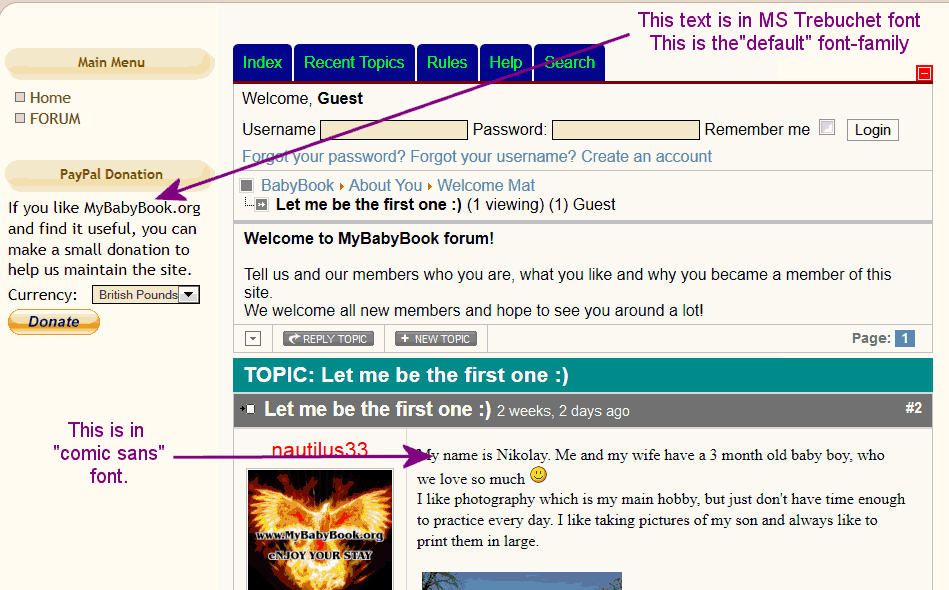
This is a different font (and differently-sized font) to MS Trebuchet. (Actually, "comic sans" is not a legal font-family name. If you want to use Comic Sans, then specify "Comic Sans" not "comic sans"). If you want differently sized font, then add other parts to that rule, e.g.
#Kunena div.kmsgbody div.kmsgtext {
font-family: Comic Sans;
font-size: <whatever font size you want>;
It would be a lot simpler if you just changed ../templates/newbornbaby/css/template.css, at around line 51 (not necessarily exactly that particular line), as I suggested, by adding the !important directive as shown below:
#Kunena div.kmsgbody div.kmsgtext {
font-family: comic sans;
}
This is a different font (and differently-sized font) to MS Trebuchet. (Actually, "comic sans" is not a legal font-family name. If you want to use Comic Sans, then specify "Comic Sans" not "comic sans"). If you want differently sized font, then add other parts to that rule, e.g.
#Kunena div.kmsgbody div.kmsgtext {
font-family: Comic Sans;
font-size: <whatever font size you want>;
It would be a lot simpler if you just changed ../templates/newbornbaby/css/template.css, at around line 51 (not necessarily exactly that particular line), as I suggested, by adding the !important directive as shown below:
Code:
body, td, div, p {
font-family: Trebuchet MS,Verdana,sans-serif !important;
font-size: 14px;
line-height: 1.3em;
}
Blue Eagle vs. Crypsis reference guide
Read my blog and
Last edit: 14 years 1 month ago by sozzled.
Please Log in or Create an account to join the conversation.
Time to create page: 0.256 seconds