
- Posts: 16
- Thank you received: 0
Kunena 7.0.9 & Kunena 6.4.14 – Security Updates Released
The Kunena team has announce the arrival of Kunena 7.0.9 [K 7.0.9] in stable which is now available for download as a native Joomla extension for J! 5.4.x/6.0.x./6.1.x. This version addresses most of the issues that were discovered in K 6.2 / K 6.3 / K 6.4 and issues discovered during the last development stages of K 7.0
Topics that are moved into this category are generally considered to be closed. Users may want to add additional information but these topics should not be resurrected in order to discuss new problems or unrelated matters.
Question Allow guests to see profile
- animator3000
-
 Topic Author
- Offline
- Junior Member
-

Less
More
14 years 9 months ago - 14 years 9 months ago #111518
by animator3000
Allow guests to see profile was created by animator3000
Hello,
I have install kunena 1.7.1 on joomla 1.7.3 and when I click on a profile, it says *Please login first*.
In security tab/Allow Guests to see User Profiles, I have put yes. So how I allow guests to see profiles ?
I have install kunena 1.7.1 on joomla 1.7.3 and when I click on a profile, it says *Please login first*.
In security tab/Allow Guests to see User Profiles, I have put yes. So how I allow guests to see profiles ?
Last edit: 14 years 9 months ago by animator3000.
Please Log in or Create an account to join the conversation.
14 years 9 months ago - 14 years 9 months ago #111522
by Redmars
Replied by Redmars on topic Re: Allow guests to see profile
Go to Administration -> Components -> Kunena Forum -> Forum Configuration
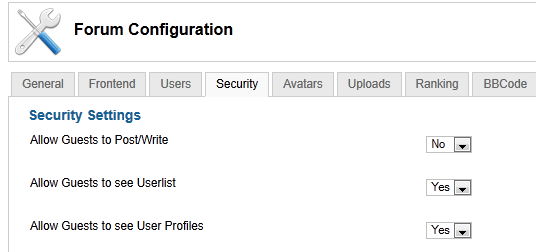
Now select the Security tab, Change the Allow Guests to see User Profiles from Yes to No.
[img][attachment=8216]ScreenShot040.png[/attachment][/img]
Now select the Security tab, Change the Allow Guests to see User Profiles from Yes to No.
[img][attachment=8216]ScreenShot040.png[/attachment][/img]
Last edit: 14 years 9 months ago by Redmars.
Please Log in or Create an account to join the conversation.
- animator3000
-
Topic Author
- Offline
- Junior Member
-
Less
More
- Posts: 16
- Thank you received: 0
14 years 9 months ago #111569
by animator3000
Replied by animator3000 on topic Re: Allow guests to see profile
I have already put this setup to yes but it didn't work.
Please Log in or Create an account to join the conversation.
14 years 9 months ago #111607
by Redmars
Replied by Redmars on topic Re: Allow guests to see profile
I tried it on a new site and it does not. I have not used it like this before because I think most people don't want the search engines to crawl the user data. Reduces the amount of spam users get by not having it open to the public.
I have even tried giving the public group higher access in Joomla and it did not work.
I will try checking more settings, maybe someone else has seen this on their site.
I have even tried giving the public group higher access in Joomla and it did not work.
I will try checking more settings, maybe someone else has seen this on their site.
Please Log in or Create an account to join the conversation.


14 years 9 months ago #111611
by sozzled
Blue Eagle vs. Crypsis reference guide
Read my blog and

Replied by sozzled on topic Re: Allow guests to see profile
This seems to me to be something caused outside Kunena if you click an avatar image and you get the message "Please login first". I don't think this is a Support issue either (and I've moved it to the Common Questions category). It would help if we knew what other software you are using, too: please see
What information should I include when I ask for help (including how to post my configuration report)?
Maybe this is a Kunena issue but I don't know. Are you using CB or JomSocial? What have you integrated Kunena with? :dry:
Maybe this is a Kunena issue but I don't know. Are you using CB or JomSocial? What have you integrated Kunena with? :dry:
Blue Eagle vs. Crypsis reference guide
Read my blog and
Please Log in or Create an account to join the conversation.
- animator3000
-
Topic Author
- Offline
- Junior Member
-
Less
More
- Posts: 16
- Thank you received: 0
14 years 9 months ago #111622
by animator3000
Replied by animator3000 on topic Re: Allow guests to see profile
I have just kunena and joomla, I don't use other software
Please Log in or Create an account to join the conversation.
Time to create page: 0.223 seconds