


- Posts: 38
- Thank you received: 0
Kunena 7.0.5 & Kunena 6.4.11 – Security Updates Released
The Kunena team has announce the arrival of Kunena 7.0.5 [K 7.0.5] in stable which is now available for download as a native Joomla extension for J! 5.4.x/6.0.x. This version addresses most of the issues that were discovered in K 6.2 / K 6.3 / K 6.4 and issues discovered during the last development stages of K 7.0.
The Kunena team is also pleased to announce the eleventh version of Kunena 6.4, a native Joomla extension for Joomla! 5.0, 5.1, 5.2, 5.3, 5.4 and 6.0.
Topics that are moved into this category are generally considered to be closed. Users may want to add additional information but these topics should not be resurrected in order to discuss new problems or unrelated matters.
Question Forums "Disappear" When Not Logged In
14 years 9 months ago - 14 years 9 months ago #103640
by Griz44
Forums "Disappear" When Not Logged In was created by Griz44
Configuration report below.
For some reason, my forums are not showing up at all to non-logged-in visitors. I've double checked my settings...public viewing, etc...all appear correct. When I log in, the forums all appear. When I log out, it just says "There are no categories in the section!" It doesn't give me any privacy messages or anything like that. It's just like the forums disappear when I log out. This one is driving me nuts. :evil:
For some reason, my forums are not showing up at all to non-logged-in visitors. I've double checked my settings...public viewing, etc...all appear correct. When I log in, the forums all appear. When I log out, it just says "There are no categories in the section!" It doesn't give me any privacy messages or anything like that. It's just like the forums disappear when I log out. This one is driving me nuts. :evil:
This message contains confidential information
Database collation check: The collation of your table fields are correct
Legacy mode: Disabled | Joomla! SEF: Enabled | Joomla! SEF rewrite: Disabled | FTP layer: Disabled |
This message contains confidential informationhtaccess: Exists | PHP environment: Max execution time: 30 seconds | Max execution memory: 64M | Max file upload: 64M
This message contains confidential information
Joomla default template details : gk_memovie | author: GavickPro | version: 1.3 | creationdate: 12 April 2011
Kunena default template details : Blue Eagle (default) | author: Kunena Team | version: 1.6.5 | creationdate: 2011-07-27
Kunena version detailled: Installed version: 1.6.5 | Build: 5005 | Version name: Babel | Kunena detailled configuration:
Warning: Spoiler![th]Kunena config settings:[/th]
board_title Kunena board_offline 0 board_ofset 0.00 offline_message <h2>The Forum is currently offline for maintenance.</h2>
<div>Check back soon!</div>enablerss 1 enablepdf 1 threads_per_page 20 messages_per_page 6 messages_per_page_search 15 showhistory 1 historylimit 6 shownew 1 jmambot 0 disemoticons 0 template default showannouncement 1 avataroncat 0 catimagepath category_images/ showchildcaticon 1 annmodid 62 rtewidth 450 rteheight 300 enableforumjump 1 reportmsg 1 username 1 askemail 0 showemail 0 showuserstats 1 showkarma 1 useredit 1 useredittime 0 useredittimegrace 600 editmarkup 1 allowsubscriptions 1 subscriptionschecked 1 allowfavorites 1 maxsubject 50 maxsig 300 regonly 0 changename 0 pubwrite 0 floodprotection 0 mailmod 0 mailadmin 0 captcha 0 mailfull 1 allowavatar 1 allowavatarupload 1 allowavatargallery 1 avatarquality 65 avatarsize 2048 allowimageupload 0 allowimageregupload 1 imageheight 800 imagewidth 800 imagesize 150 allowfileupload 0 allowfileregupload 1 filetypes txt,rtf,pdf,zip,tar.gz,tgz,tar.bz2 filesize 120 showranking 1 rankimages 1 avatar_src fb fb_profile fb pm_component no userlist_rows 30 userlist_online 1 userlist_avatar 1 userlist_name 1 userlist_username 1 userlist_posts 1 userlist_karma 1 userlist_email 0 userlist_usertype 0 userlist_joindate 1 userlist_lastvisitdate 1 userlist_userhits 1 latestcategory showstats 1 showwhoisonline 1 showgenstats 1 showpopuserstats 1 popusercount 5 showpopsubjectstats 1 popsubjectcount 5 usernamechange 0 rules_infb 1 rules_cid 1 help_infb 1 help_cid 1 showspoilertag 1 showvideotag 1 showebaytag 1 trimlongurls 1 trimlongurlsfront 40 trimlongurlsback 20 autoembedyoutube 1 autoembedebay 1 ebaylanguagecode en-us fbsessiontimeout 1800 highlightcode 0 rss_type topic rss_timelimit month rss_limit 100 rss_included_categories rss_excluded_categories rss_specification rss2.0 rss_allow_html 1 rss_author_format name rss_author_in_title 1 rss_word_count 0 rss_old_titles 1 rss_cache 900 fbdefaultpage recent default_sort asc alphauserpointsnumchars 0 sef 1 sefcats 0 sefutf8 0 showimgforguest 1 showfileforguest 1 pollnboptions 4 pollallowvoteone 1 pollenabled 1 poppollscount 5 showpoppollstats 1 polltimebtvotes 00:15:00 pollnbvotesbyuser 100 pollresultsuserslist 1 maxpersotext 50 ordering_system mesid post_dateformat ago post_dateformat_hover datetime hide_ip 1 js_actstr_integration 0 imagetypes jpg,jpeg,gif,png checkmimetypes 1 imagemimetypes image/jpeg,image/jpg,image/gif,image/png imagequality 50 thumbheight 32 thumbwidth 32 hideuserprofileinfo put_empty integration_access auto integration_login auto integration_avatar auto integration_profile auto integration_private auto integration_activity auto boxghostmessage 0 userdeletetmessage 0 latestcategory_in 1 topicicons 1 onlineusers 1 debug 0 catsautosubscribed 0 showbannedreason 0 version_check 1 showthankyou 1 showpopthankyoustats 1 popthankscount 5 mod_see_deleted 0 bbcode_img_secure text listcat_show_moderators 1 lightbox 1 activity_limit 0 show_list_time 720 show_session_type 0 show_session_starttime 0 userlist_allowed 0 userlist_count_users 1 enable_threaded_layouts 0 category_subscriptions post topic_subscriptions every pubprofile 1 thankyou_max 10
Third-party components: Jomsocial 2.2.4
Third-party SEF components: None
Plugins: System - Mootools Upgrade: Disabled | System - Mootools12: Disabled | Kunena Search 1.6.4 | My Kunena Forum Posts 1.6.4
Modules: Kunena Latest 1.6.4 | Kunena Stats 1.6.4 | Kunena Login 1.6.4
Last edit: 14 years 9 months ago by sozzled. Reason: Change topic icon
Please Log in or Create an account to join the conversation.


14 years 9 months ago #103643
by sozzled
Blue Eagle vs. Crypsis reference guide
Read my blog and

Replied by sozzled on topic Re: Forums "Disappear" When Not Logged In
Check the permissions on your Kunena menu items. The should look something like these:
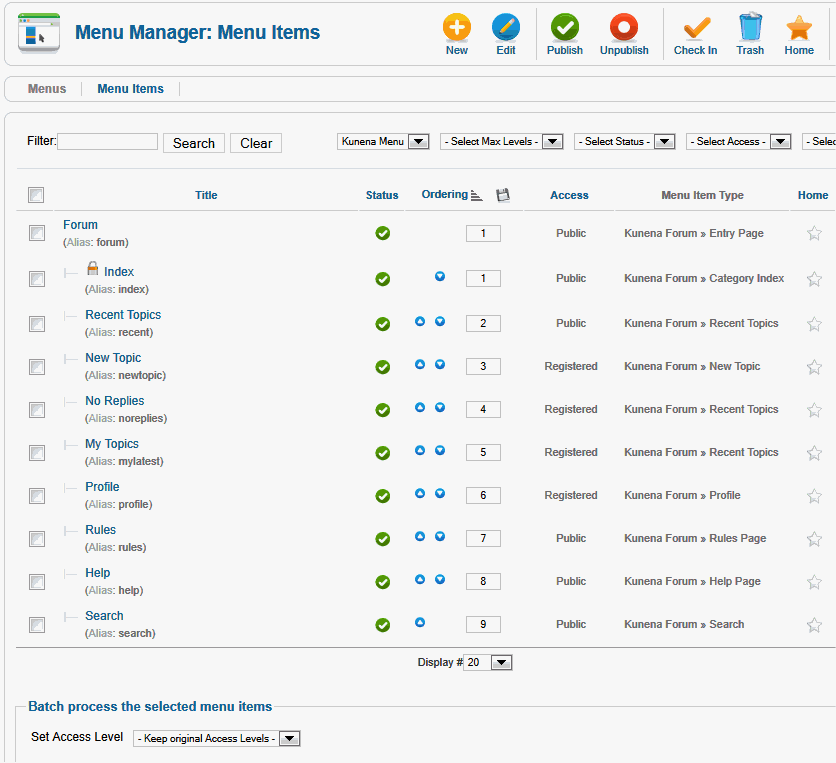
The other thing that can affect your forum is if, and how, you have modified J! 1.7 permissions settings. J! 1.7 permissions are "tricky" and you should only change these things if you really know what you are doing; otherwise, just leave J! 1.7 permissions the way that they were originally set when you first installed Joomla 1.7.
The other thing that can affect your forum is if, and how, you have modified J! 1.7 permissions settings. J! 1.7 permissions are "tricky" and you should only change these things if you really know what you are doing; otherwise, just leave J! 1.7 permissions the way that they were originally set when you first installed Joomla 1.7.
Blue Eagle vs. Crypsis reference guide
Read my blog and
Please Log in or Create an account to join the conversation.
14 years 9 months ago - 14 years 9 months ago #103647
by Griz44
UPDATE: I have reverted to all the default Groups, ACL's and Category access levels (all public). I have eliminated the Guest group...everything. There is still no forum visibility for a non-logged in user.
Could any simple Kunena configuration parameters that I may have missed cause this? Here are my settings for the ones I assume matter:
>> Allow Guests to post/write - NO
>> Registered Users Only - NO
I'm getting a bit desperate on this issue. :sick: I'd really appreciate any help you can provide.
All of my categories, with the exception of one sub-sub-sub-category, are public.
But I will say this, the problem seemed to start (I'm not 100%) certain, when I set up a Guest group so a couple of modules would disappear for logged-in users. But I got so frustrated, I removed the Guest group and Access Level completely but nothing changed.
I do have some additional groups and permissions. Is it possible you could take a look if I give you back-end access? (I'm considering removing all groups/acls I've added to see if that solves the problem, but _everything_ on the site is working perfectly EXCEPT that guests cannot see the forums. I'd prefer not to start over with my groups/acls again. They are an important part of the way my site functions.)
Thanks.
Griz (Steve)
Replied by Griz44 on topic Re: Forums "Disappear" When Not Logged In
UPDATE: I have reverted to all the default Groups, ACL's and Category access levels (all public). I have eliminated the Guest group...everything. There is still no forum visibility for a non-logged in user.
Could any simple Kunena configuration parameters that I may have missed cause this? Here are my settings for the ones I assume matter:
>> Allow Guests to post/write - NO
>> Registered Users Only - NO
I'm getting a bit desperate on this issue. :sick: I'd really appreciate any help you can provide.
All of my categories, with the exception of one sub-sub-sub-category, are public.
But I will say this, the problem seemed to start (I'm not 100%) certain, when I set up a Guest group so a couple of modules would disappear for logged-in users. But I got so frustrated, I removed the Guest group and Access Level completely but nothing changed.
I do have some additional groups and permissions. Is it possible you could take a look if I give you back-end access? (I'm considering removing all groups/acls I've added to see if that solves the problem, but _everything_ on the site is working perfectly EXCEPT that guests cannot see the forums. I'd prefer not to start over with my groups/acls again. They are an important part of the way my site functions.)
Thanks.
Griz (Steve)
sozzled wrote: Check the permissions on your Kunena menu items. The should look something like these:
The other thing that can affect your forum is if, and how, you have modified J! 1.7 permissions settings. J! 1.7 permissions are "tricky" and you should only change these things if you really know what you are doing; otherwise, just leave J! 1.7 permissions the way that they were originally set when you first installed Joomla 1.7.
Last edit: 14 years 9 months ago by Griz44.
Please Log in or Create an account to join the conversation.


14 years 9 months ago #103801
by Matias
Replied by Matias on topic Re: Forums "Disappear" When Not Logged In
If you created Guest group, it's obvious that they are not showing up (they are in another part of the ACL tree).
For the menu you need to add your new guest group to the Access level = Public
Kunena allows you to add 2 groups (with their children) into each category. Those are "Public Access Level" and "Admin Access Level". As Admin Access Level has no meaning in J1.6+ you can use it for the Guests if it's in the different sub-tree..
For the menu you need to add your new guest group to the Access level = Public
Kunena allows you to add 2 groups (with their children) into each category. Those are "Public Access Level" and "Admin Access Level". As Admin Access Level has no meaning in J1.6+ you can use it for the Guests if it's in the different sub-tree..
Please Log in or Create an account to join the conversation.
14 years 9 months ago - 14 years 9 months ago #103804
by Griz44
Replied by Griz44 on topic Re: Forums "Disappear" When Not Logged In
Appreciate the input, but...
Somehow it goes beyond that. I've been very careful and double/triple checked the guest/public access and still nothing. Finally I've done away with the Guest group altogether again and went back to all the default ACL/Group settings...still not showing. (In summary, I have all ACL groups settings back to default and ALL forums are set to public access...still don't show unless I'm logged in.) Try it at...
grizzledgamer.com/index.php/forums/forum-index
(I know you can't see the back-end, but it is properly set for visitors to be able to view the forums. If you create an account and log in, the forums will appear.)
I always hesitate to jump to this conclusion too quickly, but it seems as though I've somehow triggered a bug.
Griz
Somehow it goes beyond that. I've been very careful and double/triple checked the guest/public access and still nothing. Finally I've done away with the Guest group altogether again and went back to all the default ACL/Group settings...still not showing. (In summary, I have all ACL groups settings back to default and ALL forums are set to public access...still don't show unless I'm logged in.) Try it at...
grizzledgamer.com/index.php/forums/forum-index
(I know you can't see the back-end, but it is properly set for visitors to be able to view the forums. If you create an account and log in, the forums will appear.)
I always hesitate to jump to this conclusion too quickly, but it seems as though I've somehow triggered a bug.
Griz
Matias wrote: If you created Guest group, it's obvious that they are not showing up (they are in another part of the ACL tree).
For the menu you need to add your new guest group to the Access level = Public
Kunena allows you to add 2 groups (with their children) into each category. Those are "Public Access Level" and "Admin Access Level". As Admin Access Level has no meaning in J1.6+ you can use it for the Guests if it's in the different sub-tree..
Last edit: 14 years 9 months ago by Griz44.
Please Log in or Create an account to join the conversation.
14 years 9 months ago #103816
by Matias
Replied by Matias on topic Re: Forums "Disappear" When Not Logged In
I don't think that there's a bug -- the code is so simple:
We Just get all the groups where the user belongs into (recursively):
JAccess::getGroupsByUser(JFactory::getUser()->id, true);
.. and then we check if the group you have entered in category configuration matches one of those.
So easiest way to see the groups visitor is to add this code into somewhere where it gets run:
It returns list of user group id's (all that user belongs into)..
We Just get all the groups where the user belongs into (recursively):
JAccess::getGroupsByUser(JFactory::getUser()->id, true);
.. and then we check if the group you have entered in category configuration matches one of those.
So easiest way to see the groups visitor is to add this code into somewhere where it gets run:
Code:
print_r(JAccess::getGroupsByUser(JFactory::getUser()->id, true));die();
Please Log in or Create an account to join the conversation.
Time to create page: 0.285 seconds