


- Posts: 10
- Thank you received: 0
Kunena 7.0.5 & Kunena 6.4.11 – Security Updates Released
The Kunena team has announce the arrival of Kunena 7.0.5 [K 7.0.5] in stable which is now available for download as a native Joomla extension for J! 5.4.x/6.0.x. This version addresses most of the issues that were discovered in K 6.2 / K 6.3 / K 6.4 and issues discovered during the last development stages of K 7.0.
The Kunena team is also pleased to announce the eleventh version of Kunena 6.4, a native Joomla extension for Joomla! 5.0, 5.1, 5.2, 5.3, 5.4 and 6.0.
Question Default menu item is the only one that works. All others give 404 error
14 years 10 months ago #99310
by kwarr
I have set up Kunena 1.6.4 on Joomla 1.5.23
All the configuration settings are default (see below)
Clicking 'Forum' in the main Joomla menu opens the forum correctly in the default menu item.
None of the tabs or other links work - all give 404 errors
I have Joomla SEO on. I have tried Kunena SEO both on and off.
I have not found a solution to this on the forum and would be very grateful for help
All the configuration settings are default (see below)
Clicking 'Forum' in the main Joomla menu opens the forum correctly in the default menu item.
None of the tabs or other links work - all give 404 errors
I have Joomla SEO on. I have tried Kunena SEO both on and off.
I have not found a solution to this on the forum and would be very grateful for help
This message contains confidential information
Database collation check: The collation of your table fields are correct
Legacy mode: Disabled | Joomla! SEF: Enabled | Joomla! SEF rewrite: Enabled | FTP layer: Enabled |
This message contains confidential informationhtaccess: Exists | PHP environment: Max execution time: 30 seconds | Max execution memory: 16M | Max file upload: 2M
This message contains confidential information
Joomla default template details : kabisa | author: Kip Warr | version: 2.0.0 | creationdate: August 2010
Kunena default template details : Blue Eagle (default) | author: Kunena Team | version: 1.6.4 | creationdate: 2011-05-07
Kunena version detailled: Installed version: 1.6.4 | Build: 4832 | Version name: Kerkrade | Kunena detailled configuration:
Warning: Spoiler![th]Kunena config settings:[/th]
board_title Kunena board_offline 0 board_ofset 0.00 offline_message <h2>The Forum is currently offline for maintenance.</h2>
<div>Check back soon!</div>enablerss 1 enablepdf 1 threads_per_page 20 messages_per_page 6 messages_per_page_search 15 showhistory 1 historylimit 6 shownew 1 jmambot 0 disemoticons 0 template default showannouncement 1 avataroncat 0 catimagepath category_images/ showchildcaticon 1 annmodid 62 rtewidth 450 rteheight 300 enableforumjump 1 reportmsg 1 username 1 askemail 0 showemail 0 showuserstats 1 showkarma 1 useredit 1 useredittime 0 useredittimegrace 600 editmarkup 1 allowsubscriptions 1 subscriptionschecked 1 allowfavorites 1 maxsubject 50 maxsig 300 regonly 0 changename 0 pubwrite 0 floodprotection 0 mailmod 0 mailadmin 0 captcha 0 mailfull 1 allowavatar 1 allowavatarupload 1 allowavatargallery 1 avatarquality 65 avatarsize 2048 allowimageupload 0 allowimageregupload 1 imageheight 800 imagewidth 800 imagesize 150 allowfileupload 0 allowfileregupload 1 filetypes txt,rtf,pdf,zip,tar.gz,tgz,tar.bz2 filesize 120 showranking 1 rankimages 1 avatar_src fb fb_profile fb pm_component no userlist_rows 30 userlist_online 1 userlist_avatar 1 userlist_name 1 userlist_username 1 userlist_posts 1 userlist_karma 1 userlist_email 0 userlist_usertype 0 userlist_joindate 1 userlist_lastvisitdate 1 userlist_userhits 1 latestcategory 0 showstats 1 showwhoisonline 1 showgenstats 1 showpopuserstats 1 popusercount 5 showpopsubjectstats 1 popsubjectcount 5 usernamechange 0 rules_infb 1 rules_cid 1 help_infb 1 help_cid 1 showspoilertag 1 showvideotag 1 showebaytag 1 trimlongurls 1 trimlongurlsfront 40 trimlongurlsback 20 autoembedyoutube 1 autoembedebay 1 ebaylanguagecode en-us fbsessiontimeout 1800 highlightcode 0 rss_type topic rss_timelimit month rss_limit 100 rss_included_categories rss_excluded_categories rss_specification rss2.0 rss_allow_html 1 rss_author_format name rss_author_in_title 1 rss_word_count 0 rss_old_titles 1 rss_cache 900 fbdefaultpage recent default_sort asc alphauserpointsnumchars 0 sef 1 sefcats 0 sefutf8 0 showimgforguest 1 showfileforguest 1 pollnboptions 4 pollallowvoteone 1 pollenabled 1 poppollscount 5 showpoppollstats 1 polltimebtvotes 00:15:00 pollnbvotesbyuser 100 pollresultsuserslist 1 maxpersotext 50 ordering_system mesid post_dateformat ago post_dateformat_hover datetime hide_ip 1 js_actstr_integration 0 imagetypes jpg,jpeg,gif,png checkmimetypes 1 imagemimetypes image/jpeg,image/jpg,image/gif,image/png imagequality 50 thumbheight 32 thumbwidth 32 hideuserprofileinfo put_empty integration_access auto integration_login auto integration_avatar auto integration_profile auto integration_private auto integration_activity auto boxghostmessage 0 userdeletetmessage 0 latestcategory_in 1 topicicons 1 onlineusers 1 debug 0 catsautosubscribed 0 showbannedreason 0 version_check 1 showthankyou 1 showpopthankyoustats 1 popthankscount 5 mod_see_deleted 0 bbcode_img_secure text listcat_show_moderators 1 lightbox 1 activity_limit 0 show_list_time 720 show_session_type 0 show_session_starttime 0 userlist_allowed 0 userlist_count_users 1 enable_threaded_layouts 0 category_subscriptions post topic_subscriptions every pubprofile 1
Third-party components: None
Third-party SEF components: None
Plugins: System - Mootools Upgrade: Disabled | System - Mootools12: Disabled
Modules: None
Please Log in or Create an account to join the conversation.


14 years 10 months ago #99318
by sozzled
Blue Eagle vs. Crypsis reference guide
Read my blog and

Replied by sozzled on topic Re: Default menu item is the only one that works. All others give 404 error
Please see the FAQs tab at the top of this page. I think your question is answered if you read
Kunena menu issues
. Use the "trash-burn-build" technique described in that article I have just mentioned.
Blue Eagle vs. Crypsis reference guide
Read my blog and
Please Log in or Create an account to join the conversation.
14 years 10 months ago #99373
by kwarr
Replied by kwarr on topic Re: Default menu item is the only one that works. All others give 404 error
Thank you for the speedy reply, Sozzled, but sadly the problem remains.
I have been through all the procedures for "trash-burn-build" - twice, just to be sure.
I deleted the Kunena menu module and noted that the 'Create menu' procedure rebuilt it.
I also checked the 'Customised menus' wiki page but did not find a solution there.
The only other changes I have made are:
- changed the alias of both the Kunena 'Forum' menu item and the main menu 'Forum' item to 'kabisaforum'
- created a new Kunena menu item 'Help2'.
Note: Joomla SEF is on. When I set Kunena SEF on, no tabs or links work at all. When I set Kunena SEF off, I can follow a topic but the tabs still don't work.
I am fairly experienced in Joomla so could try other solutions if you can suggest any.
Incidentally, there seems to be no content on the ' Create menu ' wiki page
I have been through all the procedures for "trash-burn-build" - twice, just to be sure.
I deleted the Kunena menu module and noted that the 'Create menu' procedure rebuilt it.
I also checked the 'Customised menus' wiki page but did not find a solution there.
The only other changes I have made are:
- changed the alias of both the Kunena 'Forum' menu item and the main menu 'Forum' item to 'kabisaforum'
- created a new Kunena menu item 'Help2'.
Note: Joomla SEF is on. When I set Kunena SEF on, no tabs or links work at all. When I set Kunena SEF off, I can follow a topic but the tabs still don't work.
I am fairly experienced in Joomla so could try other solutions if you can suggest any.
Incidentally, there seems to be no content on the ' Create menu ' wiki page
Please Log in or Create an account to join the conversation.
14 years 10 months ago #99399
by sozzled

Getting back to the actual problem, this is a Joomla site management issue and the solution lies with basic Joomla issues (although the Joomla menuing system can be a real headache). Let's look at what you've got:
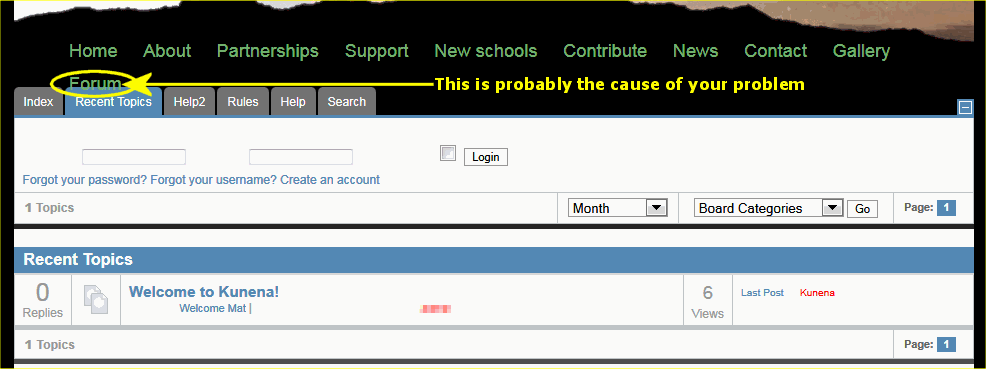
The problem is the way that you've define your Forum link (which I've circled in yellow). The actual answer to this whole problem is given in Customised menus which instructs you to create a menu link of type Alias. It's a very common mistake (and I find it's the cause of why so many people have problems. Menu type "Alias" is probably not the first choice that most novice Joomla users would use (and that's why so many people seem to fall into this trap).
So there's your answer and I hope this addresses your problem once and for all.
Blue Eagle vs. Crypsis reference guide
Read my blog and
Replied by sozzled on topic Re: Default menu item is the only one that works. All others give 404 error
Would you like to write it?kwarr wrote: Incidentally, there seems to be no content on the ' Create menu ' wiki page
Getting back to the actual problem, this is a Joomla site management issue and the solution lies with basic Joomla issues (although the Joomla menuing system can be a real headache). Let's look at what you've got:
The problem is the way that you've define your Forum link (which I've circled in yellow). The actual answer to this whole problem is given in Customised menus which instructs you to create a menu link of type Alias. It's a very common mistake (and I find it's the cause of why so many people have problems. Menu type "Alias" is probably not the first choice that most novice Joomla users would use (and that's why so many people seem to fall into this trap).
So there's your answer and I hope this addresses your problem once and for all.
Blue Eagle vs. Crypsis reference guide
Read my blog and
The following user(s) said Thank You: kwarr
Please Log in or Create an account to join the conversation.
14 years 10 months ago #99412
by kwarr
Replied by kwarr on topic Re: Default menu item is the only one that works. All others give 404 error
Many thanks for the clear instructions, but that link is Alias type - in the menu item list it shows as type Menulink. I tried creating a new menu item to make sure but had the same outcome.
I've obviously done something wrong somewhere...
I've obviously done something wrong somewhere...
Perhaps when I'm old and wise enough!Would you like to write it?
Please Log in or Create an account to join the conversation.
14 years 10 months ago #99417
by sozzled

Blue Eagle vs. Crypsis reference guide
Read my blog and
Replied by sozzled on topic Re: Default menu item is the only one that works. All others give 404 error
Type "Menulink" is what the link should be. See Customised Menus for more information. After you define the menu type, you also need to point it to your "Forum" as shown below:kwarr wrote: Many thanks for the clear instructions, but that link is Alias type - in the menu item list it shows as type Menulink. I tried creating a new menu item to make sure but had the same outcome.
Blue Eagle vs. Crypsis reference guide
Read my blog and
Please Log in or Create an account to join the conversation.
Time to create page: 0.332 seconds