
- Posts: 18
- Thank you received: 0
Kunena 7.0.9 & Kunena 6.4.14 – Security Updates Released
The Kunena team has announce the arrival of Kunena 7.0.9 [K 7.0.9] in stable which is now available for download as a native Joomla extension for J! 5.4.x/6.0.x./6.1.x. This version addresses most of the issues that were discovered in K 6.2 / K 6.3 / K 6.4 and issues discovered during the last development stages of K 7.0
Question Thumbnail Size
- Angkorthom
-
 Topic Author
- Offline
- Junior Member
-

Less
More
14 years 10 months ago - 14 years 10 months ago #111853
by Angkorthom
Thumbnail Size was created by Angkorthom
Not sure if this a problem or just the way I set it up in Kunena 1.7.1 So let me begin as a question first.
So I set up my thumbnail size as follow:
Maximum Image Width 640 px
Maximum Image Height 800 px
Thumbnail Width 200 px
Thumbnail Height 200 px
But my thumbnail still shows 32 by 32 px. It does not seem to change size according to the back-end setting.
So I set up my thumbnail size as follow:
Maximum Image Width 640 px
Maximum Image Height 800 px
Thumbnail Width 200 px
Thumbnail Height 200 px
But my thumbnail still shows 32 by 32 px. It does not seem to change size according to the back-end setting.
Last edit: 14 years 10 months ago by sozzled. Reason: Change topic icon
Please Log in or Create an account to join the conversation.


14 years 10 months ago #111854
by sozzled
Blue Eagle vs. Crypsis reference guide
Read my blog and

Replied by sozzled on topic Re: Thumbnail Size
The avatar thumbnail size (of 32 x 32) applies to the avatar images that appear on the "index" views of your forum (i.e. the Index, Recent Topics, My Topics, No Replies tabs). Is this what we are discussing? It might help if you show us exactly (with a picture) what images you would like to see sized to 200 x 200. Thanks
Blue Eagle vs. Crypsis reference guide
Read my blog and
Please Log in or Create an account to join the conversation.
- Angkorthom
-
Topic Author
- Offline
- Junior Member
-
Less
More
- Posts: 18
- Thank you received: 0
14 years 10 months ago #111869
by Angkorthom
Replied by Angkorthom on topic Re: Thumbnail Size
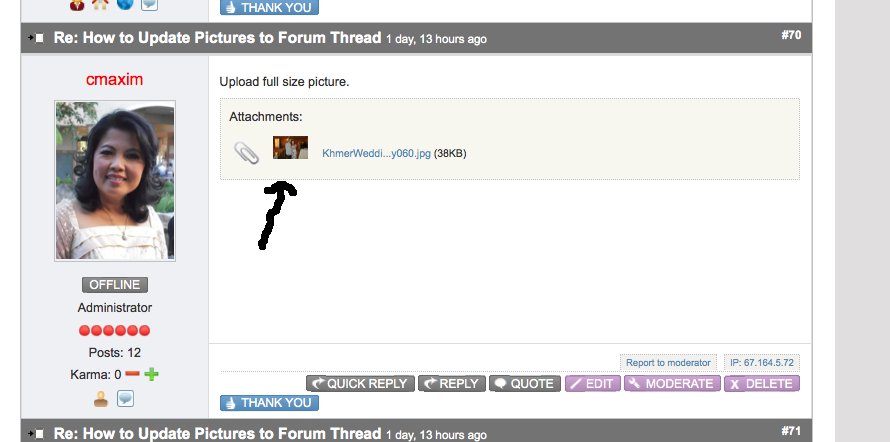
This is the thumbnail I was referring to.
Please Log in or Create an account to join the conversation.
14 years 10 months ago #111942
by sozzled
Blue Eagle vs. Crypsis reference guide
Read my blog and
Replied by sozzled on topic Re: Thumbnail Size
Thank you for explaining your problem. The thumbnail image is created when someone uploads an image on your forum and it cannot be changed after they're posted the attachment.
When someone uploads an image on the forum, two files are created. The explanation about what happens is explained in this topic: 1.7 issue with Attachments not showing
However, if you change the way that new thumbnails are created then, for new images uploaded, differently-sized thumbnails will be created in the folder ..media/kuenena/attachments/n/thumb/ (where n is the user-id of the person who uploaded their image(s)).
Now that you have changed your configuration settings, try again - post a new message on your forum with a new image - and see if this has fixed your problem.
When someone uploads an image on the forum, two files are created. The explanation about what happens is explained in this topic: 1.7 issue with Attachments not showing
However, if you change the way that new thumbnails are created then, for new images uploaded, differently-sized thumbnails will be created in the folder ..media/kuenena/attachments/n/thumb/ (where n is the user-id of the person who uploaded their image(s)).
Now that you have changed your configuration settings, try again - post a new message on your forum with a new image - and see if this has fixed your problem.
Blue Eagle vs. Crypsis reference guide
Read my blog and
Please Log in or Create an account to join the conversation.
- missalexrowsell
-

- Offline
- New Member
-

Less
More
- Posts: 8
- Thank you received: 0
14 years 7 months ago #117564
by missalexrowsell
Replied by missalexrowsell on topic Re: Thumbnail Size
Looking for the same answer, many users are saying the thumbnail is too small, and we have not been able to change this setting with any success in the obvious place.
Thanks in advance.
Thanks in advance.
Please Log in or Create an account to join the conversation.
14 years 7 months ago #117568
by sozzled
Blue Eagle vs. Crypsis reference guide
Read my blog and
Replied by sozzled on topic Re: Thumbnail Size
The dimensions of existing thumbnail images cannot be changed. You can change the dimensions for thumbnail images so that when new attachments are uploaded the dimensions of the thumbnail images will be different. That's what I was trying to explain in my previous message in this topic.
Blue Eagle vs. Crypsis reference guide
Read my blog and
The following user(s) said Thank You: missalexrowsell
Please Log in or Create an account to join the conversation.
Time to create page: 0.730 seconds