
- Posts: 36
- Thank you received: 1
Kunena 7.0.8 Released
The Kunena team has announce the arrival of Kunena 7.0.8 [K 7.0.8] in stable which is now available for download as a native Joomla extension for J! 5.4.x/6.0.x./6.1.x. This version addresses most of the issues that were discovered in K 6.2 / K 6.3 / K 6.4 and issues discovered during the last development stages of K 7.0
Question How can I change the text "Category Header"
14 years 9 months ago #110237
by oorzaak
Replied by oorzaak on topic Re: How can I change the text "Category Header"
Thanks for asking. No, I didn't find a way to fix it yet. Any suggestions are most welcome, still.
Frits
Frits
Please Log in or Create an account to join the conversation.


14 years 9 months ago #110238
by John
My websites: AquaInfo.org | AquaInfo.nl
Replied by John on topic Re: How can I change the text "Category Header"
It looks like you can find it under "Mededelingen"
After login you can find it on the index page, on the right side of your name. Click it and you get a list of all mededelingen, just rename the mededeling.
After login you can find it on the index page, on the right side of your name. Click it and you get a list of all mededelingen, just rename the mededeling.
My websites: AquaInfo.org | AquaInfo.nl
Please Log in or Create an account to join the conversation.
14 years 9 months ago #110284
by oorzaak
Replied by oorzaak on topic Re: How can I change the text "Category Header"
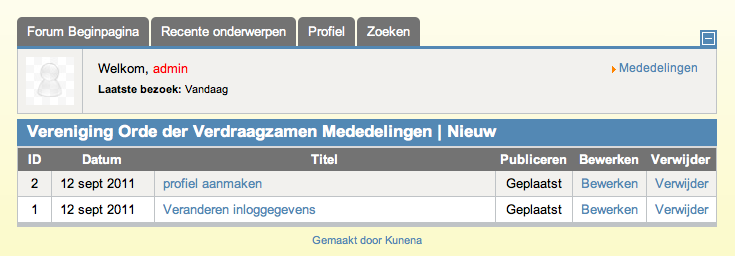
John, I'm afraid I cannot find it at the location you mentioned. See my screenshot. I can only see the messages ('mededelingen') which were posted by the board moderator. I cannot find the Category header text there.
Frits
Frits
Please Log in or Create an account to join the conversation.
14 years 9 months ago #110291
by John
My websites: AquaInfo.org | AquaInfo.nl
Replied by John on topic Re: How can I change the text "Category Header"
Thanx for the link and account....I found it....
Category Header can only be changed in the language files?
Change COM_KUNENA_FORUM_HEADER="Categorie Header" to COM_KUNENA_FORUM_HEADER="Your text"
You can find the language files in root/language/nl-NL/nl_NL_com_kunena.ini
Category Header can only be changed in the language files?
Change COM_KUNENA_FORUM_HEADER="Categorie Header" to COM_KUNENA_FORUM_HEADER="Your text"
You can find the language files in root/language/nl-NL/nl_NL_com_kunena.ini
My websites: AquaInfo.org | AquaInfo.nl
The following user(s) said Thank You: oorzaak
Please Log in or Create an account to join the conversation.
- blacktino79
-

- Offline
- Junior Member
-

Less
More
- Posts: 50
- Thank you received: 1
14 years 9 months ago #110549
by blacktino79
Replied by blacktino79 on topic Re: How can I change the text "Category Header"
I found the file talked about above, but Joomla won't let me edit it for some reason. I'm trying to change it to 'Forum Info'. Even if I change the file's permission (which turns it to an Executable File' rather than a 'file'), it won't let me save! (I changed it back to 644 instead of 755).
Please help!
Please help!
Please Log in or Create an account to join the conversation.
14 years 9 months ago #110550
by John
My websites: AquaInfo.org | AquaInfo.nl
Replied by John on topic Re: How can I change the text "Category Header"
You can edit the file with an FTP program like FileZilla. Just connect to your server and edit the file?
My websites: AquaInfo.org | AquaInfo.nl
Please Log in or Create an account to join the conversation.
Time to create page: 0.254 seconds