
Kunena 7.0.9 & Kunena 6.4.14 – Security Updates Released
The Kunena team has announce the arrival of Kunena 7.0.9 [K 7.0.9] in stable which is now available for download as a native Joomla extension for J! 5.4.x/6.0.x./6.1.x. This version addresses most of the issues that were discovered in K 6.2 / K 6.3 / K 6.4 and issues discovered during the last development stages of K 7.0
Question Move K1.7 from J1.5.23 to J.1.7


jUpgrade moves all Kunena files to Joomla 1.7, however it does not move the database and does not create the Admin Component Menu item.
Joomla 1.5 Settings:
Database collation check: The collation of your table fields are correct
Legacy mode: Disabled | Joomla! SEF: Enabled | Joomla! SEF rewrite: Enabled | FTP layer: Disabled |
This message contains confidential informationhtaccess: Exists | PHP environment: Max execution time: 30 seconds | Max execution memory: 64M | Max file upload: 2M
Joomla default template details : ja_purity_ii | author: JoomlArt.com | version: 1.0.0 | creationdate: 9/15/09
Kunena default template details : Blue Eagle (default) | author: Kunena Team | version: 1.7.0 | creationdate: 2011-08-29
Kunena version detailled: Installed version: 1.7.0 | Build: 5135 | Version name: Tale | Kunena detailled configuration:
Warning: Spoiler![th]Kunena config settings:[/th]
board_title Fórum board_offline 0 board_ofset 0 offline_message <h2>The Forum is currently offline for maintenance.</h2>
<div>Check back soon!</div>enablerss 1 enablepdf 1 threads_per_page 20 messages_per_page 6 messages_per_page_search 15 showhistory 1 historylimit 6 shownew 1 jmambot 0 disemoticons 0 template default showannouncement 0 avataroncat 0 catimagepath category_images/ showchildcaticon 1 annmodid 62 rtewidth 450 rteheight 300 enableforumjump 1 reportmsg 1 username 1 askemail 1 showemail 0 showuserstats 1 showkarma 1 useredit 1 useredittime 0 useredittimegrace 600 editmarkup 1 allowsubscriptions 1 subscriptionschecked 1 allowfavorites 1 maxsubject 50 maxsig 300 regonly 0 changename 0 pubwrite 0 floodprotection 3 mailmod 1 mailadmin 1 captcha 0 mailfull 1 allowavatar 1 allowavatarupload 1 allowavatargallery 1 avatarquality 65 avatarsize 2048 allowimageupload 0 allowimageregupload 1 imageheight 800 imagewidth 800 imagesize 150 allowfileupload 0 allowfileregupload 1 filetypes zip,txt,doc,gz,tgz,gzip filesize 120 showranking 1 rankimages 1 avatar_src fb_profile pm_component userlist_rows 30 userlist_online 1 userlist_avatar 1 userlist_name 1 userlist_username 1 userlist_posts 1 userlist_karma 1 userlist_email 0 userlist_usertype 0 userlist_joindate 1 userlist_lastvisitdate 1 userlist_userhits 1 latestcategory 0 showstats 1 showwhoisonline 1 showgenstats 1 showpopuserstats 1 popusercount 5 showpopsubjectstats 1 popsubjectcount 5 usernamechange 0 rules_infb 0 rules_cid 1 help_infb 0 help_cid 1 showspoilertag 1 showvideotag 1 showebaytag 1 trimlongurls 1 trimlongurlsfront 40 trimlongurlsback 20 autoembedyoutube 1 autoembedebay 1 ebaylanguagecode en-us fbsessiontimeout 1800 highlightcode 0 rss_type topic rss_timelimit month rss_limit 100 rss_included_categories rss_excluded_categories rss_specification rss2.0 rss_allow_html 1 rss_author_format name rss_author_in_title 1 rss_word_count 0 rss_old_titles 1 rss_cache 900 fbdefaultpage categories default_sort asc alphauserpointsnumchars 0 sef 1 sefcats 0 sefutf8 0 showimgforguest 1 showfileforguest 1 pollnboptions 4 pollallowvoteone 1 pollenabled 1 poppollscount 5 showpoppollstats 1 polltimebtvotes 00:15:00 pollnbvotesbyuser 100 pollresultsuserslist 1 maxpersotext 50 ordering_system mesid post_dateformat ago post_dateformat_hover datetime hide_ip 1 js_actstr_integration 0 imagetypes jpg,jpeg,gif,png checkmimetypes 1 imagemimetypes image/jpeg,image/jpg,image/gif,image/png imagequality 50 thumbheight 32 thumbwidth 32 hideuserprofileinfo put_empty integration_access joomla integration_login joomla integration_avatar kunena integration_profile kunena integration_private none integration_activity none boxghostmessage 0 userdeletetmessage 0 latestcategory_in 1 topicicons 1 onlineusers 1 debug 0 catsautosubscribed 0 showbannedreason 0 version_check 1 showthankyou 1 showpopthankyoustats 1 popthankscount 5 mod_see_deleted 0 bbcode_img_secure text listcat_show_moderators 1 lightbox 1 activity_limit 0 show_list_time 720 show_session_type 0 show_session_starttime 0 userlist_allowed 0 userlist_count_users 1 enable_threaded_layouts 0 category_subscriptions post topic_subscriptions every pubprofile 1 thankyou_max 10 email_recipient_count 0 email_recipient_privacy bcc email_visible_address captcha_post_limit 0 recaptcha_publickey recaptcha_privatekey recaptcha_theme white
Third-party components: None
Third-party SEF components: None
Plugins: System - Mootools Upgrade: Disabled | System - Mootools12: Disabled
Modules: None
PS: MooTools upgrade was enabled at the time of the upgrade;
Thanks in advance for your help,
Douglas Machado
Ideal Extensions for Joomla
Please Log in or Create an account to join the conversation.
- etkritikonspoudon
-

- Offline
- Senior Member
-

- Posts: 110
- Thank you received: 7
I confirm that the above mentioned process works perfectly...I had set the same database prefix for both databases, so I didn't have to mess around more when doing the importing from the old database.etkritikonspoudon wrote: I am itching to update to joomla 1.7 from J1.5.23 and I have looked into the migration options.
One thing that seems crucial is to maintain the same ids. It seem JUpgrade does not do so...I have come across another extension, called SP Upgrade which claims to do exactly that and it's reviews are stellar...unfortunately, though, it is commercial...but it may be the way for me to go...
Using that extension what you need to do is
- Make a clean J1.7 installation
- install the extension SP Upgrade, configure it and run it
- Clean install all your extensions, compatible version for J1.7
- Test, test, test.
- Then I guess copy old site to subfolder, and copy j17 site to root
Regarding the database for Kunena, seems like what -logically needs to be done is:
- export kunena database entries from old site
- Install Kunena on new site
- Drop the newly created database entries for Kunena
- Import the database entries from previous site.
Also, I copied all extra data from the folders
/media/kunena
/components/com_kunena
which contain from attachments, to customized templates etc...
Everything is working as before in the new J17 Kunena installation...
The one display problem is present in both the new default template and the custom one, built in Kunena 1.6.4...
...maybe it's a Joomla 1.7 problem?

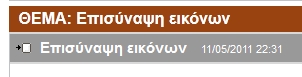
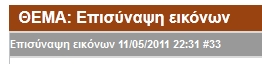
Also I noticed this difference between Kunena 1.7.0 in Joomla 1.5.23 and Joomla 1.7.0
Please Log in or Create an account to join the conversation.