
- Posts: 23
- Thank you received: 2
Kunena 7.0.9 & Kunena 6.4.14 – Security Updates Released
The Kunena team has announce the arrival of Kunena 7.0.9 [K 7.0.9] in stable which is now available for download as a native Joomla extension for J! 5.4.x/6.0.x./6.1.x. This version addresses most of the issues that were discovered in K 6.2 / K 6.3 / K 6.4 and issues discovered during the last development stages of K 7.0
Question URL Issues
- Netthandel
-

- Offline
- Junior Member
-

Less
More
15 years 1 month ago #104485
by Netthandel
Replied by Netthandel on topic Re: URL Issues
In the OLD install (Joomla 1.5.23 and recent Kunena 1.6) there was a menu called "Kunena menu" that was made by kunena itself.
In the Joomla 1.7 install there is a Kunena menu, but NO items. Can this be linked to the above error?
In the Joomla 1.7 install there is a Kunena menu, but NO items. Can this be linked to the above error?
Please Log in or Create an account to join the conversation.


15 years 1 month ago #104487
by woza
Replied by woza on topic Re: URL Issues
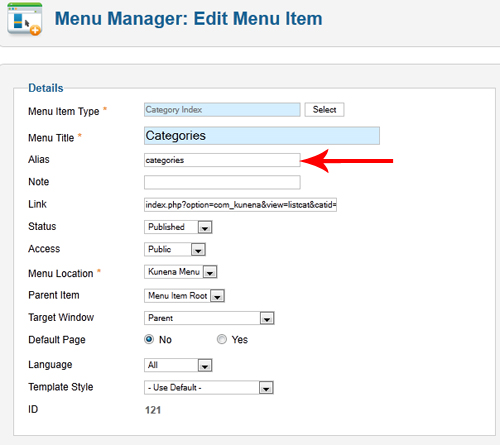
I've resolved one issues with the index.html url for the categories url. To change it you need to change the alias in the menu options. Demonstrated below...
Still now joy with the ?itemid=0 yet though.
Still now joy with the ?itemid=0 yet though.
Please Log in or Create an account to join the conversation.
- Netthandel
-
- Offline
- Junior Member
-
Less
More
- Posts: 23
- Thank you received: 2
15 years 1 month ago - 15 years 1 month ago #104490
by Netthandel
Replied by Netthandel on topic Re: URL Issues
>>> SOLUTION HERE (?) <<<
Ok,
Here is how I resolved the ?itemid=0
I saw that there was NO menu items in the menu called "Kunena menu".
SO I did:
1) Went to administrator => Menu manager => Kunena menu
2) Made a new menu item called "Forum" (menu item type = Alias, as described in Customised menus )
3) Went to the Menu Manager => Main menu
4) Edited the "Forum" menu item and selected "Default Menu Item" to be the "Kunena Menu - Forum" item
Voilá!
The forum URLs work like charm!
Ok,
Here is how I resolved the ?itemid=0
I saw that there was NO menu items in the menu called "Kunena menu".
SO I did:
1) Went to administrator => Menu manager => Kunena menu
2) Made a new menu item called "Forum" (menu item type = Alias, as described in Customised menus )
3) Went to the Menu Manager => Main menu
4) Edited the "Forum" menu item and selected "Default Menu Item" to be the "Kunena Menu - Forum" item
Voilá!
The forum URLs work like charm!
Last edit: 15 years 1 month ago by sozzled. Reason: insert "menu type" information
Please Log in or Create an account to join the conversation.
15 years 1 month ago #104491
by woza
Replied by woza on topic Re: URL Issues
I've solved it!
I had the Forum menu item in the Kunena menu disabled.
I've had to mess around with the menu to get it how I want it, but as long as that menu item is active the itemid=0 disappears. Even if you change the name and alias!
If your Kunena menu is empty then re-create it from the kunena component page.
Cheers
Warren
I had the Forum menu item in the Kunena menu disabled.
I've had to mess around with the menu to get it how I want it, but as long as that menu item is active the itemid=0 disappears. Even if you change the name and alias!
If your Kunena menu is empty then re-create it from the kunena component page.
Cheers
Warren
Please Log in or Create an account to join the conversation.
Time to create page: 0.205 seconds