


- Posts: 28
- Thank you received: 0
Kunena 7.0.9 & Kunena 6.4.14 – Security Updates Released
The Kunena team has announce the arrival of Kunena 7.0.9 [K 7.0.9] in stable which is now available for download as a native Joomla extension for J! 5.4.x/6.0.x./6.1.x. This version addresses most of the issues that were discovered in K 6.2 / K 6.3 / K 6.4 and issues discovered during the last development stages of K 7.0
Topics that are moved into this category are generally considered to be closed. Users may want to add additional information but these topics should not be resurrected in order to discuss new problems or unrelated matters.
Question "New Topic" option, post is erased if your forget category
16 years 1 month ago #55005
by veeesh
"New Topic" option, post is erased if your forget category was created by veeesh
The new topic button is a nice way quick way to post, but a major issue is that it is easy to forget to select a category. If you then try to post, your post is erased and you get an odd error message.
it would be nice to have a popup "oops you forgot to select a category" so you can go back and correct. Erasing of a post after spending some time on it can be annoying. Any solution on this?
it would be nice to have a popup "oops you forgot to select a category" so you can go back and correct. Erasing of a post after spending some time on it can be annoying. Any solution on this?
Please Log in or Create an account to join the conversation.


16 years 1 month ago #55007
by sozzled
Blue Eagle vs. Crypsis reference guide
Read my blog and

Replied by sozzled on topic Re: "New Topic" option, post is erased if your forget category
I remember, ages ago, when it was possible to enter/edit a message and, if you forgot an important piece of information, you could press the Submit button but when you returned to edit your message everything you'd entered was lost. See
retaining entered message if no subject?
Everything has changed with K 1.6. If you try to post a message without a subject, the subject text box is highlighted with a red border. If you try to post a message with no contents, the message area is highlighted with a red border. But I haven't seen (and I don't know how it's possible) how you can create a message with a subject and a message but you forget to enter the category? :dry:
When reporting errors like these, please provide us with details of your Kunena version (use the Configuration Report from your website) or post an image with details of the "odd message" that you received.
Thank you for your report, but we'd still like to see the information I have requested.
Everything has changed with K 1.6. If you try to post a message without a subject, the subject text box is highlighted with a red border. If you try to post a message with no contents, the message area is highlighted with a red border. But I haven't seen (and I don't know how it's possible) how you can create a message with a subject and a message but you forget to enter the category? :dry:
When reporting errors like these, please provide us with details of your Kunena version (use the Configuration Report from your website) or post an image with details of the "odd message" that you received.
Thank you for your report, but we'd still like to see the information I have requested.
Blue Eagle vs. Crypsis reference guide
Read my blog and
Please Log in or Create an account to join the conversation.


16 years 1 month ago #55008
by @quila
Replied by @quila on topic Re: "New Topic" option, post is erased if your forget category
Hi veeesh,
if we are talking about K1.6, you dont need to select category. If you create new topic from "New Topic" tab button, first category of forum is automatically selected and Topic is placed in this category without errors.
Maybe you have find a bug. Can you explain exactly step by step how to reproduce this?
Thank you.
if we are talking about K1.6, you dont need to select category. If you create new topic from "New Topic" tab button, first category of forum is automatically selected and Topic is placed in this category without errors.
Maybe you have find a bug. Can you explain exactly step by step how to reproduce this?
Thank you.
Please Log in or Create an account to join the conversation.
16 years 1 month ago #55017
by veeesh
Replied by veeesh on topic Re: "New Topic" option, post is erased if your forget category
i attached a picture of steps. This is on kunena website.
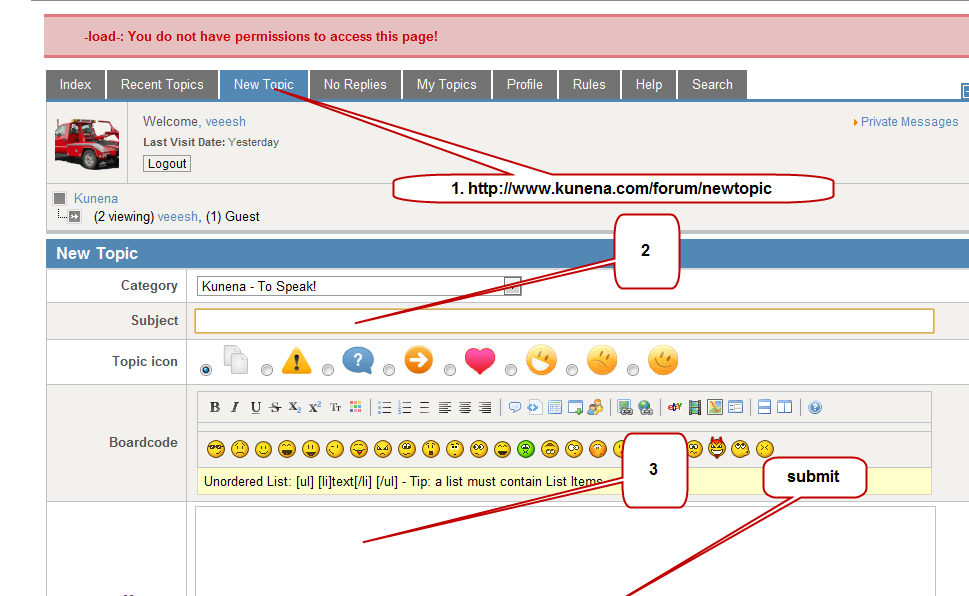
Please Log in or Create an account to join the conversation.
16 years 1 month ago - 16 years 1 month ago #55019
by sozzled
Blue Eagle vs. Crypsis reference guide
Read my blog and
Replied by sozzled on topic Re: "New Topic" option, post is erased if your forget category
There is nothing in your picture that shows how you forgot to enter a category. As @quila wrote:
What you showed was missing subject and message. If you don't enter one or other (or both) of these, you cannot press the Submit button. Therefore we cannot see how to reproduce the problem you have tried to describe. We cannot reproduce this at Kunena.com.
The problem may have something to do with the version of Kunena that you are using. Your version may be different to what is used at this website and your problem may have been fixed by a later build. Can you provide us with more information about the build number that you are using, please?
What does surprise me is the error message "-load-: You do not have permissions to access this page!". I haven't seen that error at Kunena.com. I wonder how that happened?
Your picture shows that a category was selected automatically for you, as @quila described.If you create new topic from "New Topic" tab button, first category of forum is automatically selected and ... [the new message will be posted into] this category
What you showed was missing subject and message. If you don't enter one or other (or both) of these, you cannot press the Submit button. Therefore we cannot see how to reproduce the problem you have tried to describe. We cannot reproduce this at Kunena.com.
The problem may have something to do with the version of Kunena that you are using. Your version may be different to what is used at this website and your problem may have been fixed by a later build. Can you provide us with more information about the build number that you are using, please?
What does surprise me is the error message "-load-: You do not have permissions to access this page!". I haven't seen that error at Kunena.com. I wonder how that happened?
Blue Eagle vs. Crypsis reference guide
Read my blog and
Last edit: 16 years 1 month ago by sozzled.
Please Log in or Create an account to join the conversation.
16 years 1 month ago #55081
by veeesh
Replied by veeesh on topic Re: "New Topic" option, post is erased if your forget category
step 1.
www.kunena.com/forum/newtopic
or click "New Topic" button on kunena
step 2. enter some text in subject
step 3. enter some text in message
step 4. click submit
that is it.
step 2. enter some text in subject
step 3. enter some text in message
step 4. click submit
that is it.
Please Log in or Create an account to join the conversation.
Time to create page: 0.247 seconds