
Kunena 7.0.9 & Kunena 6.4.14 – Security Updates Released
The Kunena team has announce the arrival of Kunena 7.0.9 [K 7.0.9] in stable which is now available for download as a native Joomla extension for J! 5.4.x/6.0.x./6.1.x. This version addresses most of the issues that were discovered in K 6.2 / K 6.3 / K 6.4 and issues discovered during the last development stages of K 7.0
Question Inconsistent Login Behaviour


For example, we can't reproduce your problem at Kunena.com, can we?
Can you please explain why you need to be running with Legacy mode? Please see important information about Legacy mode . This could be what is getting in the way of your website functioning properly. Let's eliminate this as a cause, OK?

Blue Eagle vs. Crypsis reference guide
Read my blog and

Please Log in or Create an account to join the conversation.
- AndyInSpain
-
 Topic Author
- Offline
- Senior Member
-

- Posts: 76
- Thank you received: 2
Many thanks for your reply.
I need Legacy mode enabled because we have one, fairly important component (namely this one) for which there is no native J1.5. version yet.
However, over the weekend I will try turning Legacy mode off and see what difference it makes.
I will let you know. Many thanks for your help.
Kind regards
Andy.
Please Log in or Create an account to join the conversation.
- AndyInSpain
-
Topic Author
- Offline
- Senior Member
-
- Posts: 76
- Thank you received: 2
I believe I may have uncovered a clue as to the cause of the problem...I have no idea what it means though. :laugh:
Ok...I uninstalled everything at Science File which needed legacy mode enabled: components, modules, plugins (there were no 1.0 templates).
Then I disabled legacy mode.
Then....everything on the site worked fine....except Kunena. See below for the screen one gets when trying to access the forums index. It's the Kunena menu plus an error message which usually means there's a 1.0 component (etc.) which requires legacy mode. Which there isn't.
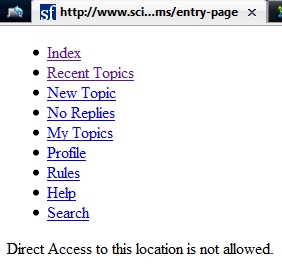
How weird is this? And what could it mean?
Please Log in or Create an account to join the conversation.
That's correct. "Direct access not allowed" usually indicates the presence of J! 1.0 legacy mode software on the same page as your Kunena web page; that's probably what is interfering with your login, too.AndyInSpain wrote: I disabled legacy mode ... everything on the site worked fine except Kunena. [There is] an error message which usually means there's a 1.0 component (etc.) which requires legacy mode.
There's a very easy way to find out if you have J! 1.0 legacy software running on a J! 1.5 website. It's not 100% foolproof but it's reliable enough for our purposes:
Go to Extensions » Install / Uninstall
You will see that 6 sub-functions you can choose from:
- Install
- Components
- Modules
- Plugins
- Languages
- Templates

If you find any items like these, disable them; better still, uninstall them. I would say that you missed one or two. See if what I have suggested makes a difference.
Blue Eagle vs. Crypsis reference guide
Read my blog and
Please Log in or Create an account to join the conversation.
- AndyInSpain
-
Topic Author
- Offline
- Senior Member
-
- Posts: 76
- Thank you received: 2
That's exactly what I had done. I went through every list many times, just to make sure, and as of now there are no red crosses in the Compatibility column. But still I get that error when I try to access Kunena - all other site components etc. are fine.
Cheers
Andy.
Please Log in or Create an account to join the conversation.
If all the other component pages on your website render clearly when you run your site natively, except for the page displaying Kunena, what module(s) are you displaying on your Kunena page that causes the "no direct access allowed" error to display?
I spent a few moments (half-an-hour or thereabouts) checking what components I could see on your site against J! 1.5 native compatibility but I had to conclude that you are in a much better position to look at this thing than me. However, if you're unable to find what's causing this problem I could look at it for you if you would like. I would, however, need administrator access to your site.
The general approach to tackling these compatibility mode issues is to use the checklist method I've referred to above. As I said, it's not totally bullet-proof. What we're actually looking for is a .php file that has the following line in it:
Blue Eagle vs. Crypsis reference guide
Read my blog and
Please Log in or Create an account to join the conversation.