
Kunena 7.0.9 & Kunena 6.4.14 – Security Updates Released
The Kunena team has announce the arrival of Kunena 7.0.9 [K 7.0.9] in stable which is now available for download as a native Joomla extension for J! 5.4.x/6.0.x./6.1.x. This version addresses most of the issues that were discovered in K 6.2 / K 6.3 / K 6.4 and issues discovered during the last development stages of K 7.0
Idea Share topic kunena on Facebook and Twitter?


Blue Eagle vs. Crypsis reference guide
Read my blog and

Please Log in or Create an account to join the conversation.


Please Log in or Create an account to join the conversation.
www.1st-movers.com/products/autotweet/autotweet-details
It works very well - but it is not free : 19euro!
Please Log in or Create an account to join the conversation.
- aleks_jboss
-

- Offline
- New Member
-

- Posts: 1
- Thank you received: 0
sorry if I reopened this post but I'm new of Kunena's world and in order to building my site I arrived at this point: I'd like to integrate a social button for share post in facebook's profile.
After a long time (studying the code and template's file) I find a solution for integrate a social button totally FREE.
This is my solution (for default template of Kunena Forum):
Before edit a below file, you must be create a free account at this site: sharethis.com/publishers/get-sharing-tools ;
_ now select "web" and follow the next step ( is very simple
 ) for generate your personal code;
_ once you get the code follow the below step:
a) open the file view.php in [your_web_path]/components/com_kunena/template/default/view
b) search the tag: <div class="kblock">
after this tag you can add the code obtained on "sharethis":
it's like this:
<br>
<div style="text-align:center">
<span class='st_facebook_hcount' displayText='Facebook'></span>
<span class='st_twitter_hcount' displayText='Tweet'></span>
<span class='st_plusone_hcount' displayText='Google +1'></span>
<span class='st_sharethis_hcount' displayText='ShareThis'></span>
<span class='st_email_hcount' displayText='Email'></span>
<script type="text/javascript">var switchTo5x=true;</script>
<script type="text/javascript" src=" w.sharethis.com/button/buttons.js ">
<script type="text/javascript">stLight.options({publisher: "xxxxxxxx-xxxx-xxxx-xxxx-xxxxxxxxxxxx"}); </script>
</div>
<br>
Now if you go in your forum, you will find the buttons!.
All works perfect without any problems!
See my forum image: (streetbasketball is my site and I hosted image and donation here!)
and offer me a simple beer! (only if you want!)
Thanks a lot, sorry for my bad english!
CLICK HERE AND VIEW IMAGE!
thx
Offer me a simple beer!
Thank you very much!
Alex
Please Log in or Create an account to join the conversation.

aleks_jboss wrote: Hi all,
sorry if I reopened this post but I'm new of Kunena's world and in order to building my site I arrived at this point: I'd like to integrate a social button for share post in facebook's profile.
After a long time (studying the code and template's file) I find a solution for integrate a social button totally FREE.
This is my solution (for default template of Kunena Forum):
Before edit a below file, you must be create a free account at this site: sharethis.com/publishers/get-sharing-tools ;
_ now select "web" and follow the next step ( is very simple
_ once you get the code follow the below step:
a) open the file view.php in [your_web_path]/components/com_kunena/template/default/view
b) search the tag: <div class="kblock">
after this tag you can add the code obtained on "sharethis":
it's like this:<br>
<div style="text-align:center">
<span class='st_facebook_hcount' displayText='Facebook'></span>
<span class='st_twitter_hcount' displayText='Tweet'></span>
<span class='st_plusone_hcount' displayText='Google +1'></span>
<span class='st_sharethis_hcount' displayText='ShareThis'></span>
<span class='st_email_hcount' displayText='Email'></span>
<script type="text/javascript">var switchTo5x=true;</script>
<script type="text/javascript" src=" w.sharethis.com/button/buttons.js ">
<script type="text/javascript">stLight.options({publisher: "xxxxxxxx-xxxx-xxxx-xxxx-xxxxxxxxxxxx"}); </script>
</div>
<br>
Now if you go in your forum, you will find the buttons!.
All works perfect without any problems!
See my forum image: (streetbasketball is my site and I hosted image and donation here!)
and offer me a simple beer! (only if you want!)
Thanks a lot, sorry for my bad english!
CLICK HERE AND VIEW IMAGE!
thx
Thanks for this!
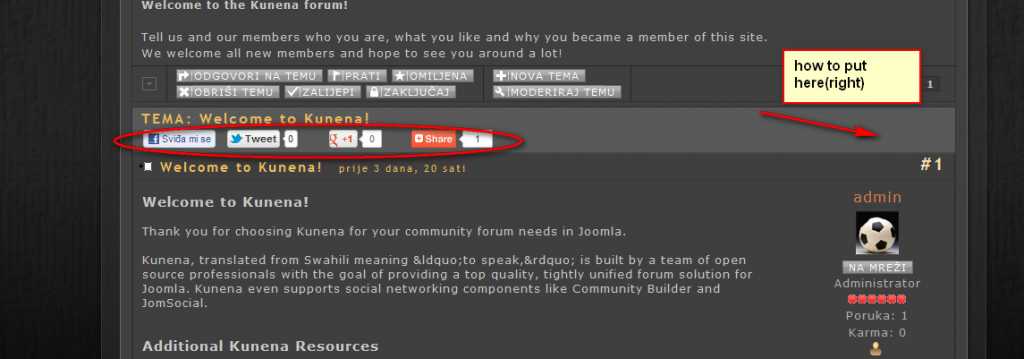
I change for myself and put adthis buttons in kheader and it works good but can somebody help me how to put buttons on right side of kheader see picture
Please Log in or Create an account to join the conversation.