
Kunena 7.0.4 Released
The Kunena team has announce the arrival of Kunena 7.0.4 [K 7.0.4] in stable which is now available for download as a native Joomla extension for J! 5.4.x/6.0.x. This version addresses most of the issues that were discovered in K 6.2 / K 6.3 / K 6.4 and issues discovered during the last development stages of K 7.0
Topics that are moved into this category are generally considered to be closed. Users may want to add additional information but these topics should not be resurrected in order to discuss new problems or unrelated matters.
Question Kunena 1.5.9 performance


16 years 2 months ago #40652
by fxstein
We love stars on the Joomla Extension Directory .
Replied by fxstein on topic Re:Kunena 1.5.9 performance
FYI
Here is the output of the last run:
This was run in addition to the regular traffic both kunena.com and starvmax.com receive
Here is the output of the last run:
Code:
Finished 1024 requests
Server Software: Apache/2.2.0
Server Hostname: www.kunena.com
Server Port: 80
Document Path: /forum
Document Length: 126574 bytes
Concurrency Level: 32
Time taken for tests: 30.968880 seconds
Complete requests: 1024
Failed requests: 0
Write errors: 0
Total transferred: 130115584 bytes
HTML transferred: 129611776 bytes
Requests per second: 33.07 [#/sec] (mean)
Time per request: 967.777 [ms] (mean)
Time per request: 30.243 [ms] (mean, across all concurrent requests)
Transfer rate: 4103.02 [Kbytes/sec] received
Connection Times (ms)
min mean[+/-sd] median max
Connect: 0 0 0.1 0 1
Processing: 536 958 191.1 938 1655
Waiting: 516 914 187.2 892 1538
Total: 536 958 191.1 938 1655
Percentage of the requests served within a certain time (ms)
50% 938
66% 1023
75% 1074
80% 1109
90% 1211
95% 1330
98% 1422
99% 1489
100% 1655 (longest request)
This was run in addition to the regular traffic both kunena.com and starvmax.com receive
We love stars on the Joomla Extension Directory .
Please Log in or Create an account to join the conversation.


16 years 2 months ago #40655
by octet
Replied by octet on topic Re:Kunena 1.5.9 performance
Hi fxstein,
Trying to reply with loads of details but it gives me an internal server error... Have a look in your apache logs.
octet
Trying to reply with loads of details but it gives me an internal server error... Have a look in your apache logs.
octet
Please Log in or Create an account to join the conversation.
16 years 2 months ago - 16 years 2 months ago #40656
by octet
Replied by octet on topic Re:Kunena 1.5.9 performance
Hi fxstein,
Thanks for your time.
Apache conf:
Joomla setup:
Cache settings:
Handler: Memcached
Persistent Memory Cache YES
Memory Cache Compression YES
Gzip compression ON.
JRE Query Cached 3.2 installed and active
CSSJSCompress installed and active.
Joomla 1.5.14
Thanks for your time.
Code:
[root@zeus asl]# ab -n 1024 -c 32 http://www.romani-online.co.uk/forum
Benchmarking www.romani-online.co.uk (be patient)
Completed 102 requests
Completed 204 requests
Completed 306 requests
Completed 408 requests
Completed 510 requests
Completed 612 requests
Completed 714 requests
Completed 816 requests
Completed 918 requests
Completed 1020 requests
Finished 1024 requests
Server Software: Apache
Server Hostname: www.romani-online.co.uk
Server Port: 80
Document Path: /forum
Document Length: 172891 bytes
Concurrency Level: 32
Time taken for tests: 30.148730 seconds
Complete requests: 1024
Failed requests: 309
(Connect: 0, Length: 309, Exceptions: 0)
Write errors: 0
Non-2xx responses: 309
Total transferred: 124202498 bytes
HTML transferred: 123914941 bytes
Requests per second: 33.96 [#/sec] (mean)
Time per request: 942.148 [ms] (mean)
Time per request: 29.442 [ms] (mean, across all concurrent requests)
Transfer rate: 4023.09 [Kbytes/sec] received
Connection Times (ms)
min mean[+/-sd] median max
Connect: 0 0 0.4 0 3
Processing: 1 931 610.5 1197 1959
Waiting: 0 858 561.5 1100 1900
Total: 1 931 610.5 1197 1959
Percentage of the requests served within a certain time (ms)
50% 1197
66% 1318
75% 1394
80% 1442
90% 1566
95% 1645
98% 1767
99% 1844
100% 1959 (longest request)
[root@zeus asl]#
Apache conf:
Code:
Timeout 20
KeepAlive On
MaxKeepAliveRequests 100
KeepAliveTimeout 2
<IfModule prefork.c>
StartServers 5
MinSpareServers 2
MaxSpareServers 10
ServerLimit 128
MaxClients 64
MaxRequestsPerChild 1000
</IfModule>
<IfModule worker.c>
StartServers 5
MaxClients 96
MinSpareThreads 10
MaxSpareThreads 75
ThreadsPerChild 25
MaxRequestsPerChild 0
</IfModule>
Joomla setup:
Cache settings:
Handler: Memcached
Persistent Memory Cache YES
Memory Cache Compression YES
Gzip compression ON.
JRE Query Cached 3.2 installed and active
CSSJSCompress installed and active.
Joomla 1.5.14
Last edit: 16 years 2 months ago by octet.
Please Log in or Create an account to join the conversation.
16 years 2 months ago #40658
by octet
Replied by octet on topic Re:Kunena 1.5.9 performance
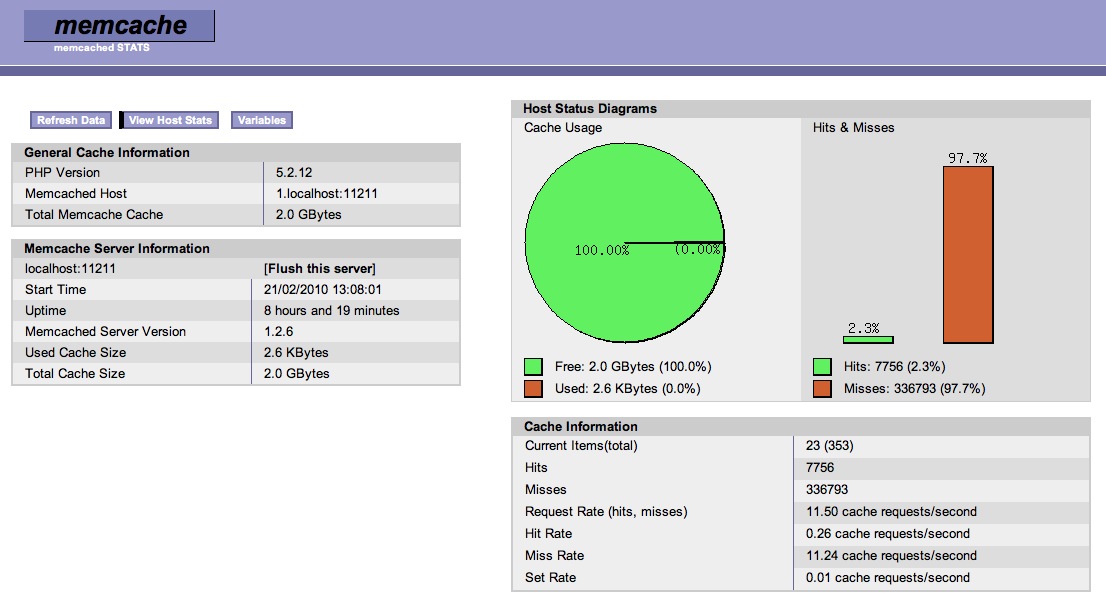
What is strange as well, memcached seem to have 97% misses and only over 2% hits.\\
Any ideas?

Any ideas?
Please Log in or Create an account to join the conversation.
16 years 2 months ago - 16 years 2 months ago #40659
by fxstein
We love stars on the Joomla Extension Directory .
Replied by fxstein on topic Re:Kunena 1.5.9 performance
Thanks for the additional information. As I thought, your forum is way too small to cause this kind of server loads.
I would go back to the basics. You have a whole list of extensions for various things.
We don't use as single one of them. If you are running on a dedicated server with your own mysql instance, there is no need for memcached either. Please disable it for now - your memcached setup certainly has issues by itself.
Also make sure you do NOT run any third party SEF components like sh404SEF on your site. Work with Joomla SEF if at all possible. The caching of sh404SEF on a site with 50,000+ unique urls would cause the same issue. Most 3rd party SEFs wort great on fairly limited sites, but not when combined with a forum that creates thousands and throusands of unique urls (like for every page of every thread.
You just want to make sure the mysql instance is setup correctly. There are a few tools out there that are very helpful.
Here are two we use all the time to check if our mysql settings are optimal:
www.unix.com/web-programming-web-2-0-mas...uning-primer-sh.html
Both tools should show mainly green for all major setting, with the exceptions of certain joins that will not use indexes.
For example: Our long_query_time log setting is at 1 sec (the lowest mysql allows)
Out of the last 66M queries 16 queries exceeded that
Make sure you run the InnoDB storage engine. It is a myth that MyISAM is faster on larger sites, especially if you need concurrent reads an writes.
With InnoDB, set the query cache to 64-128MB to start with and check with the two scripts after a day or two.
Now - there will always be some queries that cannot use a proper index (in K1.5.9) for joins. The number of those should be relatively low. In our case 4k queries out of 66M (6 days since the last mysql restart), only 39 are doing record by record lookup - these are the ones we focus on to eliminate. The majority of our queries in that category are LIKE %searchterm% search queries. It is certainly a limitation of Kunena and most other forums that certain searches are expensive and will bypass all usage of indices. That is why we are working with JXtended to integrate Kunena into Finder 2.0 that builds a true search engine style index of all content.
Next check your php installation. You should be running either apc or eaccelerator (both open source php accelerators). This can drop the php induced load on a sever to 1/3 or even less.
Since your test returns similar results, I am suspecting one of the Joomla plugins/components to be the reason for the issues. That CSS compressor sounds like it could be a CPU hog if it does realtime CSS compression on every page load. Disable as many as you can afford and check the load on the system.
There is a million things that can be wrong. You can only get there by elimination.
PS: Please update your Joomla install - you are running an outdated version with security issues.
I would go back to the basics. You have a whole list of extensions for various things.
We don't use as single one of them. If you are running on a dedicated server with your own mysql instance, there is no need for memcached either. Please disable it for now - your memcached setup certainly has issues by itself.
Also make sure you do NOT run any third party SEF components like sh404SEF on your site. Work with Joomla SEF if at all possible. The caching of sh404SEF on a site with 50,000+ unique urls would cause the same issue. Most 3rd party SEFs wort great on fairly limited sites, but not when combined with a forum that creates thousands and throusands of unique urls (like for every page of every thread.
You just want to make sure the mysql instance is setup correctly. There are a few tools out there that are very helpful.
Here are two we use all the time to check if our mysql settings are optimal:
www.unix.com/web-programming-web-2-0-mas...uning-primer-sh.html
Both tools should show mainly green for all major setting, with the exceptions of certain joins that will not use indexes.
For example: Our long_query_time log setting is at 1 sec (the lowest mysql allows)
Out of the last 66M queries 16 queries exceeded that
Make sure you run the InnoDB storage engine. It is a myth that MyISAM is faster on larger sites, especially if you need concurrent reads an writes.
With InnoDB, set the query cache to 64-128MB to start with and check with the two scripts after a day or two.
Now - there will always be some queries that cannot use a proper index (in K1.5.9) for joins. The number of those should be relatively low. In our case 4k queries out of 66M (6 days since the last mysql restart), only 39 are doing record by record lookup - these are the ones we focus on to eliminate. The majority of our queries in that category are LIKE %searchterm% search queries. It is certainly a limitation of Kunena and most other forums that certain searches are expensive and will bypass all usage of indices. That is why we are working with JXtended to integrate Kunena into Finder 2.0 that builds a true search engine style index of all content.
Next check your php installation. You should be running either apc or eaccelerator (both open source php accelerators). This can drop the php induced load on a sever to 1/3 or even less.
Since your test returns similar results, I am suspecting one of the Joomla plugins/components to be the reason for the issues. That CSS compressor sounds like it could be a CPU hog if it does realtime CSS compression on every page load. Disable as many as you can afford and check the load on the system.
There is a million things that can be wrong. You can only get there by elimination.
PS: Please update your Joomla install - you are running an outdated version with security issues.
We love stars on the Joomla Extension Directory .
Last edit: 16 years 2 months ago by fxstein.
Please Log in or Create an account to join the conversation.
16 years 2 months ago #40663
by fxstein
We love stars on the Joomla Extension Directory .
Replied by fxstein on topic Re:Kunena 1.5.9 performance
To be clear:
I would get rid of ALL of these to start with:
Joomla setup:
Cache settings:
Handler: Memcached
Persistent Memory Cache YES
Memory Cache Compression YES
Gzip compression ON.
JRE Query Cached 3.2 installed and active
CSSJSCompress installed and active.
NO memcached
NO JRE Query Cache
NO CSSJSCompress
uninstall all of them. Then make sure your mysql database is setup correctly (see my prior post).
Once you have confirmed that to work, then and only then you can try APC or eAccelerator of PHP
I would get rid of ALL of these to start with:
Joomla setup:
Cache settings:
Handler: Memcached
Persistent Memory Cache YES
Memory Cache Compression YES
Gzip compression ON.
JRE Query Cached 3.2 installed and active
CSSJSCompress installed and active.
NO memcached
NO JRE Query Cache
NO CSSJSCompress
uninstall all of them. Then make sure your mysql database is setup correctly (see my prior post).
Once you have confirmed that to work, then and only then you can try APC or eAccelerator of PHP
We love stars on the Joomla Extension Directory .
Please Log in or Create an account to join the conversation.
Time to create page: 0.251 seconds