


- Posts: 14
- Thank you received: 0
Kunena 7.0.8 Released
The Kunena team has announce the arrival of Kunena 7.0.8 [K 7.0.8] in stable which is now available for download as a native Joomla extension for J! 5.4.x/6.0.x./6.1.x. This version addresses most of the issues that were discovered in K 6.2 / K 6.3 / K 6.4 and issues discovered during the last development stages of K 7.0
Topics that are moved into this category are generally considered to be closed. Users may want to add additional information but these topics should not be resurrected in order to discuss new problems or unrelated matters.
Question Need help with mouse over on Kunena-top
16 years 4 months ago #44082
by Ninjao
Need help with mouse over on Kunena-top was created by Ninjao
Hi guys,
I am trying to customize the comuna3(jomsocial) template to fit to my kunena template. I don't know much about css, I am using firebug to change most of the stuff.
I was wondering if you could tell me how I might change the "mouse over" animation of the kunena forum.
I have copied the buttons (left, right) and already replaced the ones on my kunena theme. However it does not match my comuna3 jomsocial style.
Any ideas?
Thanks in advance!
-Ninjao

I am trying to customize the comuna3(jomsocial) template to fit to my kunena template. I don't know much about css, I am using firebug to change most of the stuff.
I was wondering if you could tell me how I might change the "mouse over" animation of the kunena forum.
I have copied the buttons (left, right) and already replaced the ones on my kunena theme. However it does not match my comuna3 jomsocial style.
Any ideas?
Thanks in advance!
-Ninjao
Please Log in or Create an account to join the conversation.
16 years 4 months ago #44091
by Ninjao
Replied by Ninjao on topic Re:Need help with mouse over on Kunena-top
this is what I would like it to look like (except with the Kunena button text of course)



Please Log in or Create an account to join the conversation.


16 years 4 months ago #44092
by Cerberus
Replied by Cerberus on topic Re:Need help with mouse over on Kunena-top
ud have to edit teh kunena template css and add " border 0px 0px 1px 0px; " for normal button and for active button add " border 1px 1px 0px 1px; " and remove any lines that say background-image
Please Log in or Create an account to join the conversation.
16 years 4 months ago #44116
by Ninjao
Replied by Ninjao on topic Re:Need help with mouse over on Kunena-top
Ah I see your method would actually have the css draw the borders around the buttons.
The jomsocial template I have uses 2 images, one for the left and one for the right (like the default Kunena template I believe).
I was thinking I would just change the position of the buttons so that the mouse over effect still works.
Do you know how I might do that?
The jomsocial template I have uses 2 images, one for the left and one for the right (like the default Kunena template I believe).
I was thinking I would just change the position of the buttons so that the mouse over effect still works.
Do you know how I might do that?
Please Log in or Create an account to join the conversation.
16 years 4 months ago - 16 years 4 months ago #44127
by Cerberus
Replied by Cerberus on topic Re:Need help with mouse over on Kunena-top
add to mouse over " border: 1px; and background-colour: #watevercolour u want;" then as u move mouse over u get ur button appear  much faster than using an image for such a simple button
much faster than using an image for such a simple button
Last edit: 16 years 4 months ago by Cerberus.
Please Log in or Create an account to join the conversation.
16 years 4 months ago #44133
by Ninjao
Replied by Ninjao on topic Re:Need help with mouse over on Kunena-top
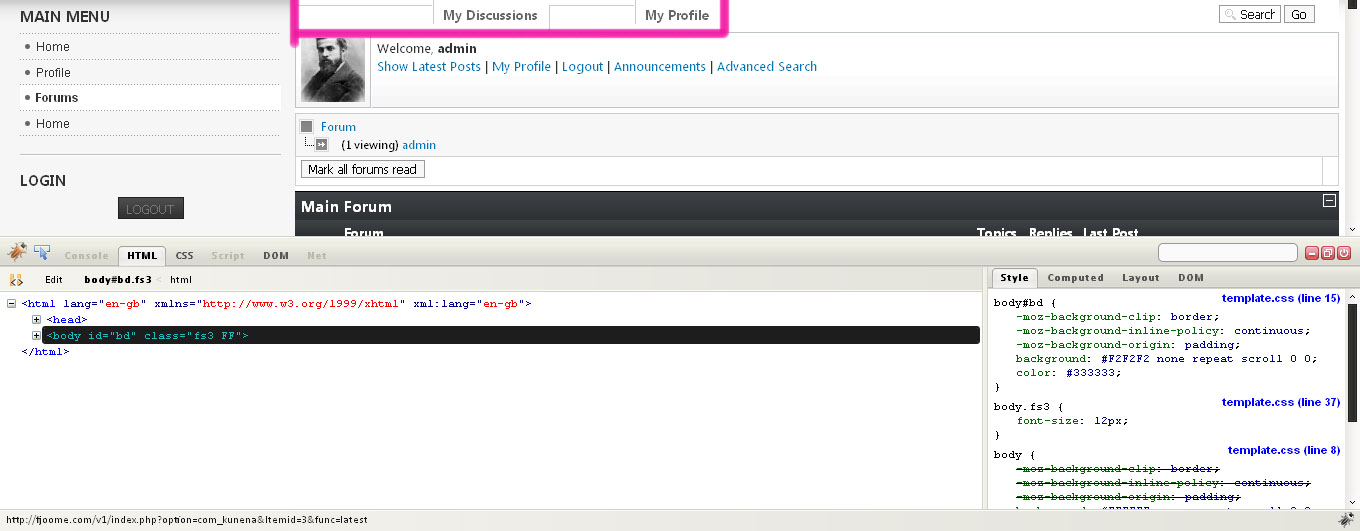
Ok I was trying to get it to work, and unfortunately havn't gotten it to work! 
Here is the current css code I have(which I think is relevant to the tabs):
As you can see I commented out the images, which worked.. except no border?
thanks for your help so far!
-Ninjao
Here is the current css code I have(which I think is relevant to the tabs):
Code:
#Kunena #fb_topmenu {
}
#Kunena #Kunena_tab {
margin:0;
top:0;
}
#Kunena #Kunena_tab ul {
margin:0;
padding:0;
list-style:none;
float:left;
}
#Kunena #Kunena_tab li {
display:inline;
float:left;
margin:0 1px 0 0;
padding:0;
}
#Kunena #Kunena_tab a {
/* background: url("images/tabmenuright.gif") no-repeat right top; */
margin:0;
padding:0;
text-decoration:none;
border 0px 0px 1px 0px;
float:left;
}
#Kunena #Kunena_tab a span {
display:block;
/* background:url("images/tabmenuleft.gif") no-repeat left top; */
padding:0 10px 0 10px;
font-family:"Segoe UI",Arial,Helvetica,sans-serif;
font-size:small;
color:#666666;
font-weight:bold;
line-height:35px;
}
#Kunena #Kunena_tab a:hover,
#Kunena #Kunena_tab li.Kunena_item_active a {
background-position:right bottom;
}
#Kunena #Kunena_tab a:hover span,
#Kunena #Kunena_tab li.Kunena_item_active a span {
background-position:left bottom;
color:#FFFFFF;
font-weight:bold;
font-style:normal;
text-decoration:none;
}
#Kunena select,
#Kunena select:focus,
#Kunena select:hover {
background:#F7F7F7 none repeat scroll 0 0;
font-size:x-small;
border:1px solid #999999;
color:#000000;
padding: 0px;
As you can see I commented out the images, which worked.. except no border
?thanks for your help so far!
-Ninjao
Please Log in or Create an account to join the conversation.
Time to create page: 0.240 seconds