


- Posts: 54
- Thank you received: 0
Kunena 7.0.8 Released
The Kunena team has announce the arrival of Kunena 7.0.8 [K 7.0.8] in stable which is now available for download as a native Joomla extension for J! 5.4.x/6.0.x./6.1.x. This version addresses most of the issues that were discovered in K 6.2 / K 6.3 / K 6.4 and issues discovered during the last development stages of K 7.0
Topics that are moved into this category are generally considered to be closed. Users may want to add additional information but these topics should not be resurrected in order to discuss new problems or unrelated matters.
Question How do I increase the width of the Last Post column?
16 years 4 months ago #42738
by damsella
Replied by damsella on topic Re:How do I increase the width of the Last Post column?
I know, it's such a pain! I am using IE8. Lots of my users use IE too, unfortunately.
Please Log in or Create an account to join the conversation.


16 years 4 months ago - 16 years 4 months ago #42740
by sozzled
Blue Eagle vs. Crypsis reference guide
Read my blog and

Replied by sozzled on topic Re:How do I increase the width of the Last Post column?
That's OK. I'm just pleased that you aren't using IE 6! :laugh:
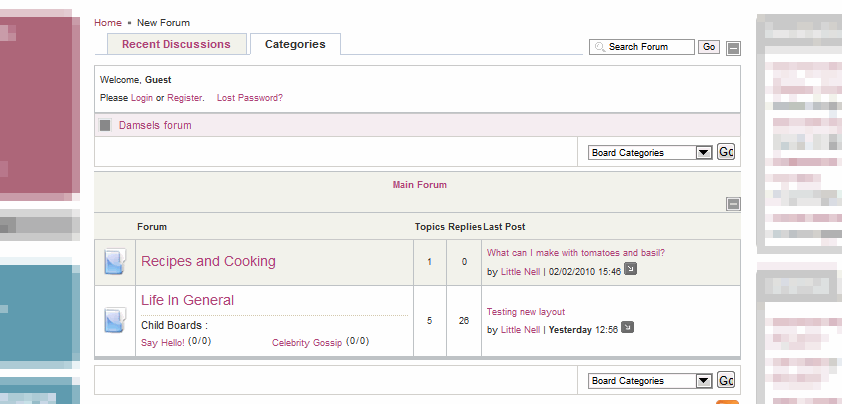
The following image is a partial view of your site, viewed with IE8:

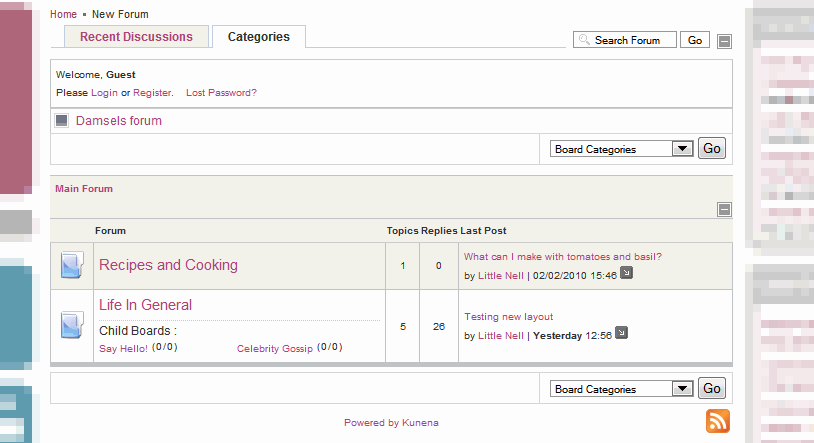
The image below is a partial view of your site using Firefox 3.6:

I don't see much of a difference, sorry. Maybe the problem has to do with how wide your screen is, or whether you have your IE window maximised, or something like that? I'm using a 55 cm monitor, 16:9 aspect ratio, at 1920 x 1080 pixel resolution.
The following image is a partial view of your site, viewed with IE8:
The image below is a partial view of your site using Firefox 3.6:
I don't see much of a difference, sorry. Maybe the problem has to do with how wide your screen is, or whether you have your IE window maximised, or something like that? I'm using a 55 cm monitor, 16:9 aspect ratio, at 1920 x 1080 pixel resolution.
Blue Eagle vs. Crypsis reference guide
Read my blog and
Last edit: 16 years 4 months ago by sozzled.
Please Log in or Create an account to join the conversation.
16 years 4 months ago #42741
by damsella
Replied by damsella on topic Re:How do I increase the width of the Last Post column?
Sorry, once again I didn't make myself very clear! I have already changed the width of Last Post in Categories view. It is in each Forum where it is too narrow in IE.
Please Log in or Create an account to join the conversation.
16 years 4 months ago - 16 years 4 months ago #42742
by sozzled
Blue Eagle vs. Crypsis reference guide
Read my blog and
Replied by sozzled on topic Re:How do I increase the width of the Last Post column?
I'm sorry. Again I see no perceptible difference between these two displays. I could post you images of what I can see but, I think, the issue has to do with your computer monitor, what resolution you are running, and whether you have your IE window maximised or not.
If the display is too cramped for your monitor (and the kinds of equipment that your users might be using) I suggest you find a different Joomla template that allows more width for displaying the Kunena component. We could adjust the "Last Post" column but I fear this may be more harmful to the overall good design of your website. Please let us know if you still want to proceed with instructions about how to change the column width, and what value you would like to set it to. It's your site and it's your choice.
If the display is too cramped for your monitor (and the kinds of equipment that your users might be using) I suggest you find a different Joomla template that allows more width for displaying the Kunena component. We could adjust the "Last Post" column but I fear this may be more harmful to the overall good design of your website. Please let us know if you still want to proceed with instructions about how to change the column width, and what value you would like to set it to. It's your site and it's your choice.
Blue Eagle vs. Crypsis reference guide
Read my blog and
Last edit: 16 years 4 months ago by sozzled.
Please Log in or Create an account to join the conversation.
16 years 4 months ago #42743
by damsella
Replied by damsella on topic Re:How do I increase the width of the Last Post column?
Thanks sozzled. I have a wide laptop screen and my window is maximised, with no need for scrolling.
I really would like to set a width for that column. If it all goes wrong then I can always unset it! :laugh: I'd like to set it to, say, 35%, and see how it looks.
It would be really great if you could help me with that!
I really would like to set a width for that column. If it all goes wrong then I can always unset it! :laugh: I'd like to set it to, say, 35%, and see how it looks.
It would be really great if you could help me with that!
Please Log in or Create an account to join the conversation.
16 years 4 months ago #42750
by sozzled
Blue Eagle vs. Crypsis reference guide
Read my blog and
Replied by sozzled on topic Re:How do I increase the width of the Last Post column?
I think this is how you need to go about your problem. Edit your Kunena CSS file ../components/com_kunena/template/jp-kunena_blueface-1-5-7/kunena.forum.css and add (somewhere) the following few lines:
td.td-6 {
width: 35%;
}
td.td-6 {
width: 35%;
}
Blue Eagle vs. Crypsis reference guide
Read my blog and
Please Log in or Create an account to join the conversation.
Time to create page: 0.236 seconds