


- Posts: 1663
- Thank you received: 201
Kunena 7.0.4 Released
The Kunena team has announce the arrival of Kunena 7.0.4 [K 7.0.4] in stable which is now available for download as a native Joomla extension for J! 5.4.x/6.0.x. This version addresses most of the issues that were discovered in K 6.2 / K 6.3 / K 6.4 and issues discovered during the last development stages of K 7.0
Topics that are moved into this category are generally considered to be closed. Users may want to add additional information but these topics should not be resurrected in order to discuss new problems or unrelated matters.
Question How to change Category Icons?
15 years 8 months ago #57934
by @quila
Replied by @quila on topic Re: How to change Category Icons?
Hi Fjody,
looking to my post from 8 months ago I cant remember that category images was in the folder media.
Instruction from here www.kunena.com/forum/103-solved-or-prior...category-icons#14641 is ok but folder is wrong.
Anyway right folder for K1.5.12 is
If you still have trouble let me know
looking to my post from 8 months ago I cant remember that category images was in the folder media.
Instruction from here www.kunena.com/forum/103-solved-or-prior...category-icons#14641 is ok but folder is wrong.
Anyway right folder for K1.5.12 is
place there images and should work./media/kunena/attachments/legacy/category_images/
If you still have trouble let me know
The following user(s) said Thank You: Fjody
The topic has been locked.


15 years 8 months ago #57999
by Fjody
Replied by Fjody on topic Re: How to change Category Icons?
Hi @quila,
seems it works.
The forum looks much better now when using images
Thank you.
seems it works.
The forum looks much better now when using images
Thank you.
The topic has been locked.
15 years 7 months ago #63299
by agathe99
Replied by agathe99 on topic Re: How to change Category Icons?
sorry to add to this subject, but it doesnt work for me.
I have joomla 1.5.20 and Kunena 1.5.12 and I added the 3 files to all possible places I believe and I still do not see any pictures.
Can you please confirm the folder ? above you mention /media/kunena/attachments/legacy/category_images/ (which is the same as in the other post isn't it ?)
Thanks if you can help, this has been driving me a little crazy
I have joomla 1.5.20 and Kunena 1.5.12 and I added the 3 files to all possible places I believe
and I still do not see any pictures.Can you please confirm the folder ? above you mention /media/kunena/attachments/legacy/category_images/ (which is the same as in the other post isn't it ?)
Thanks if you can help, this has been driving me a little crazy
The topic has been locked.


15 years 7 months ago #63302
by sozzled
Blue Eagle vs. Crypsis reference guide
Read my blog and

Replied by sozzled on topic Re: How to change Category Icons?
The folder path is ../media/kunena/attachments/legacy/category_images
@quila's instructions are correct. You can compare his instructions with these ones: Options for Customizing Subforums?
@quila's instructions are correct. You can compare his instructions with these ones: Options for Customizing Subforums?
Blue Eagle vs. Crypsis reference guide
Read my blog and
The topic has been locked.
- waynedejager
-

- Offline
- New Member
-

Less
More
- Posts: 4
- Thank you received: 0
15 years 3 months ago #82927
by waynedejager
Replied by waynedejager on topic Changing Category Icons
I have Joomla 1.5.22 and Kunena 1.5.12
I had previously changed a few of my category images and wanted to change a few more but cannot find how i change them the last time.
i have read various forum posts that refer to /media/kunena/attachments/legacy/category_images/ but i definitely do not have a KUNENA folder in images and im guessing that because i have done it before that this is the wrong information for me.
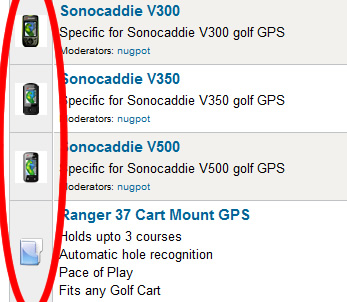
please can someone let me know the correct procedure (ive got an image below of what i have done before...
Many Tx Wayne
I had previously changed a few of my category images and wanted to change a few more but cannot find how i change them the last time.
i have read various forum posts that refer to /media/kunena/attachments/legacy/category_images/ but i definitely do not have a KUNENA folder in images and im guessing that because i have done it before that this is the wrong information for me.
please can someone let me know the correct procedure (ive got an image below of what i have done before...
Many Tx Wayne
The topic has been locked.


15 years 3 months ago - 15 years 3 months ago #82931
by 810
Replied by 810 on topic Re: Changing Category Icons
Hi,
yes it is indeed possible.
go to {joomla_root_path)\images\fbfiles\category_images
you should see some images in this folder in the format
2_notlogin.gif
2_off.gif
2_on.gif
the 2_ refers to the forums CATID number, and the above images are used for the Parent Icon,
if these files exist then these are shown other wise you get the Blue/Green folder icon instead.
Hover over the Forum category and look at the url.. CATID is at the end. eg...
index.php?option=com_kunena&Itemid=9&func=showcat&catid=1
Ideally the Parent icons will be 32x32 but thats really upto you.
Regards
810
yes it is indeed possible.
go to {joomla_root_path)\images\fbfiles\category_images
you should see some images in this folder in the format
2_notlogin.gif
2_off.gif
2_on.gif
the 2_ refers to the forums CATID number, and the above images are used for the Parent Icon,
if these files exist then these are shown other wise you get the Blue/Green folder icon instead.
Hover over the Forum category and look at the url.. CATID is at the end. eg...
index.php?option=com_kunena&Itemid=9&func=showcat&catid=1
Ideally the Parent icons will be 32x32 but thats really upto you.
Regards
810
Last edit: 15 years 3 months ago by 810. Reason: correct dir
The topic has been locked.
Time to create page: 0.253 seconds