


- Posts: 36
- Thank you received: 1
Kunena 7.0.10 & Kunena 6.4.15 – Security Updates Released and K7.1 in RC1
The Kunena team has announce the arrival of Kunena 7.0.10 [K 7.0.10] as security release which is now available for download as a native Joomla extension for J! 5.4.x/6.0.x./6.1.x/6.2.x and 6.4.15 [K 6.4.15]. This version addresses most of the issues that were discovered in K 6.2 / K 6.3 / K 6.4 and issues discovered during the last development stages of K 7.0
Please read
Before you ask for help with template issues ...
Question Column width
16 years 4 months ago - 16 years 4 months ago #50069
by oorzaak
Column width was created by oorzaak
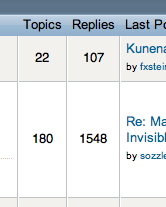
Hi, I'd like to change the column width like on this very Kunena forum (see attached screen dump).
I tried to figure it out by myself and I searched this forum, yet I have nu clue.
Specs:
-Kunena 1.5.11
-Joomla 1.5.18
Regards, Frits image missing http://www.kunena.com/media/kunena/attachments/legacy/images/screendump_columns.png
I tried to figure it out by myself and I searched this forum, yet I have nu clue.
Specs:
-Kunena 1.5.11
-Joomla 1.5.18
Regards, Frits image missing http://www.kunena.com/media/kunena/attachments/legacy/images/screendump_columns.png
Last edit: 16 years 4 months ago by oorzaak. Reason: - edit: typo in topic subject
Please Log in or Create an account to join the conversation.


16 years 4 months ago #50101
by sozzled
Replied by sozzled on topic Re: Column width
You can change the width of all columns by changing the CSS but I don't think that's what you want to do. In what way, specifically, do you want to change the column width? Do you want the width increased or decreased for example?
You probably can't make the columns any narrower because the width is controlled by the text headings (if you make the heading font smaller, the columns will automatically adjust). The columns will grow wider if the contents is too large to fit.
But, if you want to make the columns a lot bigger, you will need to hack into ../components/com_kunena/template/<your-current-template-name>/listcat.php
Change the width values.
You probably can't make the columns any narrower because the width is controlled by the text headings (if you make the heading font smaller, the columns will automatically adjust). The columns will grow wider if the contents is too large to fit.
But, if you want to make the columns a lot bigger, you will need to hack into ../components/com_kunena/template/<your-current-template-name>/listcat.php
Code:
<th class = "th-3 <?php echo $boardclass; ?>sectiontableheader" align="center" width="5%"><?php echo _GEN_TOPICS; ?></th>
<th class = "th-4 <?php echo $boardclass; ?>sectiontableheader" align="center" width="5%">
<?php echo _GEN_REPLIES; ?>
</th>
Please Log in or Create an account to join the conversation.
16 years 4 months ago #50284
by oorzaak
Replied by oorzaak on topic Re: Column width
Hi, maybe I should have been a bit more specific.
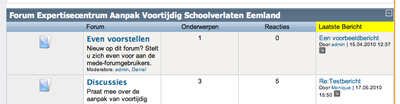
When I installed Kunena, all columns had the same width (which they still have at the moment). See also enclosed screenshot.
I would like to make some columns smaller, for instance the Topics and Replies columns, which only contain numbers. And making those columns smaller, will leave more space for the other columns which contain longer texts. image missing http://www.kunena.com/media/kunena/attachments/legacy/images/kunena_screendump.jpg
When I installed Kunena, all columns had the same width (which they still have at the moment). See also enclosed screenshot.
I would like to make some columns smaller, for instance the Topics and Replies columns, which only contain numbers. And making those columns smaller, will leave more space for the other columns which contain longer texts. image missing http://www.kunena.com/media/kunena/attachments/legacy/images/kunena_screendump.jpg
Please Log in or Create an account to join the conversation.
16 years 3 months ago #50367
by oorzaak
Replied by oorzaak on topic Re: Column width
sozzled wrote:
Frits
Hi, I tried this but my columns are still the same width, like in the picture in my post above.You probably can't make the columns any narrower because the width is controlled by the text headings (if you make the heading font smaller, the columns will automatically adjust). The columns will grow wider if the contents is too large to fit.
But, if you want to make the columns a lot bigger, you will need to hack into ../components/com_kunena/template/<your-current-template-name>/listcat.php
Frits
Please Log in or Create an account to join the conversation.


16 years 3 months ago #50368
by Cerberus
Replied by Cerberus on topic Re: Column width
what templates are you using for kunena and joomla ??
Please Log in or Create an account to join the conversation.
16 years 3 months ago #50384
by oorzaak
Replied by oorzaak on topic Re: Column width
Kunena: default_ex
Joomla: I built my own template. I'm afraid the template.css is a bit lenghty to post it here...
Frits
Joomla: I built my own template. I'm afraid the template.css is a bit lenghty to post it here...
Frits
Please Log in or Create an account to join the conversation.
Time to create page: 0.216 seconds