
- Posts: 8
- Thank you received: 0
Kunena 7.0.8 Released
The Kunena team has announce the arrival of Kunena 7.0.8 [K 7.0.8] in stable which is now available for download as a native Joomla extension for J! 5.4.x/6.0.x./6.1.x. This version addresses most of the issues that were discovered in K 6.2 / K 6.3 / K 6.4 and issues discovered during the last development stages of K 7.0
Question Installation stumper...
- redheads55
-
 Topic Author
- Offline
- New Member
-

Less
More
17 years 1 week ago - 17 years 1 week ago #26362
by redheads55
Installation stumper... was created by redheads55
Ok, I have been using joomla since it was mambo, have installed a bajillion components and plug-ins... never had this kind of trouble. Am hoping someone can assist.
Am using php 5
today's download of kunena
joomla version 5.0.11
MySQL client version: 5.0.16
The first one I know the answer to:
the script times out when I use the 'upload and install' feature. Not a problem - to be expected with such a huge file. I do not get far enough to see any files nor any database changes before it times out.
I have FTP access, so I upload the .zip to the server in the tmp folder, point to that using the install from directory feature, and get the error:
So I try the install from URL, and tried a few different ones, I tried uploading it to my own server and pointing to that, I tried using the one posted in the forums that linked back to here:
I have tried changing tmp folder permissions to 777, have tried creating a new directory and putting the files there then calling that folder. Have tried unzipping it off-line, then uploading and calling the folder, have tried calling the unzipped 'tmp/com_kunena_v1.5.4_stable_b1730_2009-07-11/install' folder.
and I get this error when calling *any* URL:
I am truly at a loss about what to try next... what would YOU try next???

Am using php 5
today's download of kunena
joomla version 5.0.11
MySQL client version: 5.0.16
The first one I know the answer to:
the script times out when I use the 'upload and install' feature. Not a problem - to be expected with such a huge file. I do not get far enough to see any files nor any database changes before it times out.
I have FTP access, so I upload the .zip to the server in the tmp folder, point to that using the install from directory feature, and get the error:
Code:
Please enter a package directory
Unable to find install package
So I try the install from URL, and tried a few different ones, I tried uploading it to my own server and pointing to that, I tried using the one posted in the forums that linked back to here:
Code:
http://joomlacode.org/gf/download/frsrelease/10622/41854/com_kunena_v1.5.4_stable_b1730_2009-07-11.zip
I have tried changing tmp folder permissions to 777, have tried creating a new directory and putting the files there then calling that folder. Have tried unzipping it off-line, then uploading and calling the folder, have tried calling the unzipped 'tmp/com_kunena_v1.5.4_stable_b1730_2009-07-11/install' folder.
and I get this error when calling *any* URL:
Code:
* Remote Server connection failed, failed to open stream: no suitable wrapper could be found
* Invalid URL
I am truly at a loss about what to try next... what would YOU try next???
Last edit: 17 years 1 week ago by redheads55.
Please Log in or Create an account to join the conversation.


17 years 1 week ago - 17 years 1 week ago #26368
by sozzled
Blue Eagle vs. Crypsis reference guide
Read my blog and

Replied by sozzled on topic Re:Installation stumper...
The first thing I would do is
Download
the installation kit to your PC. Please understand that the following instructions are for Joomla 1.5.x - I'm unfamiliar with J! 5.0.11; is that, perhaps, J! 1.5.11?
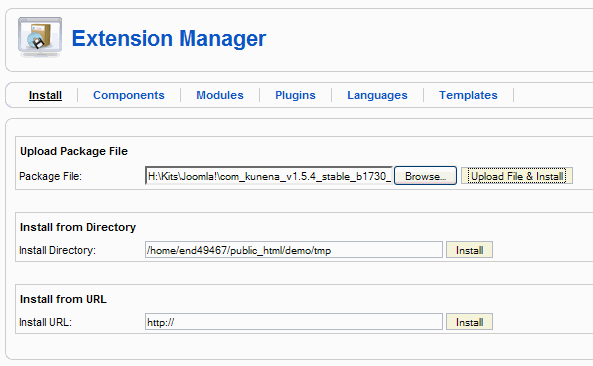
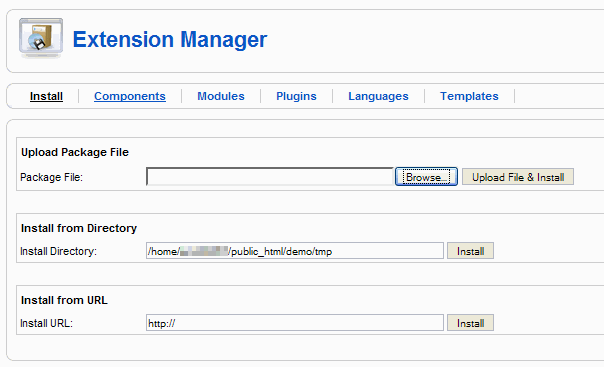
Using the Joomla Extension Manager (see image below), click the "Browse" button in the Upload Package File area.

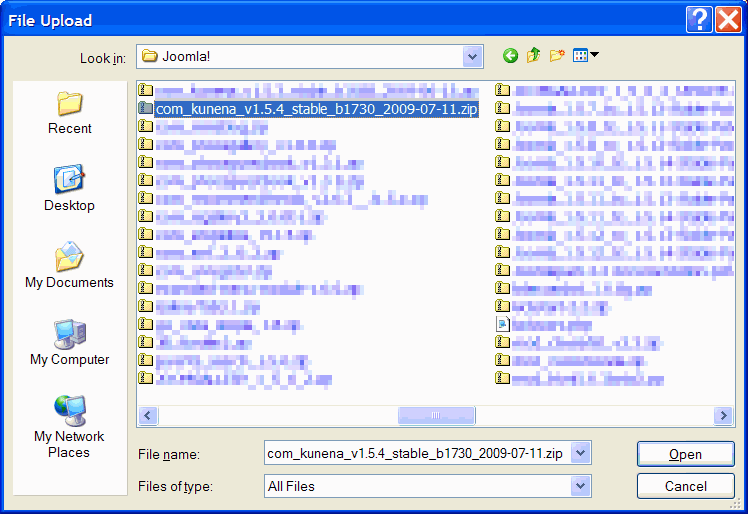
This will result in a File Upload dialog (see following image). Locate the [.ZIP] file that you saved earlier and click "Open".

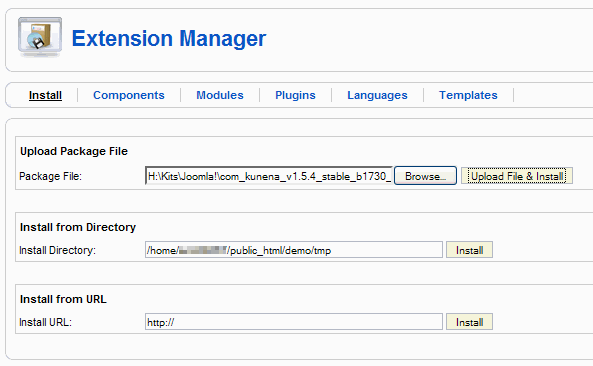
Returning to the Joomla Extension Manager (see following image), click the "Upload File & Install" button.

That's what I do.
Using the Joomla Extension Manager (see image below), click the "Browse" button in the Upload Package File area.
This will result in a File Upload dialog (see following image). Locate the [.ZIP] file that you saved earlier and click "Open".
Returning to the Joomla Extension Manager (see following image), click the "Upload File & Install" button.
That's what I do.
Blue Eagle vs. Crypsis reference guide
Read my blog and
Last edit: 17 years 1 week ago by sozzled.
Please Log in or Create an account to join the conversation.
- redheads55
-
Topic Author
- Offline
- New Member
-
Less
More
- Posts: 8
- Thank you received: 0
17 years 1 week ago #26374
by redheads55
Replied by redheads55 on topic Re:Installation stumper...
sozzled wrote:
Yes, my dyslexic tendency -- you are right about that - 1.5.11.
In my description of what I have already done I posted:
Your post was a GREAT description of the process by which I used the upload and install feature. Alas, it is not as helpful as it might have been had I not tried that first :silly: ... That was my first attempt, and it went crazier from there (since the script would time out) :laugh:
In the meantime, I sent some info and a login over to my host to check it all out... they cannot see anything wrong, but they are not able to install, either... will update you when we figure out what the problemo is. :lol:
I have been installing other mods, but after my long post here I decided to go install another plug-in, and it gave me all of the same errors... so it is now NOT necessarily Kunena, though the problems started there (I had just installed other stuff with no trouble). Will post an update
The first thing I would do is Download the installation kit to your PC. Please understand that the following instructions are for Joomla 1.5.x - I'm unfamiliar with J! 5.0.11; is that, perhaps, J! 1.5.11?
Yes, my dyslexic tendency -- you are right about that - 1.5.11.
In my description of what I have already done I posted:
The first one I know the answer to:
the script times out when I use the 'upload and install' feature. Not a problem - to be expected with such a huge file. I do not get far enough to see any files nor any database changes before it times out.
Your post was a GREAT description of the process by which I used the upload and install feature. Alas, it is not as helpful as it might have been had I not tried that first :silly: ... That was my first attempt, and it went crazier from there (since the script would time out) :laugh:
In the meantime, I sent some info and a login over to my host to check it all out... they cannot see anything wrong, but they are not able to install, either... will update you when we figure out what the problemo is. :lol:
I have been installing other mods, but after my long post here I decided to go install another plug-in, and it gave me all of the same errors... so it is now NOT necessarily Kunena, though the problems started there (I had just installed other stuff with no trouble). Will post an update
Please Log in or Create an account to join the conversation.
17 years 1 week ago - 17 years 1 week ago #26375
by sozzled
Blue Eagle vs. Crypsis reference guide
Read my blog and
Replied by sozzled on topic Re:Installation stumper...
redheads55 wrote:
There are a few other tips, too (for example, Installation Issues in the Wiki and unzipping the files, as suggested by Matias in White page and installation failure and my follow-up Details for Install ).
I could attempt the installation for you, if you like, but I think you know as much as there is to know about how to install Joomla extensions. From the sounds of things, you have a few issues with your webhost provider.
Flattery will get you anywhere ...Your post was a GREAT description of the process by which I used the upload and install feature ...
There are a few other tips, too (for example, Installation Issues in the Wiki and unzipping the files, as suggested by Matias in White page and installation failure and my follow-up Details for Install ).
I could attempt the installation for you, if you like, but I think you know as much as there is to know about how to install Joomla extensions. From the sounds of things, you have a few issues with your webhost provider.
Blue Eagle vs. Crypsis reference guide
Read my blog and
Last edit: 17 years 1 week ago by sozzled.
Please Log in or Create an account to join the conversation.
- redheads55
-
Topic Author
- Offline
- New Member
-
Less
More
- Posts: 8
- Thank you received: 0
17 years 1 week ago #26411
by redheads55
Well, the good news is, I really DID try everything before posting
...except trying to install another mod after I started Kunena, and I tried that right after I posted. Next time I would try *that* before posting, too
It is a chicken-or-the-egg problem now... was the installer not working when I went to install Kunena (I had installed other mods less than a day earlier with no trouble), or did the attempts at installation break something? Will let you know what I find out.
Thank you for the offer - I set the host on it, and if they cannot figure anything out I will turn you loose on it the more the merrier, though not at the same time. 
Replied by redheads55 on topic Re:Installation stumper...
There are a few other tips, too (for example, Installation Issues in the Wiki and unzipping the files, as suggested by Matias in White page and installation failure and my follow-up Details for Install).
Well, the good news is, I really DID try everything before posting
...except trying to install another mod after I started Kunena, and I tried that right after I posted. Next time I would try *that* before posting, too
It is a chicken-or-the-egg problem now... was the installer not working when I went to install Kunena (I had installed other mods less than a day earlier with no trouble), or did the attempts at installation break something? Will let you know what I find out.
I could attempt the installation for you, if you like, but I think you know as much as there is to know about how to install Joomla extensions. From the sounds of things, you have a few issues with your webhost provider.
Thank you for the offer - I set the host on it, and if they cannot figure anything out I will turn you loose on it
the more the merrier, though not at the same time. Please Log in or Create an account to join the conversation.
- redheads55
-
Topic Author
- Offline
- New Member
-
Less
More
- Posts: 8
- Thank you received: 0
17 years 1 week ago #26458
by redheads55
Replied by redheads55 on topic SOLVED - Re:Installation stumper...
Ok, after all of that, when we set my php timeout higher it worked... so the timer was set to 30(!) seconds, and that was not long enough for it no matter which way I tried...
It is up-n-runnin' now!
thanks, everyone!! And now this is in the forum just in case anyone else has that trouble!
It is up-n-runnin' now!
thanks, everyone!! And now this is in the forum just in case anyone else has that trouble!
Please Log in or Create an account to join the conversation.
Time to create page: 0.257 seconds