


- Posts: 11
- Thank you received: 0
Kunena 7.0.4 Released
The Kunena team has announce the arrival of Kunena 7.0.4 [K 7.0.4] in stable which is now available for download as a native Joomla extension for J! 5.4.x/6.0.x. This version addresses most of the issues that were discovered in K 6.2 / K 6.3 / K 6.4 and issues discovered during the last development stages of K 7.0
Topics that are moved into this category are generally considered to be closed. Users may want to add additional information but these topics should not be resurrected in order to discuss new problems or unrelated matters.
Question Joomla Site Preview not working
16 years 1 month ago - 16 years 1 month ago #44304
by Amrit
Joomla Site Preview not working was created by Amrit
I am using Joomla 1.5.14 and Kunena 1.5.10-2
I can't get Preview to work.
I deleted all javascripts and disabled ALL plugins and ALL modules.
No luck in getting the preview to work.
Even tried with rhuk_milkway template, but still no luck.
Any suggestions on what can be wrong?
I can't get Preview to work.
I deleted all javascripts and disabled ALL plugins and ALL modules.
No luck in getting the preview to work.
Even tried with rhuk_milkway template, but still no luck.
Any suggestions on what can be wrong?
Last edit: 16 years 1 month ago by sozzled. Reason: Changed subject to improve search relevance
Please Log in or Create an account to join the conversation.


16 years 1 month ago #44306
by xillibit
I don't provide support by PM, because this can be useful for someone else.
Replied by xillibit on topic Re:Preview not working
Hello,
Can you try with K1.5.11 ? What kunena template do you using ?
Do you have already read this doc : docs.kunena.com/index.php/Conflicting_plugins ?
Can you try with K1.5.11 ? What kunena template do you using ?
Do you have already read this doc : docs.kunena.com/index.php/Conflicting_plugins ?
I don't provide support by PM, because this can be useful for someone else.
Please Log in or Create an account to join the conversation.
16 years 1 month ago #44334
by Amrit
Replied by Amrit on topic Re:Preview not working
I have tried 1.5.11 now, and yes, I read about Conflicting plugins.
Can't get it to work with my site.
Tried it on a clean Joomla and there it works.
Though the submenu does not work, that is the navbar for Kunena isn't visible in either installation.
I even uninstalled Kunena and tried an earlier version, but no luck.
I disabled all my modules, my plugins and all components and cleaned out my header.
Still no luck.
Quite annoyoing. :blink:
Can't get it to work with my site.
Tried it on a clean Joomla and there it works.
Though the submenu does not work, that is the navbar for Kunena isn't visible in either installation.
I even uninstalled Kunena and tried an earlier version, but no luck.
I disabled all my modules, my plugins and all components and cleaned out my header.
Still no luck.
Quite annoyoing. :blink:
Please Log in or Create an account to join the conversation.


16 years 1 month ago #44336
by sozzled
Blue Eagle vs. Crypsis reference guide
Read my blog and

Replied by sozzled on topic Re:Preview not working
Amrit wrote:
Amrit wrote:
Joomla 1.5.15?Tried it on a clean Joomla and there it works.
Amrit wrote:
I don't understand the terms "submenu" or "navbar". Could you show us a screenshot? What kind of Joomla template are you using? What happens if you use rhuk_milkyway template? What Kunena template are you using?Though the submenu does not work, that is the navbar for Kunena isn't visible in either installation.
Blue Eagle vs. Crypsis reference guide
Read my blog and
Please Log in or Create an account to join the conversation.
16 years 1 month ago #44392
by Amrit
Replied by Amrit on topic Re:Preview not working
Hi Sozzled.
Yes I tried it on Joomla 1.5.15, and I used Kunena 1.5.11.
I first installed Joomla, and then Kunena.
I then clicked on Kunena and I see a button missing.
Check my screenshot.
Beneath the Preview in the upper right corner there should be a green button with the text Back under it.

Now this problem was just something else I noticed with 1.5.11, and I was a bit tired when writing it, so therefore I might have been unclear on what was happening.
(And I probably should have posted this post above in another thread)
To clarify:
Yes, the Preview button functions properly on a clean 1.5.15 Joomla with Kunena 1.5.11 with the default_ex Kunena template and with rhuk_milkway template.
It actually works with any Joomla template I use on my clean site, which suggests that my live site is having a conflict with something.
My live site has JCE 1.56, Jseblod 1.5.1, JEvents 1.5.3, Phocagallery 2.6.2 and Admin-User-Access 2.04 and also Kunena 1.5.11, (I upgraded from Kunena 1.5.8 first to 1.5.10-2, and from that one to 1.5.11)
The strange part is that i disabled ALL plugins, ALL modules and ALL components but Kunena, and I used rhuk_milkway template, and still I couldn't get the preview to work.
I checked the source of the kunena page (option=com_kunena&Itemid=30&func=post&do=reply&catid=3) and I could not find any other javascript it could conflict with.
So I setup my live site the same way as my fresh site.
That means I took every setting from the fresh site, and setup my live site accordingly.
Then I compared the sources of the two sites and apart from the different languages and some html, I couldn't find anything that would suggest why preview doesn't work.
I also tried using English as language, but still no preview.
Also tried downgrading to 1.5.10-2, and even tried 1.5.8, without any luck.
So I have tried more then a few things.
I'm just fresh out of ideas to as what Kunena might be conflicting with.
Yes I tried it on Joomla 1.5.15, and I used Kunena 1.5.11.
I first installed Joomla, and then Kunena.
I then clicked on Kunena and I see a button missing.
Check my screenshot.
Beneath the Preview in the upper right corner there should be a green button with the text Back under it.
Now this problem was just something else I noticed with 1.5.11, and I was a bit tired when writing it, so therefore I might have been unclear on what was happening.
(And I probably should have posted this post above in another thread)
To clarify:
Yes, the Preview button functions properly on a clean 1.5.15 Joomla with Kunena 1.5.11 with the default_ex Kunena template and with rhuk_milkway template.
It actually works with any Joomla template I use on my clean site, which suggests that my live site is having a conflict with something.
My live site has JCE 1.56, Jseblod 1.5.1, JEvents 1.5.3, Phocagallery 2.6.2 and Admin-User-Access 2.04 and also Kunena 1.5.11, (I upgraded from Kunena 1.5.8 first to 1.5.10-2, and from that one to 1.5.11)
The strange part is that i disabled ALL plugins, ALL modules and ALL components but Kunena, and I used rhuk_milkway template, and still I couldn't get the preview to work.
I checked the source of the kunena page (option=com_kunena&Itemid=30&func=post&do=reply&catid=3) and I could not find any other javascript it could conflict with.
So I setup my live site the same way as my fresh site.
That means I took every setting from the fresh site, and setup my live site accordingly.
Then I compared the sources of the two sites and apart from the different languages and some html, I couldn't find anything that would suggest why preview doesn't work.
I also tried using English as language, but still no preview.
Also tried downgrading to 1.5.10-2, and even tried 1.5.8, without any luck.
So I have tried more then a few things.
I'm just fresh out of ideas to as what Kunena might be conflicting with.
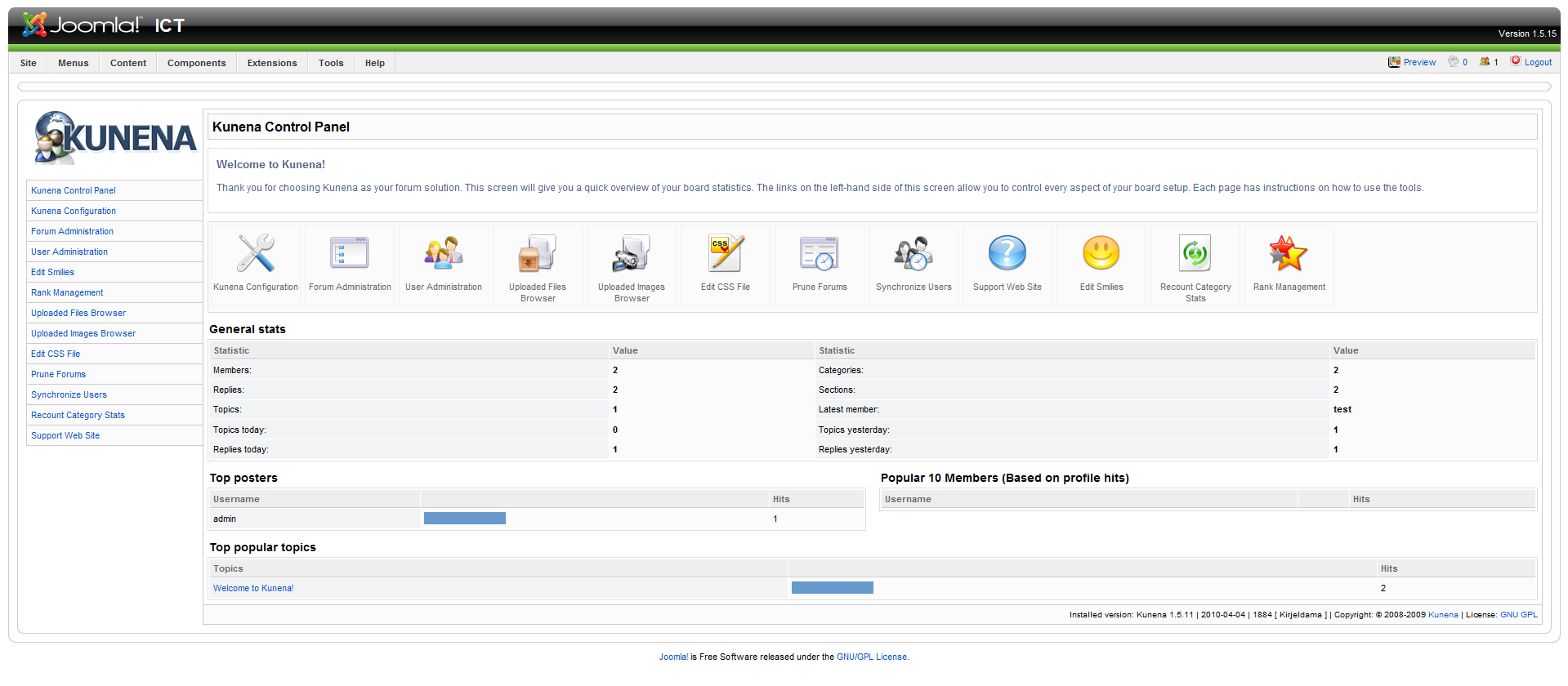
Please Log in or Create an account to join the conversation.
16 years 1 month ago - 16 years 1 month ago #44467
by sozzled
Blue Eagle vs. Crypsis reference guide
Read my blog and
Replied by sozzled on topic Re:Joomla Site Preview not working
Thank you for the picture you have given us in message
#44392
. You will notice that I have changed the subject to better reflect what we are discussing.
Although you still have not answered my earlier questions - What is the "submenu"? What is the "navbar"? - I have a better understanding about the problem. We are talking about the backend - the Joomla admininstration - site, not the website that your users visit.
I see, from the image you posted, you are missing a "Back" button.
From what you have shown it looks as though your Kunena admininistration modules have not properly installed. I can't explain why. But I would guess that your live site would be having problems affecting more than simply Kunena. Somewhere, along the way, you've done something to your live website and you've damaged it.
The next question is: how do we fix it? Had I known that we were discussing a problem with your backend I would not have advised you to upgrade or downgrade Kunena. The problem has nothing to do with Kunena. You could uninstall Kunena and reinstall it and it still won't disappear. In fact, you could probably uninstall Kunena and you'd probably find another place in your backend where the "Site Preview" button doesn't work, too.
If I were in your shoes, I'm not sure what I would be approaching this problem. I would imagine that I would rebuild a new "live site", using a fresh, clean, Joomla 1.5.15 installation, in a separate directory, starting with Kunena and rhuk_milkyway and nothing else. After getting the basics in place I would then add Joomlapack and take a backup of my website. Then I would attempt to add all the other components that I'd used on my live site (checking, after I'd added each one, that my Kunena administration panel continued to work), one by one, taking site backups after each, until I'd fully reassembled my site. After doing all of that I would then import the data from my live site across to my new site, backup my new site and restore it over my old live site.
Another possible solution is to simply extract all the administrator modules from the Kunena installation kit and copy them to your live site. However, I suspect that your live site has been corrupted by something else as you have already stated that you do not have these problems in a fresh site build.
This sounds like a lot of work but it preserves the effort you've put into your live site.
On the other hand, if your live site contains no content then what the heck. Just start again. We might only be talking a couple of hours at the most. That's one of the things I love about Joomla. It's what I call "disposable technology".
Although you still have not answered my earlier questions - What is the "submenu"? What is the "navbar"? - I have a better understanding about the problem. We are talking about the backend - the Joomla admininstration - site, not the website that your users visit.
I see, from the image you posted, you are missing a "Back" button.
From what you have shown it looks as though your Kunena admininistration modules have not properly installed. I can't explain why. But I would guess that your live site would be having problems affecting more than simply Kunena. Somewhere, along the way, you've done something to your live website and you've damaged it.
The next question is: how do we fix it? Had I known that we were discussing a problem with your backend I would not have advised you to upgrade or downgrade Kunena. The problem has nothing to do with Kunena. You could uninstall Kunena and reinstall it and it still won't disappear. In fact, you could probably uninstall Kunena and you'd probably find another place in your backend where the "Site Preview" button doesn't work, too.
If I were in your shoes, I'm not sure what I would be approaching this problem. I would imagine that I would rebuild a new "live site", using a fresh, clean, Joomla 1.5.15 installation, in a separate directory, starting with Kunena and rhuk_milkyway and nothing else. After getting the basics in place I would then add Joomlapack and take a backup of my website. Then I would attempt to add all the other components that I'd used on my live site (checking, after I'd added each one, that my Kunena administration panel continued to work), one by one, taking site backups after each, until I'd fully reassembled my site. After doing all of that I would then import the data from my live site across to my new site, backup my new site and restore it over my old live site.
Another possible solution is to simply extract all the administrator modules from the Kunena installation kit and copy them to your live site. However, I suspect that your live site has been corrupted by something else as you have already stated that you do not have these problems in a fresh site build.
This sounds like a lot of work but it preserves the effort you've put into your live site.
On the other hand, if your live site contains no content then what the heck. Just start again. We might only be talking a couple of hours at the most. That's one of the things I love about Joomla. It's what I call "disposable technology".
Blue Eagle vs. Crypsis reference guide
Read my blog and
Last edit: 16 years 1 month ago by sozzled.
Please Log in or Create an account to join the conversation.
Time to create page: 0.274 seconds