


- Posts: 6
- Thank you received: 0
Kunena 7.0.5 & Kunena 6.4.11 – Security Updates Released
The Kunena team has announce the arrival of Kunena 7.0.5 [K 7.0.5] in stable which is now available for download as a native Joomla extension for J! 5.4.x/6.0.x. This version addresses most of the issues that were discovered in K 6.2 / K 6.3 / K 6.4 and issues discovered during the last development stages of K 7.0.
The Kunena team is also pleased to announce the eleventh version of Kunena 6.4, a native Joomla extension for Joomla! 5.0, 5.1, 5.2, 5.3, 5.4 and 6.0.
Topics that are moved into this category are generally considered to be closed. Users may want to add additional information but these topics should not be resurrected in order to discuss new problems or unrelated matters.
Important 2 errors in Kunena
15 years 11 months ago - 15 years 11 months ago #50058
by mitchmink
2 errors in Kunena was created by mitchmink
Hi all,
i have 2 errors on my website.
1) i cant navigate trough the posts . I have set the posts per page on 50. When i click the thread i go to page 2 but i can't see page 1 anymore.
2) is there any way i can set order the posts in a thread ? i know it is possible to set the order of the posts by newest first and oldelst first in the user profile but i want to set the newest posts first automaticly.
hope you understand me
cheers
i have 2 errors on my website.
1) i cant navigate trough the posts . I have set the posts per page on 50. When i click the thread i go to page 2 but i can't see page 1 anymore.
2) is there any way i can set order the posts in a thread ? i know it is possible to set the order of the posts by newest first and oldelst first in the user profile but i want to set the newest posts first automaticly.
hope you understand me
cheers
Last edit: 15 years 11 months ago by sozzled. Reason: minor spelling edit in subject
Please Log in or Create an account to join the conversation.


15 years 11 months ago #50059
by sozzled
Blue Eagle vs. Crypsis reference guide
Read my blog and

Replied by sozzled on topic Re: 2 errors in Kunena
G'day, mitchmink, and welcome to Kunena.
First of all, we like to remind all our users that they can probably save themselves time if they familiarise themselves with a few general guidelines that are summarised in K 1.5.x Support: Please read this first . It saves you time if you provide some basic information about your installation and it save us time asking for it. So, let's start with the basics:
What version of Kunena are you using and what Kunena template are you using?
I don't quite understand the first problem you are having but, after you provide the information I've asked for, we can look deeper into it.
"First-post-first" vs "last-post-first" is, as you know, a user preference that is settable on a per-user basis. I am a strong believer in allowing users as much control over their own preferences instead of imposing my ideas on how they should operate the forum. You know how to change the preference for you (so there's no problem there) what's the problem that you are having?
By default, Kunena sets the preference to first-post-first (and users can change it around the other way, if they like). There is no "universal setting" to apply an alternative preference to all users in K 1.5.x (and I think that is a good thing, too!) nor is there a setting in K 1.6. The short answer is that the development team has given this matter a great deal of thought and they have decided that the status quo should remain - each user can choose the order that messages appear (either the first post first, and later posts in increasing chronological sequence, or the most recent post first, and earlier posts in decreasing chronological sequence).
First of all, we like to remind all our users that they can probably save themselves time if they familiarise themselves with a few general guidelines that are summarised in K 1.5.x Support: Please read this first . It saves you time if you provide some basic information about your installation and it save us time asking for it. So, let's start with the basics:
What version of Kunena are you using and what Kunena template are you using?
I don't quite understand the first problem you are having but, after you provide the information I've asked for, we can look deeper into it.
"First-post-first" vs "last-post-first" is, as you know, a user preference that is settable on a per-user basis. I am a strong believer in allowing users as much control over their own preferences instead of imposing my ideas on how they should operate the forum. You know how to change the preference for you (so there's no problem there) what's the problem that you are having?
By default, Kunena sets the preference to first-post-first (and users can change it around the other way, if they like). There is no "universal setting" to apply an alternative preference to all users in K 1.5.x (and I think that is a good thing, too!) nor is there a setting in K 1.6. The short answer is that the development team has given this matter a great deal of thought and they have decided that the status quo should remain - each user can choose the order that messages appear (either the first post first, and later posts in increasing chronological sequence, or the most recent post first, and earlier posts in decreasing chronological sequence).
Blue Eagle vs. Crypsis reference guide
Read my blog and
The following user(s) said Thank You: mitchmink
Please Log in or Create an account to join the conversation.
15 years 11 months ago #50062
by mitchmink
Replied by mitchmink on topic Re: 2 errors in Kunena
first of all sorry for the post without the requested information.
My joomla version = 1.5.15
My kunena version = 1.5.9
Kunena template = grey

My joomla version = 1.5.15
My kunena version = 1.5.9
Kunena template = grey
When a user select the option in his kunena user profile (last posts first) it doesn't work. It still showing it the normal way."First-post-first" vs "last-post-first" is, as you know, a user preference that is settable on a per-user basis. I am a strong believer in allowing users as much control over their own preferences instead of imposing my ideas on how they should operate the forum. You know how to change the preference for you (so there's no problem there) what's the problem that you are having?
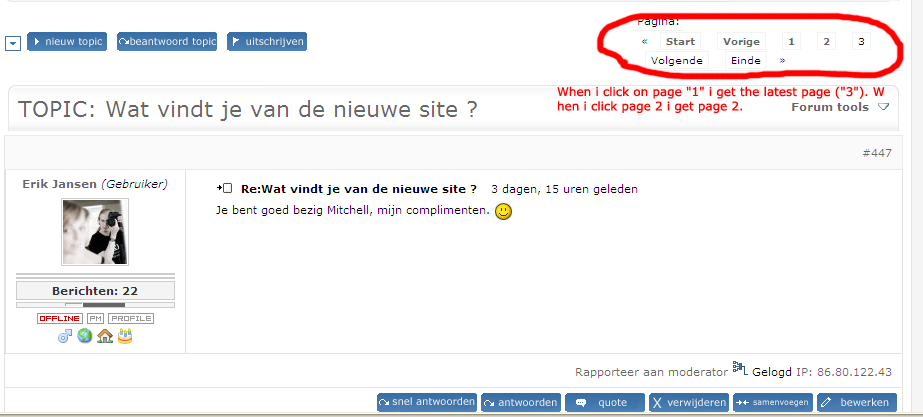
I will explain it better: I cant navigate trough the pages from the posts. It is showing me page 2 and i can't go to page 1. here is a screenshot. [img]C:\Profiles\mmi001ab\Desktop\forum-error.png[/img]I don't quite understand the first problem you are having but, after you provide the information I've asked for, we can look deeper into it.
Please Log in or Create an account to join the conversation.
15 years 11 months ago #50063
by sozzled
Blue Eagle vs. Crypsis reference guide
Read my blog and
Replied by sozzled on topic Re: 2 errors in Kunena
I don't know anything about a "grey" template (default_gray, perhaps?  ) but it sounds like it's the template that causing all your problems (see
There is only one endorsed and supported Kunena template ... default_ex
for more information about the default_gray template). I know for a fact that the default_gray template clobbers page navigation/pagination dishonours the last-post-first preference.
) but it sounds like it's the template that causing all your problems (see
There is only one endorsed and supported Kunena template ... default_ex
for more information about the default_gray template). I know for a fact that the default_gray template clobbers page navigation/pagination dishonours the last-post-first preference.
Secondly, you should, as soon as possible, upgrade to K 1.5.11 because it fixes 30+ known problems with K 1.5.9.
There you go: two good tips for the price of one! :laugh:
Please confirm that it was default_gray template that you were using. If it is, get rid of it, use default_ex, familiarise yourself with the "sticky" messages in the Support category, and you won't have any more problems.
) but it sounds like it's the template that causing all your problems (see
There is only one endorsed and supported Kunena template ... default_ex
for more information about the default_gray template). I know for a fact that the default_gray template clobbers page navigation/pagination dishonours the last-post-first preference.Secondly, you should, as soon as possible, upgrade to K 1.5.11 because it fixes 30+ known problems with K 1.5.9.
There you go: two good tips for the price of one! :laugh:
Please confirm that it was default_gray template that you were using. If it is, get rid of it, use default_ex, familiarise yourself with the "sticky" messages in the Support category, and you won't have any more problems.
Blue Eagle vs. Crypsis reference guide
Read my blog and
Please Log in or Create an account to join the conversation.
15 years 11 months ago #50065
by mitchmink
Replied by mitchmink on topic Re: 2 errors in Kunena
its not default_gray but another template from the internet its called grey, it comes also with a jomsocial template grey when i upgrade everything will go right ?
its called grey, it comes also with a jomsocial template grey when i upgrade everything will go right ? Please Log in or Create an account to join the conversation.
15 years 11 months ago #50066
by mitchmink
Replied by mitchmink on topic Re: 2 errors in Kunena
i have upgraded to the 1.5.11 version but i still have the latest-posts issue and the other issue is still on too.
and the other issue is still on too. Please Log in or Create an account to join the conversation.
Time to create page: 0.282 seconds