


- Posts: 21
- Thank you received: 0
Kunena 7.0.5 & Kunena 6.4.11 – Security Updates Released
The Kunena team has announce the arrival of Kunena 7.0.5 [K 7.0.5] in stable which is now available for download as a native Joomla extension for J! 5.4.x/6.0.x. This version addresses most of the issues that were discovered in K 6.2 / K 6.3 / K 6.4 and issues discovered during the last development stages of K 7.0.
The Kunena team is also pleased to announce the eleventh version of Kunena 6.4, a native Joomla extension for Joomla! 5.0, 5.1, 5.2, 5.3, 5.4 and 6.0.
Topics that are moved into this category are generally considered to be closed. Users may want to add additional information but these topics should not be resurrected in order to discuss new problems or unrelated matters.
Question [Topic closed by moderator - assumed resolved] Joomla SEO issues: Kunena forum pages do not display
16 years 1 month ago - 16 years 1 month ago #44134
by chicaloca
[Topic closed by moderator - assumed resolved] Joomla SEO issues: Kunena forum pages do not display was created by chicaloca
Hi
I hope I've put this in the right place. This is my first post on the forum so very new to kunena. I'm using version 1.5.9 and using joomla version 1.5.15. I've already uninstalled then reinstalled kunena but still having the same problem. I've tried to have a look at the support documentation and forum but maybe I'm just missing something very basic.
This is how it looks so far:
kds.dkeenan.co.uk/index.php/forum
The background is completely blank which I don't understand. I've made some artiles in joomla and they all have blank backgrounds for some reason. Is it more likely to be a problem within joomla or is there something I'm missing?
also I've configured kunena so no registration is required so I'm a bit confused as to why theres a log in box!
any pointers in the right direction would be appreciated.
thanks
I hope I've put this in the right place. This is my first post on the forum so very new to kunena. I'm using version 1.5.9 and using joomla version 1.5.15. I've already uninstalled then reinstalled kunena but still having the same problem. I've tried to have a look at the support documentation and forum but maybe I'm just missing something very basic.
This is how it looks so far:
kds.dkeenan.co.uk/index.php/forum
The background is completely blank which I don't understand. I've made some artiles in joomla and they all have blank backgrounds for some reason. Is it more likely to be a problem within joomla or is there something I'm missing?
also I've configured kunena so no registration is required so I'm a bit confused as to why theres a log in box!
any pointers in the right direction would be appreciated.
thanks
Last edit: 16 years 1 month ago by sozzled. Reason: Topic closed
Please Log in or Create an account to join the conversation.


16 years 1 month ago #44136
by xillibit
I don't provide support by PM, because this can be useful for someone else.
Replied by xillibit on topic Re:lack of display
Hello,
There is an issue with the Kunena CSS file : components/com_kunena/template/default_ex/templates/system/css/error.css, maybe there is not present or there isn't the right to be read.
There is an issue with the Kunena CSS file : components/com_kunena/template/default_ex/templates/system/css/error.css, maybe there is not present or there isn't the right to be read.
I don't provide support by PM, because this can be useful for someone else.
Please Log in or Create an account to join the conversation.


16 years 1 month ago #44138
by @quila
Replied by @quila on topic Re:lack of display
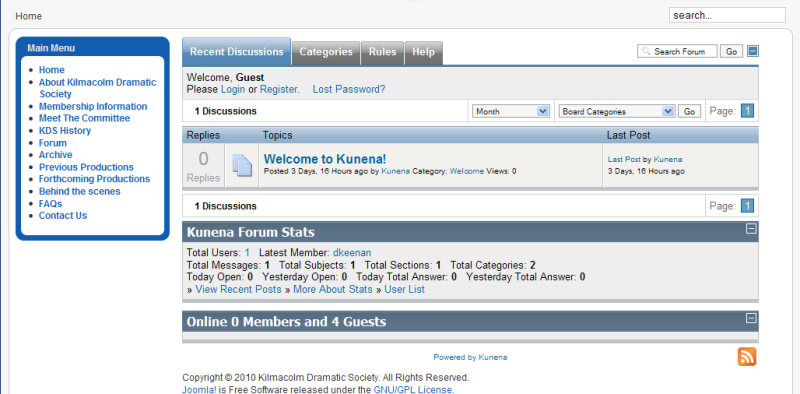
There are also SEF problem. Try to disable SEF component you are using.
This is your forum without SEF

This is your forum without SEF
Please Log in or Create an account to join the conversation.
16 years 1 month ago #44141
by chicaloca
Replied by chicaloca on topic Re:lack of display
hi
thanks for the replies. I can click the edit css option on the left hand side of the screen and the css appears.
sorry where would i be able to disable the SEF component?
thanks for the replies. I can click the edit css option on the left hand side of the screen and the css appears.
sorry where would i be able to disable the SEF component?
Please Log in or Create an account to join the conversation.
16 years 1 month ago - 16 years 1 month ago #44142
by @quila
Replied by @quila on topic Re:lack of display
If you are using Joomla SEO
Joomla Backend -> Site -> Global Configuration -> SEO Settings
Then Tools -> Clean Cache
Joomla Backend -> Site -> Global Configuration -> SEO Settings
Then Tools -> Clean Cache
Last edit: 16 years 1 month ago by @quila.
Please Log in or Create an account to join the conversation.
16 years 1 month ago - 16 years 1 month ago #44143
by chicaloca
Replied by chicaloca on topic Re:lack of display
thanks so much! not sure why this would cause the problem but I turned SEF off and it appears properly now!
I'm planning to do some SEO later so I would prefer if the urls were search endgine friendly but at least this way my forum appears correctly.
thanks again
just one other question, I've got the settings so that the users dont have to register, but on the forum it still asks the uder to register or log in, is there something else I've missed?
I'm planning to do some SEO later so I would prefer if the urls were search endgine friendly but at least this way my forum appears correctly.
thanks again
just one other question, I've got the settings so that the users dont have to register, but on the forum it still asks the uder to register or log in, is there something else I've missed?
Last edit: 16 years 1 month ago by chicaloca. Reason: further information
Please Log in or Create an account to join the conversation.
Time to create page: 0.256 seconds