


- Posts: 21
- Thank you received: 0
Kunena 7.0.9 & Kunena 6.4.14 – Security Updates Released
The Kunena team has announce the arrival of Kunena 7.0.9 [K 7.0.9] in stable which is now available for download as a native Joomla extension for J! 5.4.x/6.0.x./6.1.x. This version addresses most of the issues that were discovered in K 6.2 / K 6.3 / K 6.4 and issues discovered during the last development stages of K 7.0
Topics that are moved into this category are generally considered to be closed. Users may want to add additional information but these topics should not be resurrected in order to discuss new problems or unrelated matters.
Question .JPEG, not .JPG, Image attachment question
16 years 7 months ago - 16 years 5 months ago #40187
by 360236
Replied by 360236 on topic Re:Image Attachment Question
I just uploaded the same image via File Uploader:
http://*****/index.php?option=com_kunena&Itemid=29&func=view&catid=48&id=89#89
http://*****/index.php?option=com_kunena&Itemid=29&func=view&catid=48&id=89#89
Last edit: 16 years 5 months ago by sozzled. Reason: URL edited by moderator for compliance with site policy
Please Log in or Create an account to join the conversation.


16 years 7 months ago #40188
by sozzled
Blue Eagle vs. Crypsis reference guide
Read my blog and

Replied by sozzled on topic Re:Image Attachment Question
What's this "File Uploader"??? :S

Blue Eagle vs. Crypsis reference guide
Read my blog and
Please Log in or Create an account to join the conversation.
16 years 7 months ago #40189
by 360236
Replied by 360236 on topic Re:Image Attachment Question
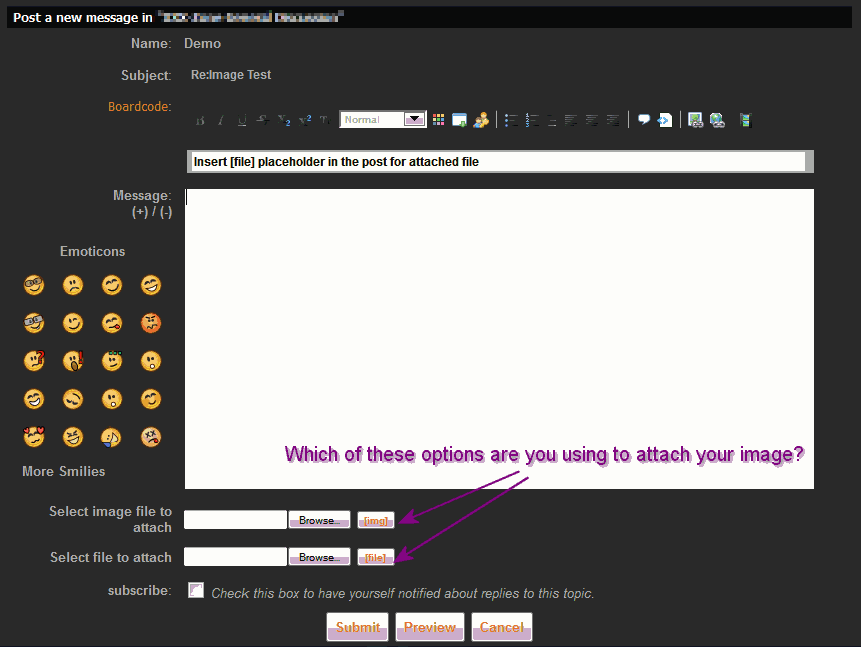
I use "Select image file to attach".
Please Log in or Create an account to join the conversation.
16 years 7 months ago #40194
by sozzled
Blue Eagle vs. Crypsis reference guide
Read my blog and
Replied by sozzled on topic Re:Image Attachment Question
You selected the "Select image file to attach" - good, that's exactly what I used to post the dancing man. Please try to not confuse the discussion by introducing new jargon like "file uploader".
So, where is this image located that you are trying to upload - it's on your PC, yes? Can you upload other images. I mean, I could upload an image to your website. The question is, why can't you? :S
What is the .JPEG extension? Have you tried uploading an image with a different extension? I uploaded a .GIF. Maybe that's the problem? :S
So, where is this image located that you are trying to upload - it's on your PC, yes? Can you upload other images. I mean, I could upload an image to your website. The question is, why can't you? :S
What is the .JPEG extension? Have you tried uploading an image with a different extension? I uploaded a .GIF. Maybe that's the problem? :S
Blue Eagle vs. Crypsis reference guide
Read my blog and
Please Log in or Create an account to join the conversation.
16 years 7 months ago #40198
by 360236
Replied by 360236 on topic Re:Image Attachment Question
OK, I uploaded a .gif. I think it is the .jpeg extension. Where can I make it so .jpeg will work like .gif?
Please Log in or Create an account to join the conversation.
16 years 7 months ago - 16 years 7 months ago #40200
by sozzled
Blue Eagle vs. Crypsis reference guide
Read my blog and
Replied by sozzled on topic Re:Image Attachment Question
Try renaming the original file to .JPG and uploading that instead.
.JPG, .GIF and .PNG are different image formats. You can convert one into another (to an extent) with an image editing program. You can also convert other images into one of these three, too, using a similar process.
For further information about the differences between .JPEG and .JPG, use Google.
.JPG, .GIF and .PNG are different image formats. You can convert one into another (to an extent) with an image editing program. You can also convert other images into one of these three, too, using a similar process.
For further information about the differences between .JPEG and .JPG, use Google.
Blue Eagle vs. Crypsis reference guide
Read my blog and
Last edit: 16 years 7 months ago by sozzled.
Please Log in or Create an account to join the conversation.
Time to create page: 0.253 seconds