


- Posts: 20
- Thank you received: 2
Kunena 7.0.4 Released
The Kunena team has announce the arrival of Kunena 7.0.4 [K 7.0.4] in stable which is now available for download as a native Joomla extension for J! 5.4.x/6.0.x. This version addresses most of the issues that were discovered in K 6.2 / K 6.3 / K 6.4 and issues discovered during the last development stages of K 7.0
Question More topic icons?
17 years 1 month ago #7792
by jojalamic
More topic icons? was created by jojalamic
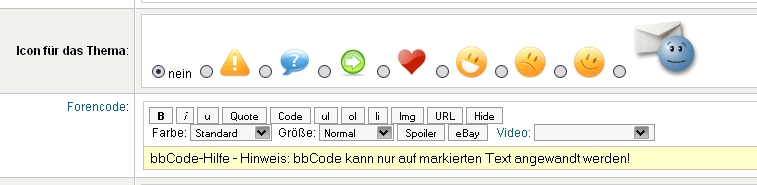
Hello how can i add more topic icons...can somewon help me?
[img=http://img10.imageshack.us/img10/763/49446866.th.gif][/url] [img size=922]http://www.kunena.com/media/kunena/attachments/legacy/images/Untitled_2.gif[/img]
[img=http://img10.imageshack.us/img10/763/49446866.th.gif][/url] [img size=922]http://www.kunena.com/media/kunena/attachments/legacy/images/Untitled_2.gif[/img]

Please Log in or Create an account to join the conversation.


17 years 1 month ago - 17 years 1 month ago #7814
by Lintzy
Replied by Lintzy on topic Re:More topic icons?
You have to add the smilies in your template_images_language_emoticons
for example /template/default_ex/images/german/emoticons
Put them in all emoticons folders you have (english/emoticons, yourlanguage/emoticons)and in default template AND default_ex.
IMPORTANT: only *.gif files and no animated. Maybe the width and height of smileys is restricted too, i don't know, test it.
Let say, you have added a smiley named nono.gif.
So, now, you must add code into some files.
smile.class.php: search:
and add this strict below:
Look at value! and the name of the Gif-file. That is, what you must do: value="8" or value[8] (look at code) for nono.gif, value="9" or value[9] for nextnew.gif
Next code you have to add
under the lists of existing smileys.
I have searched and quoted here as exmaple the exclam.gif, with the files you must edit - so you can find the lists easier:
At least you can fill your new smiley into *.xml in alphabeticle order, but i think, this xml is for install only.
After that you can choose your new smiley nono.gif and it looks as on pictures below:


for example /template/default_ex/images/german/emoticons
Put them in all emoticons folders you have (english/emoticons, yourlanguage/emoticons)and in default template AND default_ex.
IMPORTANT: only *.gif files and no animated. Maybe the width and height of smileys is restricted too, i don't know, test it.
Let say, you have added a smiley named nono.gif.
So, now, you must add code into some files.
smile.class.php: search:
Code:
<input type = "radio" name = "topic_emoticon" value = "7"<?php echo $selected==7?" checked=\"checked\" ":"";?>/>
<img src = "<?php echo KUNENA_URLEMOTIONSPATH ;?>smile.gif" alt = "" border = "0" />
Code:
<input type = "radio" name = "topic_emoticon" value = "8"<?php echo $selected==7?" checked=\"checked\" ":"";?>/>
<img src = "<?php echo KUNENA_URLEMOTIONSPATH ;?>nono.gif" alt = "" border = "0" />
Look at value! and the name of the Gif-file. That is, what you must do: value="8" or value[8] (look at code) for nono.gif, value="9" or value[9] for nextnew.gif
Next code you have to add
Code:
$topic_emoticons[8] = KUNENA_URLEMOTIONSPATH . 'nono.gif';
I have searched and quoted here as exmaple the exclam.gif, with the files you must edit - so you can find the lists easier:
[/components/com_kunena/template/default/flat.php]
Line 32 : $topic_emoticons[1] = KUNENA_URLEMOTIONSPATH . 'exclam.gif';
[/components/com_kunena/template/default/plugin/fbprofile/forummsg.php]
Line 68 : $topic_emoticons[1] = KUNENA_URLEMOTIONSPATH . 'exclam.gif';
[/components/com_kunena/template/default/plugin/myprofile/myprofile_msg.php]
Line 66 : $topic_emoticons[1] = KUNENA_URLEMOTIONSPATH . 'exclam.gif';
[/components/com_kunena/template/default/plugin/recentposts/recentposts.php]
Line 63 : $topic_emoticons[1] = KUNENA_URLEMOTIONSPATH . 'exclam.gif';
[/components/com_kunena/template/default/thread.php]
Line 36 : $topic_emoticons[1] = KUNENA_URLEMOTIONSPATH . 'exclam.gif';
[/components/com_kunena/template/default_ex/flat.php]
Line 52 : $topic_emoticons[1] = KUNENA_URLEMOTIONSPATH . 'exclam.gif';
[/components/com_kunena/template/default_ex/thread.php]
Line 36 : $topic_emoticons[1] = KUNENA_URLEMOTIONSPATH . 'exclam.gif';
At least you can fill your new smiley into *.xml in alphabeticle order, but i think, this xml is for install only.
[/administrator/components/com_kunena/kunena.xml]
Line 208 : <filename>template/default/images/english/emoticons/exclam.gif</filename>
Line 736 : <filename>template/default_ex/images/english/emoticons/exclam.gif</filename>
After that you can choose your new smiley nono.gif and it looks as on pictures below:
![[img=http://img10.imageshack.us/img10/763/49446866.th.gif][/url] [img size=922]http://www.kunena.com/media/kunena/attachments/legacy/images/Untitled_2.gif[/img]](http://img10.imageshack.us/my.php?image=49446866.gif)
Last edit: 17 years 1 month ago by Lintzy.
Please Log in or Create an account to join the conversation.
Time to create page: 0.390 seconds