


- Posts: 4
- Thank you received: 0
Kunena 7.0.4 Released
The Kunena team has announce the arrival of Kunena 7.0.4 [K 7.0.4] in stable which is now available for download as a native Joomla extension for J! 5.4.x/6.0.x. This version addresses most of the issues that were discovered in K 6.2 / K 6.3 / K 6.4 and issues discovered during the last development stages of K 7.0
Question Open in Parent Window With Browser Navigation not working properly
17 years 2 months ago #6469
by Gibbo
Hey All, I have set my Kunena forums up ok on my joomla installation, but I have one problem trying to use it.
when I select "Open in Parent Window With Browser Navigation"
I get the result below, I have cropped out the header image that also appears:

I wish to have it take up the whole width of the screen without the header or side menu showing.
The only setting that does that is the new windows without browser navigation, bit I dont want a new window.
this is a fresh uninstall of joomla and kunena. Im using the free Auto Mania 2 Joomla template.
thanks in advance.
when I select "Open in Parent Window With Browser Navigation"
I get the result below, I have cropped out the header image that also appears:
I wish to have it take up the whole width of the screen without the header or side menu showing.
The only setting that does that is the new windows without browser navigation, bit I dont want a new window.
this is a fresh uninstall of joomla and kunena. Im using the free Auto Mania 2 Joomla template.
thanks in advance.
Please Log in or Create an account to join the conversation.


17 years 2 months ago - 17 years 2 months ago #6515
by sozzled
Blue Eagle vs. Crypsis reference guide
Read my blog and

Replied by sozzled on topic Re:Open in Parent Window With Browser Navigation not working properly
G'day, mate :laugh: Interesting concept: open a new page without giving your users the opportunity to navigate to other parts of the site.  It kind of defeats the purpose of having a site template, doesn't it? :huh:
I've not seen what you're trying to attempt before. Have you got an example site where this behaviour occurs?
Perhaps the problem lies in your choice of template: have you considered using a template that doesn't have a vertical-style menu but has a horizontal menu, say at the top or bottom of the page (like the one here at www.kunena.com )?
There's another alternative: create two Joomla sites, one for your usual stuff (using the "Auto Mania 2" template) and the other site for your forum using a different template - with a backlink to your main site. The menu item on your main site would link to the second site. Of course, your users would have to login to the second site, but that's your problem. That's one way to employ different template themes.
Good luck with this. I think you're heading into unchartered territory ...
It kind of defeats the purpose of having a site template, doesn't it? :huh:I've not seen what you're trying to attempt before. Have you got an example site where this behaviour occurs?
Perhaps the problem lies in your choice of template: have you considered using a template that doesn't have a vertical-style menu but has a horizontal menu, say at the top or bottom of the page (like the one here at www.kunena.com )?
There's another alternative: create two Joomla sites, one for your usual stuff (using the "Auto Mania 2" template) and the other site for your forum using a different template - with a backlink to your main site. The menu item on your main site would link to the second site. Of course, your users would have to login to the second site, but that's your problem. That's one way to employ different template themes.
Good luck with this. I think you're heading into unchartered territory ...
Blue Eagle vs. Crypsis reference guide
Read my blog and
Last edit: 17 years 2 months ago by sozzled.
Please Log in or Create an account to join the conversation.
17 years 2 months ago #6518
by Gibbo
Replied by Gibbo on topic Re:Open in Parent Window With Browser Navigation not working properly
Thanks for the reply.
the pic above only really shows a small part of the screen. Here is the full SS:

What I dont like is the fact that the forum seems squeezed into a tiny space, I wanted to get rid of the side menu to give the forum more width across the screen.
People can still use the menu @ the top when they want.
Can this be achieved?
Thanks.
the pic above only really shows a small part of the screen. Here is the full SS:
What I dont like is the fact that the forum seems squeezed into a tiny space, I wanted to get rid of the side menu to give the forum more width across the screen.
People can still use the menu @ the top when they want.
Can this be achieved?
Thanks.
Please Log in or Create an account to join the conversation.


17 years 2 months ago - 17 years 2 months ago #6521
by nzjacob
Replied by nzjacob on topic Re:Open in Parent Window With Browser Navigation not working properly
Gibbo wrote:
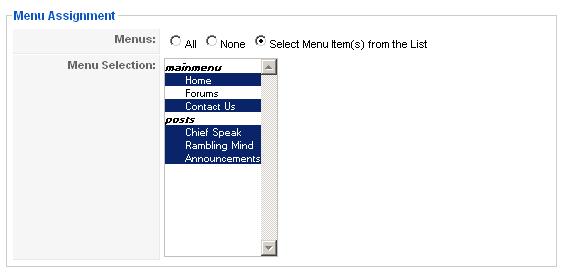
Yes .. you need to change the settings for when the two modules on the left appear.
This is done in the module manager at the back end of Joomla.
Change these modules to "Select Menu Items from List" and unhighlight Forums (or whatever you called the Forums).

Once you have done this, you will just have to remove the header part .. this might be trickier, but at least your halfway there.
Thanks for the reply.
What I dont like is the fact that the forum seems squeezed into a tiny space, I wanted to get rid of the side menu to give the forum more width across the screen.
People can still use the menu @ the top when they want.
Can this be achieved?
Thanks.
Yes .. you need to change the settings for when the two modules on the left appear.
This is done in the module manager at the back end of Joomla.
Change these modules to "Select Menu Items from List" and unhighlight Forums (or whatever you called the Forums).
Once you have done this, you will just have to remove the header part .. this might be trickier, but at least your halfway there.
Last edit: 17 years 2 months ago by nzjacob.
Please Log in or Create an account to join the conversation.
17 years 2 months ago - 17 years 2 months ago #6522
by sozzled
Blue Eagle vs. Crypsis reference guide
Read my blog and
Replied by sozzled on topic Re:Open in Parent Window With Browser Navigation not working properly
D'oh! Of course! :pinch:
Don't assign a menu to appear on your forum page (as described in nzjacob's) reply! Now I've gotta live down the fact that I've been upstaged by a kiwi ... unngghh! :blush:
Make sure your top/horizontal menu has a link back to your home page, otherwise you'll leave your users stranded with only their back button to guide them.
Don't assign a menu to appear on your forum page (as described in nzjacob's) reply! Now I've gotta live down the fact that I've been upstaged by a kiwi ... unngghh! :blush:
Make sure your top/horizontal menu has a link back to your home page, otherwise you'll leave your users stranded with only their back button to guide them.
Blue Eagle vs. Crypsis reference guide
Read my blog and
Last edit: 17 years 2 months ago by sozzled.
Please Log in or Create an account to join the conversation.
17 years 2 months ago - 17 years 2 months ago #6523
by Gibbo
Replied by Gibbo on topic Re:Open in Parent Window With Browser Navigation not working properly
Thanks for that, great information!
I have now removed the menu items from the left, but the forum STILL takes up the same small space it did before!
Is there another setting somewhere that will make it take up the whole width?
OR is there a good template editor I can use to ake the template full screen instead of hogging the middle of the page?
Thanks again.
I have now removed the menu items from the left, but the forum STILL takes up the same small space it did before!
Is there another setting somewhere that will make it take up the whole width?
OR is there a good template editor I can use to ake the template full screen instead of hogging the middle of the page?
Thanks again.
Last edit: 17 years 2 months ago by Gibbo.
Please Log in or Create an account to join the conversation.
Time to create page: 0.228 seconds