


- Posts: 73
- Thank you received: 2
Kunena 6.4.13 Released
The Kunena team has announce the arrival of Kunena 6.4.13 [6.4.13] in stable which is now available for download as a native Joomla extension for J! 5.4.x/6.0.x./6.1.x. This version addresses most of the issues that were discovered in K 6.2 / K 6.3 / K 6.4 and issues discovered during the last development stages of K 6.0
Hint: This version is primarily intended to facilitate an upgrade if Joomla was first updated to version 6.1 before Kunena was up to dated.
Question Avatar and image upload failed
17 years 2 months ago #17316
by Wiz
Kunena always the best!
Avatar and image upload failed was created by Wiz
Need help,

i have change permission but still cannot upload.
joomla 1.5.10
kunena 1.0.10
i have change permission but still cannot upload.
joomla 1.5.10
kunena 1.0.10
Kunena always the best!
Please Log in or Create an account to join the conversation.


17 years 2 months ago #17361
by Matias
Replied by Matias on topic Re: Avatar and image upload failed
Hmm.. It looks like uploaded file isn't there. Have you checked write permissions for Joomla tmp directory?
Please Log in or Create an account to join the conversation.
17 years 2 months ago - 17 years 2 months ago #17531
by Wiz
Kunena always the best!
Replied by Wiz on topic Re: Avatar and image upload failed
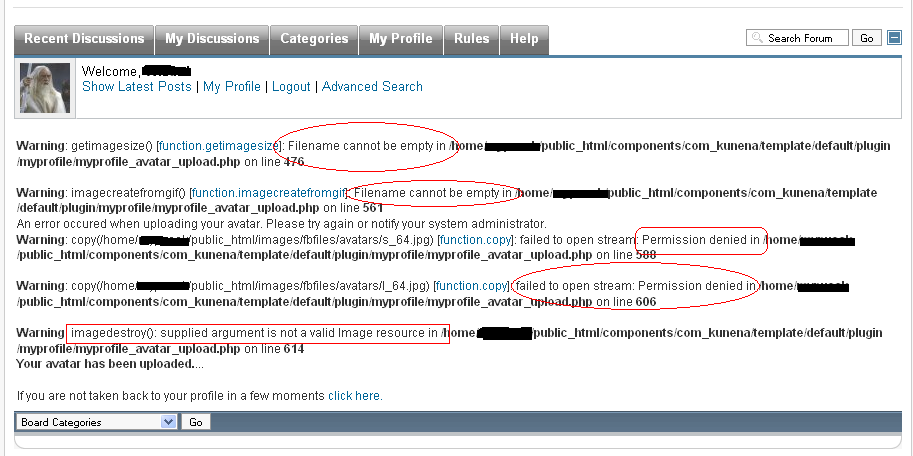
yes...permission is 777...i reinstall all the files...
now it look like this...

i have set permission to 777 to file myprofile_avatar_upload.php
any idea? :dry:
now it look like this...
i have set permission to 777 to file myprofile_avatar_upload.php
any idea? :dry:
Kunena always the best!

Last edit: 17 years 2 months ago by Wiz.
Please Log in or Create an account to join the conversation.
17 years 2 months ago #17938
by Matias
Replied by Matias on topic Re: Avatar and image upload failed
You have to chmod (in Joomla base directory):
images/fbfiles
images/fbfiles/avatars
images/fbfiles/files
images/fbfiles/images
images/fbfiles
images/fbfiles/avatars
images/fbfiles/files
images/fbfiles/images
Please Log in or Create an account to join the conversation.
Time to create page: 0.253 seconds