Search Results (Searched for: message)

08 Oct 2026 06:56
Hi Pikeltje,

"On my computer" means: on my desktop PC.

Let me clarify my problem: After updating to version 7, I can still access and read the discussion posts on the public page of my website, but I can't post new ones. Previously, I could log in to the public page, but now I only get the error message "The requested page could not be found." Curiously, it tells me I can log out. When I click "log out," I get the message "Successfully logged out." So, I was logged in, but I didn't have access to my Kunena admin pages.

On the public page, I previously only had three links under "Forum": Index, My topics, and Current topic. After the update, there's suddenly a whole list.
06 Oct 2026 16:17 - 06 Oct 2026 16:55
Sounds like a plan. And you should never ever change core files. Try making overrides for views or try using Rereplacer from Regularlabs first to make your changes. 
Or keep a log file somewhere with your changes if everything else fails.
And maybe disable JCH optimize to test. Might be the cause of your problem as well.
06 Oct 2026 14:52
Thanks for looking into this.

I compared the <object> line in the source with the original pdf.php file and with my edited pdf.php file. In the former case the url has a forward slash that shouldn't be there, so no wonder it's not displaying the PDF!

This is the <object> line with pdf.php unaltered
Code:
<object class="pdf pdf-viewer wf-responsive wf-responsive-full" data="data:image/gif;base64,R0lGODlhAQABAIAAAAAAAP///yH5BAEAAAAALAAAAAABAAEAAAIBRAA7" type="application/pdf" data-src="https/://www.pgweb.uk/media/kunena/attachments/1657/PressRelease2-EnoughisEnoughAugust2025.pdf" >

Where has that extraneous / come from? Presumably it's something that I've done somewhere (I have done a certain amount of tweaking of things over the years). 

This the <object> line with my added line (PDF displays properly)
Code:
<object class="pdf pdf-viewer wf-responsive wf-responsive-full" data="data:image/gif;base64,R0lGODlhAQABAIAAAAAAAP///yH5BAEAAAAALAAAAAABAAEAAAIBRAA7" type="application/pdf" data-src="/media/kunena/attachments/1657/PressRelease2-EnoughisEnoughAugust2025.pdf" >

I have to confess to doing some editing to libraries/kunena/src/BBCode/KunenaBBCode.php to make some changes to how forum content is displayed on various parts of the website. However, on a development version of the website I have substituted the current version of that file from Github and it hasn't fixed the problem.

For the time being I'll stick with my edited version of pdf.php on the live website while I work on the development website to trace the source of the problem. Looks like I've caused this myself, so I can't expect the Kunena team to fix it for me!
05 Oct 2026 11:20 - 05 Oct 2026 11:21
I've looked into this. The PDF part of Kunena hasn't changed between K6.4 and K7.0: pdf.php and the getUrl() method in KunenaAttachment work the same way in both versions. So this isn't caused by Kunena 7 itself.
I checked the direct URL of one of your PDFs (/media/kunena/attachments/773/20260709_075242.pdf): it returns 200 OK with Content-Type: application/pdf, so the .htaccess doesn't seem to block the file itself.

A few things I noticed on your site:
  1. Your attachments aren't protected (the PDF has its normal filename), so that setting isn't the issue.
  2. The PDF is served correctly by your server (Content-Type: application/pdf, same origin, www redirect is fine).
  3. The wf-responsive classes and the ?ts= parameter on your <object> come from the Responsify plugin (by the JCE developers), not from Kunena. I tested Responsify on my own test site, though, and the PDF still displayed fine there.

Could you please:
  1. Restore the original pdf.php (remove your substr change)
  2. Clear the JCH Optimize cache and do a hard refresh (Ctrl+F5)
  3. If the PDF still doesn't show, open the browser console (F12) and post any error messages here, together with the rendered <object> line from the page source.

That way we can see what is actually blocking it on your site.
05 Oct 2026 11:03 - 05 Oct 2026 11:16
I don't see anything there.
Aha, I checked with an FTP program to see if I could find the log files, and sure enough I did,
Code:
# #<?php die('Forbidden.'); ?> #Date: 2026-10-05 05:53:43 UTC #Software: Joomla! 6.1.4 Stable [ Nyota ] 29-September-2026 16:00 UTC #Fields: date    time    priority    message 2026-10-05    05:53:43    INFO    Task> Process cleanPendingAttachments ERROR: Unknown column 'status' in 'WHERE'
 
05 Oct 2026 10:49 - 05 Oct 2026 10:52
Hello,

In your case you have setting attachment protected disabled, so this issue could be caused by SEF settings.
The method which generate URL for pdf embeded in message is here :  github.com/Kunena/Kunena-Forum/blob/K6.4...aAttachment.php#L584

Do-you use the htaccess without changes in it or there is changes in it ?
04 Oct 2026 19:25 - 05 Oct 2026 13:53
I started this thread six weeks ago with the title Is it possible to revert from K7.0.8 to K6.4? and  9themestore  got involved. However, because of being very busy with some urgent matters I wasn't able to take up his offer and haven't been able to work on this further until today.

The thread title is in fact misleading, the real issue was that after I moved from K6.4 to K7.0, the display of PDFs in messages stopped working - both when using a 9themstore template and when using the default template.. I've now found a workround that works:

Instead of using the full path to the PDF file I edited template/system/layouts/bbcode/attachment/pdf.php to use a relative link and now everything works properly.

After line 21 I added $location = substr($location,21); to remove the first part of the URL - in my case this removes https://www,pgweb.uk/ - which is 21 characters long. 

I wonder whether the cause could be some hardening of security by the developers of Joomla or one of the extensions that I use? But why have other users not encounterd this issue?

The solution that I found is not of course applicable across the board because it depends on the number of characters in the base URL for each specific website.
Edit Pinkeltje: I've changed the topic subject.
 
02 Oct 2026 16:20
Hello,I am upgrading an old Joomla/Kunena website and I seem to have ended up with an incomplete Kunena database migration. I would appreciate some advice before making further changes to the database.The website was originally running Joomla 3.10 with Kunena 5.2.14. I first migrated Joomla successfully to Joomla 4 and then to Joomla 5.4.9.I then upgraded Kunena without uninstalling it, following this sequence:Kunena 5.2.14 → Kunena 6.4.13 → Kunena 7.0.9Both installations completed, and the Kunena version table now contains:
Code:
id version versiondate installdate build versionname sampleData state 13 5.2.14 2022-12-14 2026-10-02 5.2.14 Tharsis 0 14 6.4.13 2026-07-20 2026-10-02 6.4.13 Ravasanella 1 5.2.14 15 7.0.9 2026-09-10 2026-10-02 7.0.9 Vagliumina 1
However, after installing Kunena 7.0.9, I initially received this error:
Code:
500 - Trying to get non-existing property: profiler
With Joomla debugging enabled, the beginning of the call stack was:
Code:
JROOT/libraries/kunena/src/Config/KunenaConfig.php:351 Kunena\Forum\Libraries\Config\KunenaConfig->__get() JROOT/administrator/components/com_kunena/api/api.php:25
I checked 
Code:
#__kunena_configuration
. It contains a single 
Code:
params
 JSON field, inherited from the old installation, but there was no 
Code:
profiler
 property.As a temporary workaround I added 
Code:
"profiler":0
 to the JSON configuration using 
Code:
JSON_SET()
. This removed the 500 error and Kunena 7 now loads.The main problem is that Kunena does not recognize the existing categories. In the Kunena administrator Categories page I see 0 categories, and the frontend consequently has no usable forum structure.However, the historical data are still present in the database.
Code:
#__kunena_categories
 contains the original categories, for example:
Code:
id parent_id name 1 0 Main Forum 2 1 OpenSMOKE++ Suite 3 1 DoctorSMOKE++ 10 1 laminarSMOKE++
They are published, and 
Code:
#__kunena_topics
, 
Code:
#__kunena_messages
 and 
Code:
#__kunena_messages_text
 also contain all the historical topics and posts. Therefore, this does not appear to be a data-loss problem.As another diagnostic test, I tried to create a new category from the Kunena 7 administrator interface. This fails with:
Code:
1054 Unknown column 'parentid' in 'WHERE'
The existing 
Code:
#__kunena_categories
 table has a column called:
Code:
parent_id
rather than 
Code:
parentid
.There are also indications that some earlier Kunena database migrations were not executed. For example, 
Code:
#__kunena_users
 still contains old fields such as:
Code:
icq twitter friendfeed
while fields introduced/changed by later migrations such as:
Code:
socials x_social bluesky_app
are not present.
Code:
#__kunena_topics
, on the other hand, still contains all the historical topics and references the existing categories through 
Code:
category_id
.Joomla’s System → Maintenance → Database page does not report any database problem related to Kunena.I have now made a complete SQL backup of the current database and have stopped making further changes.Before proceeding, could you please advise what the correct recovery procedure is?In particular:
  1. Is there a supported way to make Kunena rerun the missing database migrations starting from the 5.2.14 schema?
  2. Should anything be changed in 
    Code:
    #__kunena_version
     to make the installer recognize that the 5.2 → 6.x migration was incomplete?
  3. Should I reinstall a Kunena 6.x package first and then upgrade again to Kunena 7, or should the repair be performed directly with Kunena 7.0.9 installed?
  4. Is 
    Code:
    state = "5.2.14"
     in the 6.4.13 entry significant for determining where the migration stopped?
I have deliberately not renamed 
Code:
parent_id
, manually added/dropped the other database columns, deleted entries from 
Code:
#__kunena_version
, or attempted to downgrade from Kunena 7 to Kunena 6, because I would prefer to let the official migration scripts repair the schema if possible.I can provide 
Code:
SHOW CREATE TABLE
 / 
Code:
SHOW COLUMNS
 output for any of the Kunena tables if useful.Thank you very much for your help.

Alberto
01 Oct 2026 18:56
I think this message will help you resolve it.
www.kunena.org/forum/k7-0-0-support-arch...nguage-in-set#234893
I suppose you missed a database update with earlier updates. 
01 Oct 2026 14:16

According to Joomla.org, published on Tuesday, 29 September 2026 at 15:20
 and on Wednesday, 30 September 2026 at 11:10, I got the error message!
 That’s not even 24 hours!
 I think this has been greatly exaggerated.

@Gindi, if this had been a stable release, you might have had a point. But this is a beta. You are testing it. Testing a beta on anything other than the latest Joomla release makes no sense: the developers build and test against the current version, not against last week's.Joomla 6.1.4 was available a day before you installed it. Updating takes one click. Running into a version check and then calling it "greatly exaggerated" is not useful feedback, it's just noise.The confusing part of the message (the recommended version) has already been corrected by Florian, so thanks for spotting that. For the rest: update Joomla first, then test again and report what you find.
01 Oct 2026 13:17 - 01 Oct 2026 13:19
I forgot to update a piece, but the message should be "but it highly recommended to use Joomla! 6.2.0 or later"

When the stable release of K7.1 will be released there will be Joomla! 6.2.0 released as stable
01 Oct 2026 13:14
According to Joomla.org, published on Tuesday, 29 September 2026 at 15:20
 and on Wednesday, 30 September 2026 at 11:10, I got the error message!
 That’s not even 24 hours!
 I think this has been greatly exaggerated.
 
01 Oct 2026 11:34 - 01 Oct 2026 11:44
Makes sense in my opinion. You should always use latest Joomla release and 6.1.4 was released last tuesday.
Only change that could be made is to remove confusing message:

but it is highly recommended to use Joomla! 6.1.0 or later.

01 Oct 2026 09:21
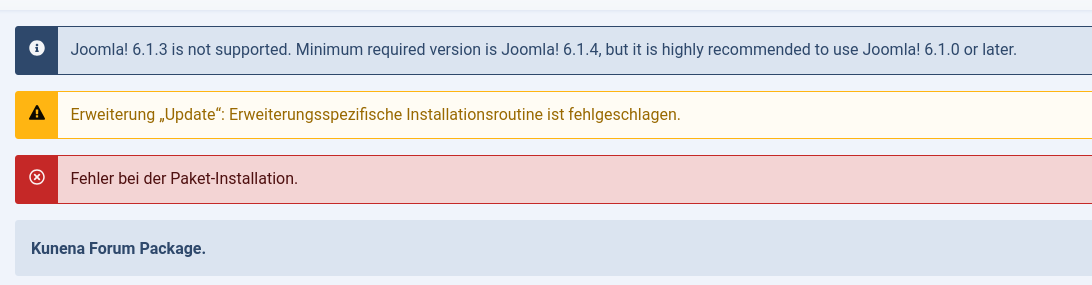
When I try to install version 7.1.0-BETA4_2026-09-26 on a local test server running Joomla 6.1.3 and Kunena 7.0.9, I get the following message:


30 Sep 2026 10:28
For me, the upgrade from Kunena 7.0.9 to the new BETA4 version worked, with the relevant messages appearing.
 In the Kunena dashboard, the ‘Mails Queue’ feature was created, but the corresponding database table was not.
Displaying 46 - 60 out of 297 results.
Time to create page: 0.162 seconds