
- Posts: 25
- Thank you received: 0
Kunena 7.0.9 & Kunena 6.4.14 – Security Updates Released
The Kunena team has announce the arrival of Kunena 7.0.9 [K 7.0.9] in stable which is now available for download as a native Joomla extension for J! 5.4.x/6.0.x./6.1.x. This version addresses most of the issues that were discovered in K 6.2 / K 6.3 / K 6.4 and issues discovered during the last development stages of K 7.0
This category is for the plugin developed, endorsed, maintained and supported by the Kunena project team. The topics in this category only relate to the plugin developed for K 3.0 and later versions.
If you are having problems then, for your own benefit, it would save us all a lot of time if you would kindly post your configuration report when you ask for help from this forum. If you do not post your configuration report we will not ask you for it but you will probably not get your problem solved, either.
If you are having problems then, for your own benefit, it would save us all a lot of time if you would kindly post your configuration report when you ask for help from this forum. If you do not post your configuration report we will not ask you for it but you will probably not get your problem solved, either.
Important Kunena Discuss box does not appear in content page
- roeroelectric
-
 Topic Author
- Offline
- Junior Member
-

Less
More
12 years 2 months ago - 11 years 11 months ago #157280
by roeroelectric
Kunena Discuss box does not appear in content page was created by roeroelectric
Hello
I'm developing my site in joomla 3, the old site is in joomla1.5.
I have installed the great Kunena extension (3.0.5) and I have imported Sections and Categories from Joomla 1.5, other than sections, categories and contents of joomla.
I have also installed the kunena discuss content plugin .
I have two problems.
The box of the content plugin does not appear in the pages of the articles .
Here a page of example:
www.roero-illuminazione.it/joomla3/index...1&Itemid=469&lang=it
Also in Kunena do not appear the articles of Joomla, I have set the content plugin to copy the articles in Kunena in the first visit, but this does not happen.
This is the category page for Kunena:
www.roero-illuminazione.it/joomla3/index...&lang=it&layout=list
In attachment the file with the configuration report.
Best regards!
I'm developing my site in joomla 3, the old site is in joomla1.5.
I have installed the great Kunena extension (3.0.5) and I have imported Sections and Categories from Joomla 1.5, other than sections, categories and contents of joomla.
I have also installed the kunena discuss content plugin .
I have two problems.
The box of the content plugin does not appear in the pages of the articles .
Here a page of example:
www.roero-illuminazione.it/joomla3/index...1&Itemid=469&lang=it
Also in Kunena do not appear the articles of Joomla, I have set the content plugin to copy the articles in Kunena in the first visit, but this does not happen.
This is the category page for Kunena:
www.roero-illuminazione.it/joomla3/index...&lang=it&layout=list
In attachment the file with the configuration report.
This message contains confidential information
Database collation check: The collation of your table fields are correct
Joomla! SEF: Disabled | Joomla! SEF rewrite: Disabled | FTP layer: Disabled |
This message contains confidential informationhtaccess: Exists | PHP environment: Max execution time: 300 seconds | Max execution memory: 128M | Max file upload: 25M
Kunena menu details:
Warning: Spoiler!
ID Name Menutype Link Path 462 Crea Nuovo Articolo newsportalmenu view=topic&layout=create crea-articolo 134 Lighting Forum mainmenu Itemid=125 community/lighting-forum 252 Homepage Forum mainmenu view=home&defaultmenu=125 community/lighting-forum/homepage-forum 253 Categorie mainmenu view=category&layout=list&catid=0 community/lighting-forum/categorie 254 Posts Recenti mainmenu view=topics&layout=posts&mode=recent community/lighting-forum/posts-recenti 255 Statistiche mainmenu view=statistics community/lighting-forum/statistiche 256 Ricerca Avanzata mainmenu view=search community/lighting-forum/ricerca-avanzata 125 Forum kunenamenu view=home&defaultmenu=127 forum 126 Indice delle categorie kunenamenu view=category&layout=list forum/home 127 Discussioni recenti kunenamenu view=topics&mode=replies forum/recente 128 Nuova discussione kunenamenu view=topic&layout=create forum/nuovadiscussione 129 Senza risposta kunenamenu view=topics&mode=noreplies forum/senzarisposte 130 Mie discussioni kunenamenu view=topics&layout=user&mode=default forum/mierecenti 131 Profilo kunenamenu view=user forum/profilo 132 Aiuto kunenamenu view=misc forum/aiuto 133 Ricerca kunenamenu view=search forum/cerca
Joomla default template details : purity_III | author: JoomlArt.com | version: 1.1.0 | creationdate: Unknown
Kunena default template details : Blue Eagle | author: Kunena Team | version: 3.0.5 | creationdate: 2014-03-09
Kunena version detailed: Kunena 3.0.5 | 2014-03-09 [ Invecchiato ]
| Kunena detailed configuration:| Kunena integration settings:Warning: Spoiler!
Kunena config settings: board_offline 0 enablerss 1 threads_per_page 30 messages_per_page 10 messages_per_page_search 25 showhistory 1 historylimit 10 shownew 1 disemoticons 0 template blue_eagle showannouncement 1 avataroncat 1 catimagepath category_images/ showchildcaticon 1 rtewidth 450 rteheight 300 enableforumjump 1 reportmsg 1 username 0 askemail 0 showemail 0 showuserstats 1 showkarma 1 useredit 1 useredittime 600 useredittimegrace 600 editmarkup 1 allowsubscriptions 1 subscriptionschecked 1 allowfavorites 1 maxsubject 85 maxsig 150 regonly 0 pubwrite 1 floodprotection 120 mailmod 1 mailadmin 0 captcha 1 mailfull 0 allowavatarupload 1 allowavatargallery 1 avatarquality 85 avatarsize 2048 imageheight 1280 imagewidth 1920 imagesize 5000 filetypes txt,doc,docx,rtf,xls,xlsx,ppt,pptx,pdf,odt,ods,odp,odb,dwg,dxf,mp3,ogg,wav,avi,mpeg,wmv,mp4,3gp,flv,png,bmp,gif,jpg,jpeg,psd,htm,html,shtml,shtm,stm,zip,rar,gz,tgz filesize 25000 showranking 1 rankimages 1 userlist_rows 30 userlist_online 1 userlist_avatar 1 userlist_name 1 userlist_posts 1 userlist_karma 1 userlist_email 0 userlist_joindate 1 userlist_lastvisitdate 1 userlist_userhits 1 latestcategory 0 showstats 1 showwhoisonline 1 showgenstats 1 showpopuserstats 1 popusercount 10 showpopsubjectstats 1 popsubjectcount 10 usernamechange 0 showspoilertag 1 showvideotag 1 showebaytag 1 trimlongurls 0 trimlongurlsfront 40 trimlongurlsback 20 autoembedyoutube 1 autoembedebay 1 ebaylanguagecode it-it sessiontimeout 1800 highlightcode 0 rss_type post rss_timelimit week rss_limit 25 rss_included_categories rss_excluded_categories rss_specification rss2.0 rss_allow_html 0 rss_author_format name rss_author_in_title 0 rss_word_count 250 rss_old_titles 0 rss_cache 0 defaultpage categories default_sort desc sef 0 showimgforguest 1 showfileforguest 1 pollnboptions 10 pollallowvoteone 0 pollenabled 1 poppollscount 10 showpoppollstats 1 polltimebtvotes 00:15:00 pollnbvotesbyuser 100 pollresultsuserslist 1 maxpersotext 1000 ordering_system mesid post_dateformat datetime post_dateformat_hover ago hide_ip 1 imagetypes png,bmp,gif,jpg,jpeg,psd checkmimetypes 1 imagemimetypes image/jpeg,image/jpg,image/gif,image/png imagequality 75 thumbheight 32 thumbwidth 32 hideuserprofileinfo put_empty boxghostmessage 0 userdeletetmessage 0 latestcategory_in 1 topicicons 1 debug 0 catsautosubscribed 0 showbannedreason 1 version_check 1 showthankyou 1 showpopthankyoustats 1 popthankscount 10 mod_see_deleted 1 bbcode_img_secure text listcat_show_moderators 1 lightbox 1 show_list_time 720 show_session_type 0 show_session_starttime 0 userlist_allowed 0 userlist_count_users 1 enable_threaded_layouts 1 category_subscriptions post topic_subscriptions first pubprofile 1 thankyou_max 10 email_recipient_count 50 email_recipient_privacy bcc captcha_post_limit 10 keywords 0 userkeywords 0 image_upload everybody file_upload everybody topic_layout flat time_to_create_page 1 show_imgfiles_manage_profile 1 hold_newusers_posts 10 hold_guest_posts 1 attachment_limit 8 pickup_category 0 article_display full send_emails 1 fallback_english 1 cache 1 cache_time 180 iptracking 1 rss_feedburner_url feeds.feedburner.com/roero-lighting-forum autolink 1 access_component 1 statslink_allowed 1 userlist_usertype 1 sefutf8 1 enablepdf 1 jmambot 1 annmodid 63 changename 1 userlist_username 1 rules_infb 0 help_infb 0 onlineusers 1 | Joomla! detailed language files installed:Warning: Spoiler!Kunena - AlphaUserPoints Disabled
Kunena - Community Builder Disabled
Kunena - Gravatar Enabled: avatar=1
Kunena - JomSocial Enabled: access=1 login=1 activity=1 avatar=1 profile=1 private=1 activity_points_limit=0 activity_stream_limit=0
Kunena - Joomla Enabled: access=1 login=1
Kunena - Kunena Enabled: avatar=1 profile=1
Kunena - UddeIM Disabled
Warning: Spoiler!
Joomla! languages installed: en-GB English (United Kingdom) it-IT Italian (IT)
Third-party components: Jomsocial 3.0.4
Third-party SEF components: None
Plugins: Search - Kunena Search 3.0.1 | Content - Kunena Discuss 3.0.1 | JomSocial - My Kunena Forum Menu 2.0.3 | JomSocial - My Kunena Forum Posts 2.0.3 | JomSocial - Kunena Groups 2.0.3
Modules: None
Best regards!
Last edit: 11 years 11 months ago by rich. Reason: Configuration text file removed
Please Log in or Create an account to join the conversation.


12 years 2 months ago #157366
by 810
Replied by 810 on topic Kunena Discuss box does not appear in content page
can you add a screenshot from the settings on the discuss plugin
Please Log in or Create an account to join the conversation.


11 years 11 months ago #159681
by iatttmp
Replied by iatttmp on topic Kunena Discuss box does not appear in content page
I have the same problem. There are no discussion links with Joomla articles and there doesn't seem to be a setting anywhere (in Kunena or Joomla content) that turns them on and off.
I'd do a site report, as the rules say I should, but I don't know how. There's nothing called "site report" in all of Google related to Kunena or Joomla.
I've attached screen shots of the discuss settings page.
Thanks.
I'd do a site report, as the rules say I should, but I don't know how. There's nothing called "site report" in all of Google related to Kunena or Joomla.
I've attached screen shots of the discuss settings page.
Thanks.
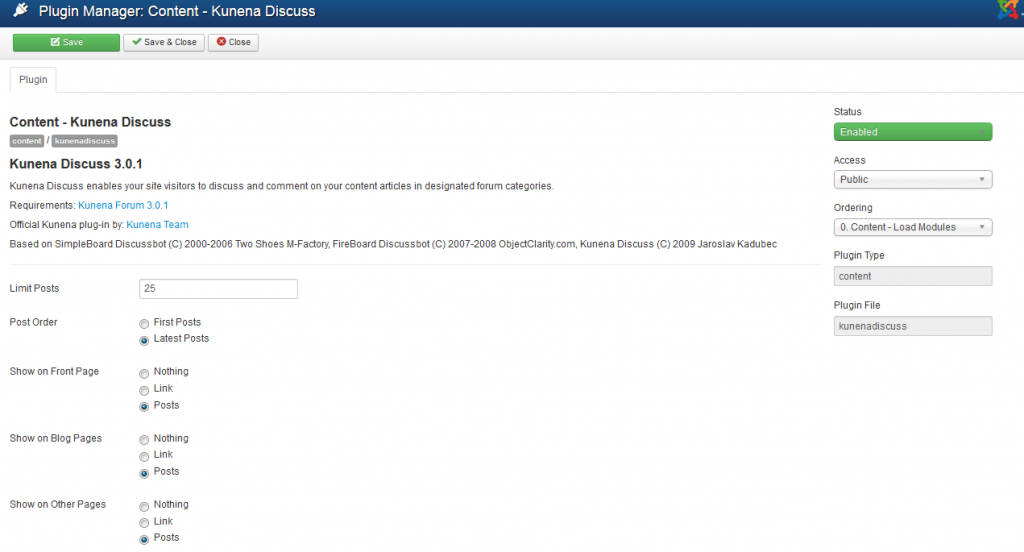
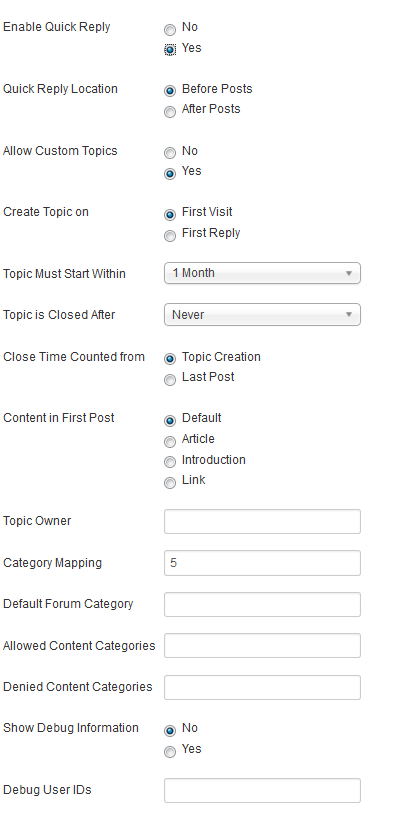
Please Log in or Create an account to join the conversation.


Less
More
- Posts: 12291
- Thank you received: 2538
11 years 11 months ago #159683
by rich
Important! Always create a backup before you make any changes to your website!
Replied by rich on topic Kunena Discuss box does not appear in content page
Your setting is "Category Mapping - 5". That doesn't work. You require for mapping a Joomla category ID also a Kunena category ID.
Example: Joomla category ID = 5 and Kunena category ID = 3
then is Category Mapping - 5,3;
Example: Joomla category ID = 5 and Kunena category ID = 3
then is Category Mapping - 5,3;
Important! Always create a backup before you make any changes to your website!
Please Log in or Create an account to join the conversation.
11 years 11 months ago #159688
by iatttmp
Replied by iatttmp on topic Kunena Discuss box does not appear in content page
Thanks, but that didn't seem to do it.
Please Log in or Create an account to join the conversation.
Less
More
- Posts: 12291
- Thank you received: 2538
11 years 11 months ago #159689
by rich
Important! Always create a backup before you make any changes to your website!
Replied by rich on topic Kunena Discuss box does not appear in content page
Are you using the Joomla article or category ID ? It must be the category ID.
Important! Always create a backup before you make any changes to your website!
Please Log in or Create an account to join the conversation.
Time to create page: 0.310 seconds