
- Posts: 27
- Thank you received: 1
Kunena 7.0.9 & Kunena 6.4.14 – Security Updates Released
The Kunena team has announce the arrival of Kunena 7.0.9 [K 7.0.9] in stable which is now available for download as a native Joomla extension for J! 5.4.x/6.0.x./6.1.x. This version addresses most of the issues that were discovered in K 6.2 / K 6.3 / K 6.4 and issues discovered during the last development stages of K 7.0
Topics that are moved into this category are generally considered to be closed. Users may want to add additional information but these topics should not be resurrected in order to discuss new problems or unrelated matters.
Solved Content - Kunena Discuss
- Christophg
-
 Topic Author
- Offline
- Junior Member
-

Less
More
4 years 1 month ago #224907
by Christophg
Content - Kunena Discuss was created by Christophg
Hello ...
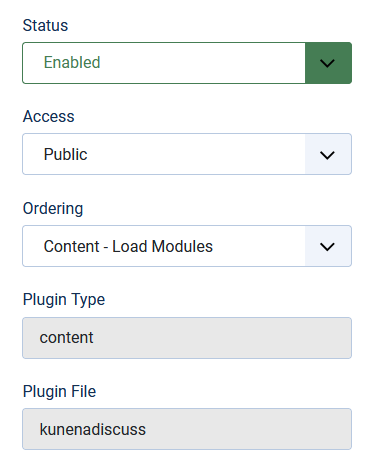
I have installed the Kunena Discuss plugin. When a user is not logged in, the "Login to Comment" control is visible. When the user logs in, the comments plugin does not appear. I have created the "path" configuration in the plugin, and the plugin is enabled. When I first installed the plug in, all was working fine: the first 2 articles appeared in the appropriate Kunena categories and comments were able to be made at the front end. The 3rd article does not show the comments area, both as a logged in administrator or user. No settings were changed in Kunena permissions, that I am aware of. I have made an attachment below.
Also, i could not find the process of how to collect and add the Joomla and server environment configuration, so that the environment data is available for review. Please advise and help. Thank you ... Christoph
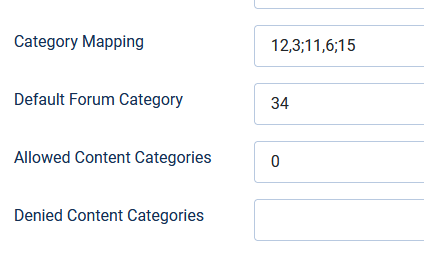
I have installed the Kunena Discuss plugin. When a user is not logged in, the "Login to Comment" control is visible. When the user logs in, the comments plugin does not appear. I have created the "path" configuration in the plugin, and the plugin is enabled. When I first installed the plug in, all was working fine: the first 2 articles appeared in the appropriate Kunena categories and comments were able to be made at the front end. The 3rd article does not show the comments area, both as a logged in administrator or user. No settings were changed in Kunena permissions, that I am aware of. I have made an attachment below.
Also, i could not find the process of how to collect and add the Joomla and server environment configuration, so that the environment data is available for review. Please advise and help. Thank you ... Christoph
Please Log in or Create an account to join the conversation.
- Christophg
-
Topic Author
- Offline
- Junior Member
-
Less
More
- Posts: 27
- Thank you received: 1
4 years 1 month ago #224908
by Christophg
Replied by Christophg on topic Content - Kunena Discuss
My apologies: I am using Joomla 4.2.1 and Kunena 6.0.1.1
Please Log in or Create an account to join the conversation.


4 years 1 month ago #224919
by Leen
With kind regards
Leen
Replied by Leen on topic Content - Kunena Discuss
maybe there is something missing from number 15 in Category Mapping
and why does Allowed Content Categories have a 0
Otherwise try to enter the desired joomla categories there
and if that doesn't help then do another test with the Category Mapping empty and allowed Content Categories with the desired.
and why does Allowed Content Categories have a 0
Otherwise try to enter the desired joomla categories there
and if that doesn't help then do another test with the Category Mapping empty and allowed Content Categories with the desired.
With kind regards
Leen

Please Log in or Create an account to join the conversation.


Less
More
- Posts: 12291
- Thank you received: 2538
4 years 1 month ago #224932
by rich
Important! Always create a backup before you make any changes to your website!
Replied by rich on topic Content - Kunena Discuss
With your configuration, for all Joomla articles that are not entered in the category mapping field, a discussion is opened in the Kunena category 34.
If you want discussions for articles in Joomla category 15, you must remove the ID 15 from the mapping field.
docs.kunena.org/en/plugins/kunena-discuss-plugin
If you want discussions for articles in Joomla category 15, you must remove the ID 15 from the mapping field.
docs.kunena.org/en/plugins/kunena-discuss-plugin
Important! Always create a backup before you make any changes to your website!
Please Log in or Create an account to join the conversation.
- Christophg
-
Topic Author
- Offline
- Junior Member
-
Less
More
- Posts: 27
- Thank you received: 1
4 years 4 weeks ago - 4 years 4 weeks ago #224961
by Christophg
Replied by Christophg on topic Content - Kunena Discuss
Hello All ...
Thanks you very much for responding. I changed the plug-in settings: I removed category 15 from the mapping; I removed the "0" from allowed (although documentation defines it as allowing ALL articles. With those two changes all seems to be functioning properly again.
1. The "Log in to comment" appears on all articles ...
2. I created a new article as admin from the back-end and it appears in the default forum heading ID-15.
3. All Website menus function normally and navigate correctly.
However, when i log into the website as a Registered or Administrator from the front-end, Navigation is broken when attempting to go to the articles: either from the website menu or any link taking me to an article. A 404 error occurs with "Database not set in Joomla\CMS\Form\FormFactory
These link issues occur only when logged in from the front-end as a User, Registered or Admin.
Any ideas? Attachments enclosed.
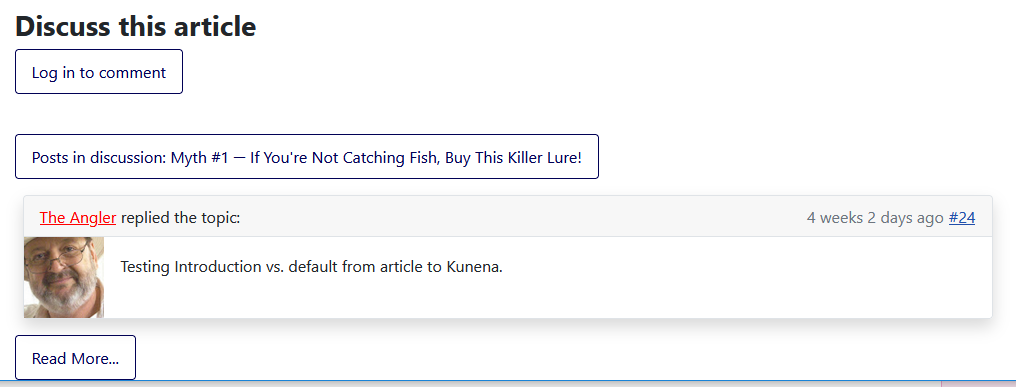

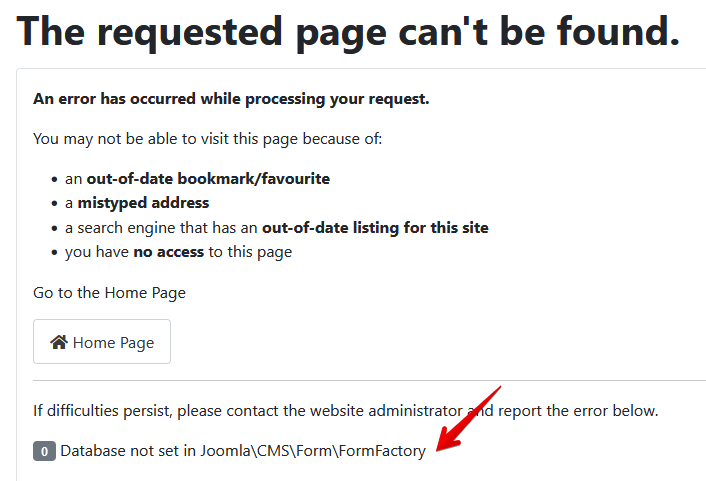
Thanks you very much for responding. I changed the plug-in settings: I removed category 15 from the mapping; I removed the "0" from allowed (although documentation defines it as allowing ALL articles. With those two changes all seems to be functioning properly again.
1. The "Log in to comment" appears on all articles ...
2. I created a new article as admin from the back-end and it appears in the default forum heading ID-15.
3. All Website menus function normally and navigate correctly.
However, when i log into the website as a Registered or Administrator from the front-end, Navigation is broken when attempting to go to the articles: either from the website menu or any link taking me to an article. A 404 error occurs with "Database not set in Joomla\CMS\Form\FormFactory
These link issues occur only when logged in from the front-end as a User, Registered or Admin.
Any ideas? Attachments enclosed.
Last edit: 4 years 4 weeks ago by Christophg. Reason: Double entry of attachments
Please Log in or Create an account to join the conversation.
4 years 4 weeks ago #224971
by Leen
With kind regards
Leen
Replied by Leen on topic Content - Kunena Discuss
I had that myself for a while and then it turned out that it was due to the seo settings
if I disable the Search Engine Friendly URLs it works.
later I turned the Search Engine Friendly URLs back on
and this problem was suddenly gone
if I disable the Search Engine Friendly URLs it works.
later I turned the Search Engine Friendly URLs back on
and this problem was suddenly gone
With kind regards
Leen
Please Log in or Create an account to join the conversation.
Time to create page: 0.227 seconds