
- Posts: 85
- Thank you received: 1
Kunena 7.0.9 & Kunena 6.4.14 – Security Updates Released
The Kunena team has announce the arrival of Kunena 7.0.9 [K 7.0.9] in stable which is now available for download as a native Joomla extension for J! 5.4.x/6.0.x./6.1.x. This version addresses most of the issues that were discovered in K 6.2 / K 6.3 / K 6.4 and issues discovered during the last development stages of K 7.0
Topics that are moved into this category are generally considered to be closed. Users may want to add additional information but these topics should not be resurrected in order to discuss new problems or unrelated matters.
Solved How to map Kunena category to blog
- friday shoes
-
 Topic Author
- Offline
- Senior Member
-

Less
More
12 years 6 months ago #154281
by friday shoes
How to map Kunena category to blog was created by friday shoes
I want to set up something similar to the Kunena category to Kunena blog relationship that is happening on the Kunena website.
I've enabled my Joomla blog which has an ID of 174 and I want the topics that get posted under my forum category ID 18 to get duplicated onto the blog.
From reading the brief instructions on Kunena Discussion I believe I need to enter some stuff in the category mapping box on the Kunena Discuss plugin, but I'm a little unsure.
I thought I'd ask here before I jump in.
I've enabled my Joomla blog which has an ID of 174 and I want the topics that get posted under my forum category ID 18 to get duplicated onto the blog.
From reading the brief instructions on Kunena Discussion I believe I need to enter some stuff in the category mapping box on the Kunena Discuss plugin, but I'm a little unsure.
I thought I'd ask here before I jump in.
Please Log in or Create an account to join the conversation.


Less
More
- Posts: 12291
- Thank you received: 2538
12 years 6 months ago #154284
by rich
Important! Always create a backup before you make any changes to your website!
Replied by rich on topic How to map Kunena category to blog
This is the category ID? Write in the field "Category Mapping" 174,18; That's all.I've enabled my Joomla blog which has an ID of 174
Important! Always create a backup before you make any changes to your website!
Please Log in or Create an account to join the conversation.
- friday shoes
-
Topic Author
- Offline
- Senior Member
-
Less
More
- Posts: 85
- Thank you received: 1
12 years 6 months ago #154285
by friday shoes
Replied by friday shoes on topic How to map Kunena category to blog
Thanks, but I'm seeing nothing on my blog, I haven't changed any of the other settings on discusss plugin
Please Log in or Create an account to join the conversation.


12 years 6 months ago #154286
by sozzled
Blue Eagle vs. Crypsis reference guide
Read my blog and

Replied by sozzled on topic How to map Kunena category to blog
You will need to make one or two changes to the Kunena Discuss plugin settings before you will see a change in the way your article commenting behaves. I recommend, as a starting point, that you familiarise yourself with some basic settings; read
A Kunena Discuss workshop: How to allow my users to comment on my Joomla articles in my forum
. If this does not help, posting your configuration report and a picture of your Kunena Discuss plugin settings will give us a lot more information.
Blue Eagle vs. Crypsis reference guide
Read my blog and
Please Log in or Create an account to join the conversation.
- friday shoes
-
Topic Author
- Offline
- Senior Member
-
Less
More
- Posts: 85
- Thank you received: 1
12 years 6 months ago #154289
by friday shoes
Replied by friday shoes on topic How to map Kunena category to blog
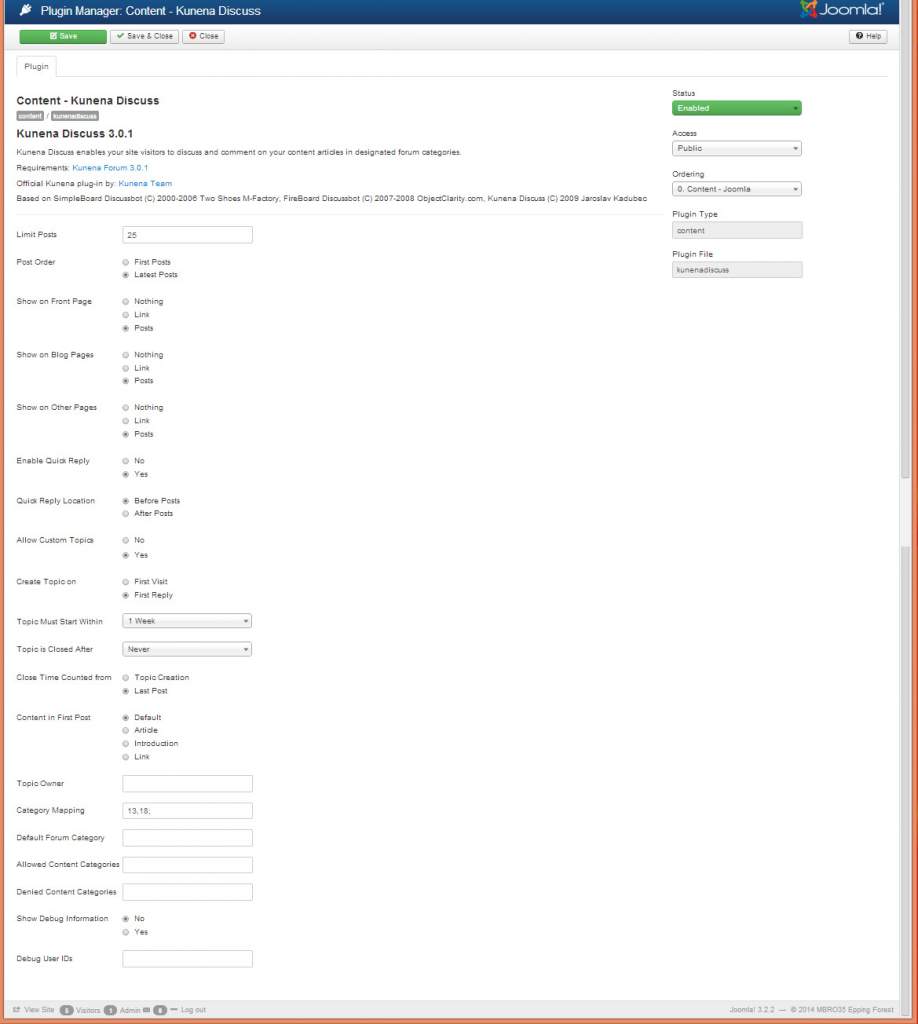
Here's my forum report and snapshot of kunena discuss plugin
This message contains confidential information
Database collation check: The collation of your table fields are correct
Joomla! SEF: Enabled | Joomla! SEF rewrite: Disabled | FTP layer: Disabled |
This message contains confidential informationhtaccess: Missing | PHP environment: Max execution time: 30 seconds | Max execution memory: 128M | Max file upload: 256M
Kunena menu details:
Warning: Spoiler!
ID Name Menutype Link Path 125 Forum mainmenu Itemid=116 kunena-2013-08-08 116 Forum kunenamenu view=home&defaultmenu=118 forum 117 Index kunenamenu view=category&layout=list forum/index 118 Recent Topics kunenamenu view=topics&mode=replies forum/recent 119 New Topic kunenamenu view=topic&layout=create forum/newtopic 120 No Replies kunenamenu view=topics&mode=noreplies forum/noreplies 121 My Topics kunenamenu view=topics&layout=user&mode=default forum/mylatest 122 Profile kunenamenu view=user forum/profile 123 Help kunenamenu view=misc forum/help 124 Search kunenamenu view=search forum/search
Joomla default template details : vg_simplekey | author: Valentín García | version: 1.3.4 | creationdate: Unknown
Kunena default template details : Blue Eagle | author: Kunena Team | version: 3.0.4 | creationdate: 2013-12-22
Kunena version detailed: Kunena 3.0.4 | 2013-12-22 [ Ukko ]
| Kunena detailed configuration:| Kunena integration settings:Warning: Spoiler!
Kunena config settings: board_offline 0 enablerss 1 threads_per_page 20 messages_per_page 10 messages_per_page_search 15 showhistory 1 historylimit 6 shownew 1 disemoticons 0 template blue_eagle showannouncement 1 avataroncat 0 catimagepath category_images showchildcaticon 1 rtewidth 450 rteheight 300 enableforumjump 1 reportmsg 1 username 1 askemail 0 showemail 0 showuserstats 1 showkarma 1 useredit 1 useredittime 0 useredittimegrace 600 editmarkup 1 allowsubscriptions 1 subscriptionschecked 0 allowfavorites 1 maxsubject 50 maxsig 300 regonly 0 pubwrite 0 floodprotection 30 mailmod 0 mailadmin 0 captcha 0 mailfull 1 allowavatarupload 1 allowavatargallery 0 avatarquality 75 avatarsize 500 imageheight 800 imagewidth 800 imagesize 150 filetypes txt,rtf,pdf,zip,tar.gz,tgz,tar.bz2 filesize 120 showranking 1 rankimages 1 userlist_rows 30 userlist_online 1 userlist_avatar 1 userlist_name 0 userlist_posts 1 userlist_karma 1 userlist_email 0 userlist_joindate 1 userlist_lastvisitdate 1 userlist_userhits 1 latestcategory 0 showstats 1 showwhoisonline 1 showgenstats 1 showpopuserstats 1 popusercount 5 showpopsubjectstats 1 popsubjectcount 5 usernamechange 0 showspoilertag 1 showvideotag 1 showebaytag 1 trimlongurls 1 trimlongurlsfront 40 trimlongurlsback 20 autoembedyoutube 1 autoembedebay 1 ebaylanguagecode en-gb sessiontimeout 1800 highlightcode 0 rss_type topic rss_timelimit month rss_limit 100 rss_included_categories rss_excluded_categories rss_specification rss2.0 rss_allow_html 1 rss_author_format name rss_author_in_title 1 rss_word_count 0 rss_old_titles 1 rss_cache 900 defaultpage recent default_sort asc sef 1 showimgforguest 0 showfileforguest 0 pollnboptions 4 pollallowvoteone 1 pollenabled 1 poppollscount 5 showpoppollstats 1 polltimebtvotes 00:15:00 pollnbvotesbyuser 100 pollresultsuserslist 1 maxpersotext 50 ordering_system mesid post_dateformat ago post_dateformat_hover datetime hide_ip 1 imagetypes jpg,jpeg,gif,png checkmimetypes 1 imagemimetypes image/jpeg,image/jpg,image/gif,image/png imagequality 50 thumbheight 32 thumbwidth 32 hideuserprofileinfo put_empty boxghostmessage 0 userdeletetmessage 1 latestcategory_in 1 topicicons 1 debug 0 catsautosubscribed 0 showbannedreason 0 version_check 1 showthankyou 1 showpopthankyoustats 1 popthankscount 5 mod_see_deleted 0 bbcode_img_secure text listcat_show_moderators 1 lightbox 1 show_list_time 720 show_session_type 0 show_session_starttime 0 userlist_allowed 1 userlist_count_users 1 enable_threaded_layouts 0 category_subscriptions post topic_subscriptions every pubprofile 0 thankyou_max 1000 email_recipient_count 0 email_recipient_privacy bcc captcha_post_limit 3 keywords 0 userkeywords 0 image_upload file_upload topic_layout flat time_to_create_page 1 show_imgfiles_manage_profile 1 hold_newusers_posts 3 hold_guest_posts 0 attachment_limit 8 pickup_category 0 article_display intro send_emails 1 fallback_english 1 cache 1 cache_time 180 iptracking 1 rss_feedburner_url autolink 1 access_component 1 statslink_allowed 1 | Joomla! detailed language files installed:Warning: Spoiler!Kunena - AlphaUserPoints Disabled
Kunena - Community Builder Disabled
Kunena - Gravatar Disabled
Kunena - JomSocial Disabled
Kunena - Joomla Enabled: access=1 login=1
Kunena - Kunena Enabled: avatar=1 profile=1
Kunena - UddeIM Enabled: private=1
Warning: Spoiler!
Joomla! languages installed: en-GB English (United Kingdom)
Third-party components: UddeIM 3.2
Third-party SEF components: None
Plugins: Content - Kunena Discuss 3.0.1
Modules: None
Please Log in or Create an account to join the conversation.
Less
More
- Posts: 12291
- Thank you received: 2538
12 years 6 months ago #154290
by rich
Important! Always create a backup before you make any changes to your website!
Replied by rich on topic How to map Kunena category to blog
The configurations are correct. You mapping between Joomla category 13 and Kunena category 18. Number 13 is the category or article ID?
I thought your blog category has the ID 174?
I thought your blog category has the ID 174?
Important! Always create a backup before you make any changes to your website!
Please Log in or Create an account to join the conversation.
Time to create page: 0.284 seconds