


- Posts: 68
- Thank you received: 1
Kunena 7.0.9 & Kunena 6.4.14 – Security Updates Released
The Kunena team has announce the arrival of Kunena 7.0.9 [K 7.0.9] in stable which is now available for download as a native Joomla extension for J! 5.4.x/6.0.x./6.1.x. This version addresses most of the issues that were discovered in K 6.2 / K 6.3 / K 6.4 and issues discovered during the last development stages of K 7.0
Question Error Class "JFactory" not found after upgrade to Kunena 7.0
7 months 4 weeks ago - 7 months 4 weeks ago #234313
by crimle
After upgrading to Kunena 7.0, the Front-End of my websites is no longer available. The following error is being displayed:
0 - Class "JFactory" not found
The Back-End works as it should.
I am on Joomla 6.0.2. The compatibility plugin is enabled.
I opened the Kunena Dashboard after the upgrade and a message confirmed, that the database tables were also updated.
The update process was very strange.
Step 1
Kunena Forum update.kunena.org/6.3/pkg_kunena.xml Site Paket Installed 6.3.10 Available 6.4.8
This update could not be installed. Error «Invalid extension update».
Step 2
I downloaded Kunena 7.0 and tried to install.
Error «You cannot not upgrade Kunena from version 6.3.10, you can only upgrade from version 6.4.5 or higher»
Step 3
I downloaded the latest Kunena pkg_kunena_v6.4.8_2025-12-06 and tried to install.
Error (I do not remember the exact error message).
Step 4
I downloaded the Kunena pkg_kunena_v6.4.5_2025-08-23 and tried to install.
Success.
I opened the Kunena Dashboard after the upgrade and a message confirmed, that the database tables were also updated.
Step 5
I downloaded Kunena 7.0 and installed it successfully.
I opened the Kunena Dashboard after the upgrade and a message confirmed, that the database tables were also updated.
When I opened the Front-End, the error message 0 - Class "JFactory" not found was displayed.
I cleared all caches but the error message in the Front-End remains.
So I restored the previously created backup.
My site is working now, but with a fallback to Kunena 6.3.10.
And again the update to Kunena 6.4.8 is being recommended:

0 - Class "JFactory" not found
The Back-End works as it should.
I am on Joomla 6.0.2. The compatibility plugin is enabled.
I opened the Kunena Dashboard after the upgrade and a message confirmed, that the database tables were also updated.
The update process was very strange.
Step 1
Kunena Forum update.kunena.org/6.3/pkg_kunena.xml Site Paket Installed 6.3.10 Available 6.4.8
This update could not be installed. Error «Invalid extension update».
Step 2
I downloaded Kunena 7.0 and tried to install.
Error «You cannot not upgrade Kunena from version 6.3.10, you can only upgrade from version 6.4.5 or higher»
Step 3
I downloaded the latest Kunena pkg_kunena_v6.4.8_2025-12-06 and tried to install.
Error (I do not remember the exact error message).
Step 4
I downloaded the Kunena pkg_kunena_v6.4.5_2025-08-23 and tried to install.
Success.
I opened the Kunena Dashboard after the upgrade and a message confirmed, that the database tables were also updated.
Step 5
I downloaded Kunena 7.0 and installed it successfully.
I opened the Kunena Dashboard after the upgrade and a message confirmed, that the database tables were also updated.
When I opened the Front-End, the error message 0 - Class "JFactory" not found was displayed.
I cleared all caches but the error message in the Front-End remains.
So I restored the previously created backup.
My site is working now, but with a fallback to Kunena 6.3.10.
And again the update to Kunena 6.4.8 is being recommended:
Last edit: 7 months 4 weeks ago by crimle.
Please Log in or Create an account to join the conversation.


7 months 4 weeks ago #234314
by Leen
With kind regards
Leen
Replied by Leen on topic Error Class "JFactory" not found after upgrade to Kunena 7.0
Have you already tried Clear cache in Joomla management section?
With kind regards
Leen
Please Log in or Create an account to join the conversation.
7 months 4 weeks ago #234315
by crimle
Replied by crimle on topic Error Class "JFactory" not found after upgrade to Kunena 7.0
Yes I did.Have you already tried Clear cache in Joomla management section?
Please Log in or Create an account to join the conversation.
7 months 4 weeks ago #234316
by crimle
Replied by crimle on topic Error Class "JFactory" not found after upgrade to Kunena 7.0
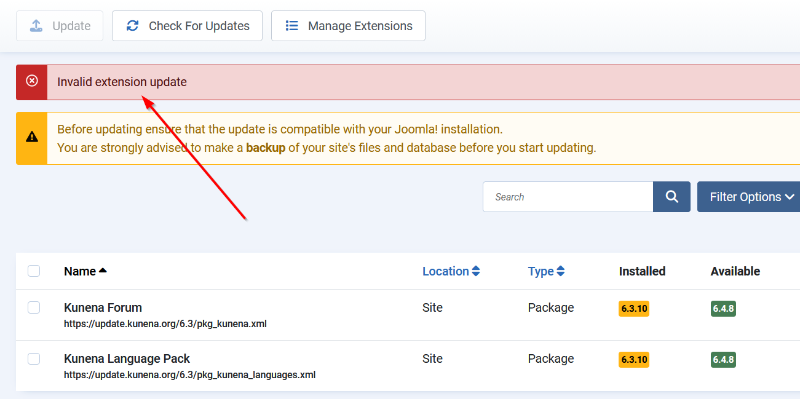
Trying to install the recommended update from 6.3.10 to 6.4.8. Error:
Please Log in or Create an account to join the conversation.
7 months 4 weeks ago #234317
by crimle
Replied by crimle on topic Error Class "JFactory" not found after upgrade to Kunena 7.0
So I download Kunena 6.4.5 from
github.com/Kunena/Kunena-Forum/releases/tag/6.4.5
and install.
Success.

But I will now certainly refrain from upgrading to Kunena 7!
Success.
But I will now certainly refrain from upgrading to Kunena 7!
Please Log in or Create an account to join the conversation.
7 months 4 weeks ago #234318
by Leen
With kind regards
Leen
Replied by Leen on topic Error Class "JFactory" not found after upgrade to Kunena 7.0
Hello,
I now notice that you edited your first question slightly
after I asked if you had cleared the Joomla cache.
So now it's difficult to find a good answer, but why don't you test this locally first with a Wamp or Xamp server?
I now notice that you edited your first question slightly
after I asked if you had cleared the Joomla cache.
So now it's difficult to find a good answer, but why don't you test this locally first with a Wamp or Xamp server?
With kind regards
Leen
Please Log in or Create an account to join the conversation.
Time to create page: 0.241 seconds