


- Posts: 7245
- Thank you received: 566
Kunena 7.0.9 & Kunena 6.4.14 – Security Updates Released
The Kunena team has announce the arrival of Kunena 7.0.9 [K 7.0.9] in stable which is now available for download as a native Joomla extension for J! 5.4.x/6.0.x./6.1.x. This version addresses most of the issues that were discovered in K 6.2 / K 6.3 / K 6.4 and issues discovered during the last development stages of K 7.0
Topics that are moved into this category are considered to be closed. Users may want to add additional information but these topics should not be resurrected in order to discuss new problems or unrelated matters.
Important Kunena does not work as my site homepage or with my Joomla menus
12 years 7 months ago - 12 years 7 months ago #153685
by Matias
Replied by Matias on topic Kunena does not work as my site homepage or with my Joomla menus
Adding menu item alias to the URLs is a feature of Joomla router in Joomla 2.5 and 3.2 and there's nothing I can do to fix the issue.
Basically it means that you can set Kunena Menu > Forum as your home page, but unfortunately Joomla always adds /forum to every menu item under it. It's just the way how later versions of Joomla work and the same issue exists on every component or menus which are self-contained.
Its a known issue but not a bug in Kunena.
In case if someone is trying to understand the issue:
* Create a new site and install only Kunena into there
* In backend go to Menu manager and Kunena menu
* Mark /forum as your default menu item (home page)
The issue is that sub-menu items aren't aliased to /:
/
/forum/index
/forum/recent
/forum/profile
Basically it means that you can set Kunena Menu > Forum as your home page, but unfortunately Joomla always adds /forum to every menu item under it. It's just the way how later versions of Joomla work and the same issue exists on every component or menus which are self-contained.
Its a known issue but not a bug in Kunena.
In case if someone is trying to understand the issue:
* Create a new site and install only Kunena into there
* In backend go to Menu manager and Kunena menu
* Mark /forum as your default menu item (home page)
The issue is that sub-menu items aren't aliased to /:
/
/forum/index
/forum/recent
/forum/profile
Last edit: 12 years 7 months ago by Matias.
Please Log in or Create an account to join the conversation.


12 years 7 months ago - 12 years 7 months ago #153687
by sozzled
Blue Eagle vs. Crypsis reference guide
Read my blog and

Replied by sozzled on topic Kunena does not work as my site homepage or with my Joomla menus
I would like to add a couple of comments to this topic:
Let's look at the backend of a "typical" - OK, it's a very "vanilla-flavoured" - Joomla website. In J! 3.2.2 , the Menu Manager) shows us something like this:
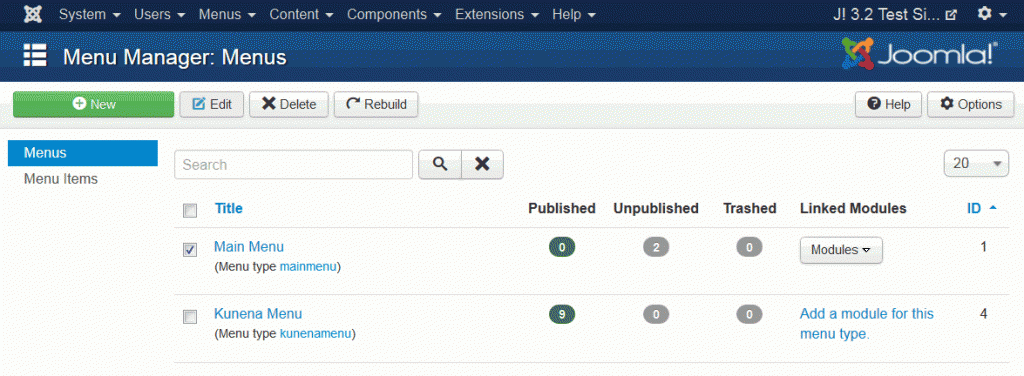
Go into the kunenamenu menu and you will see a number of items (see the image below):
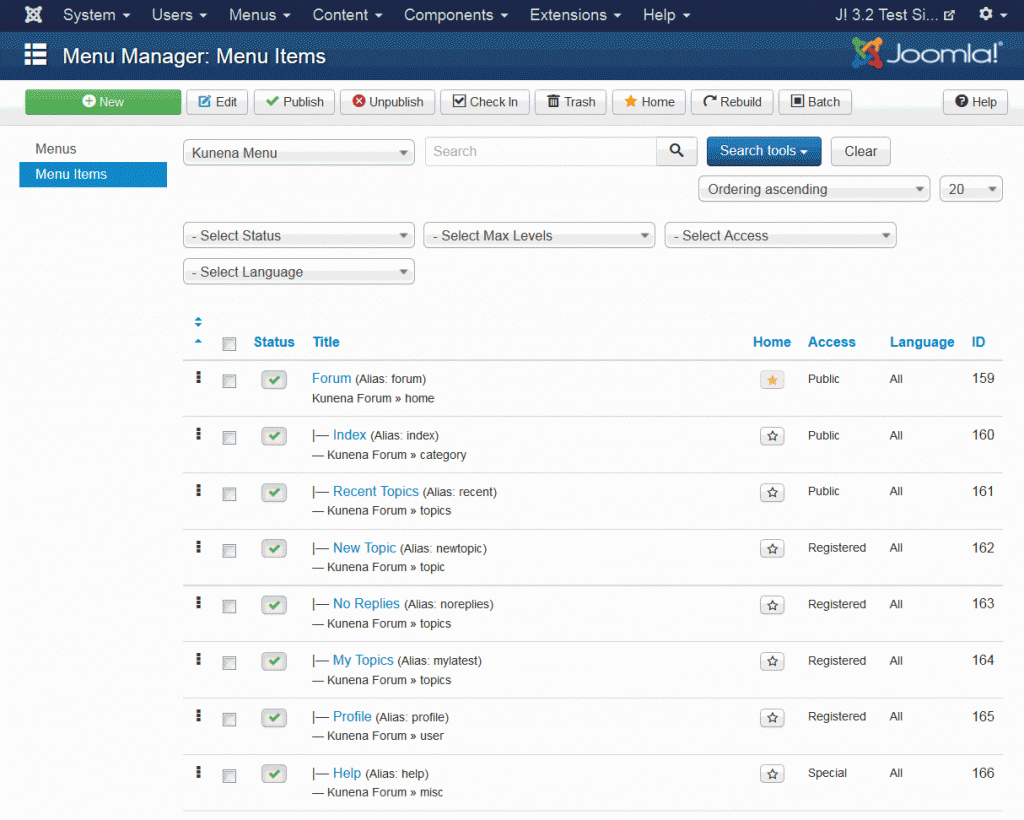
You see, from this second image, that I have made the first item (the one with the alias "forum") is the default Joomla (i.e. website) menu item (it has a "gold star") which is where you land after entering site.com into your brower; this means that when I visit my site, the first page that is opened - the home page - is the page defined by that "forum" menu item.
After that, when people go to different menu tabs in the forum, the URLs derive from this "root" (i.e. site.com/forum ).
If, for example, I change the menu item alias from "forum" to "xyz", then the URLS on the Kunena menu tabs derive their names from site.com/xyz ; so you would have site.com/xyz/index , site.com/xyz/recent , site.com/xyz/search and so on and so forth.
But things work a little differently when you go to categories or topics in your forum. Let's take an example - what is the URL of the (standard) "Welcome to Kunena" topic? Under the arrangement I have just shown, the URL would be site.com/welcome-mat/1-welcome-to-kunena .
Maybe this is not quite what you wanted to know - I'm not sure - but it gives us an example of how Joomla currently works and how the Kunena router generates URLs.
However, coming back to the subject of this topic that suggests that "Kunena does not work as a person's site homepage" (or how it interferes with or creats "havoc" with Joomla's menu system), I'm not sure exactly what is the problem or what needs to be done within Kunena to fix it.
Does this help to explain what the problem seems to be about?
That is correct and that is the way that Joomla should work. When you use Joomla SEO and you make a menu item the default (i.e. "home page" item and, let's say, the site is called site.com), the URL is site.com .woonydanny wrote: Main Menu:
Home = kunena home page (url is site.com)
This is also correct. If you go to any forum page in the forum after you have visited the home page, the SEF URLs of those Kunena menu tabs will be something site.com/forum/ <view>, where <view> is "index" or "recent", for example).woonydanny wrote: Forum = show kunena home page / category list (so that url is site.com/forum)
Let's look at the backend of a "typical" - OK, it's a very "vanilla-flavoured" - Joomla website. In J! 3.2.2 , the Menu Manager) shows us something like this:
Go into the kunenamenu menu and you will see a number of items (see the image below):
You see, from this second image, that I have made the first item (the one with the alias "forum") is the default Joomla (i.e. website) menu item (it has a "gold star") which is where you land after entering site.com into your brower; this means that when I visit my site, the first page that is opened - the home page - is the page defined by that "forum" menu item.
After that, when people go to different menu tabs in the forum, the URLs derive from this "root" (i.e. site.com/forum ).
If, for example, I change the menu item alias from "forum" to "xyz", then the URLS on the Kunena menu tabs derive their names from site.com/xyz ; so you would have site.com/xyz/index , site.com/xyz/recent , site.com/xyz/search and so on and so forth.
But things work a little differently when you go to categories or topics in your forum. Let's take an example - what is the URL of the (standard) "Welcome to Kunena" topic? Under the arrangement I have just shown, the URL would be site.com/welcome-mat/1-welcome-to-kunena .
Maybe this is not quite what you wanted to know - I'm not sure - but it gives us an example of how Joomla currently works and how the Kunena router generates URLs.
However, coming back to the subject of this topic that suggests that "Kunena does not work as a person's site homepage" (or how it interferes with or creats "havoc" with Joomla's menu system), I'm not sure exactly what is the problem or what needs to be done within Kunena to fix it.
Does this help to explain what the problem seems to be about?
Blue Eagle vs. Crypsis reference guide
Read my blog and
Last edit: 12 years 7 months ago by sozzled.
Please Log in or Create an account to join the conversation.
12 years 6 months ago #154732
by sozzled
Blue Eagle vs. Crypsis reference guide
Read my blog and
Replied by sozzled on topic Kunena does not work as my site homepage or with my Joomla menus
@woonydanny: have you been able to follow-up on our suggestions?
Blue Eagle vs. Crypsis reference guide
Read my blog and
Please Log in or Create an account to join the conversation.
- woonydanny
-
 Topic Author
- Offline
- Elite Member
-

Less
More
- Posts: 694
- Thank you received: 22
12 years 5 months ago #155297
by woonydanny
yes, Matias explained it well, and confirms that you cannot use kunena as forum home page if you dont want the name you give the forum menu item in every url of your whole site.
eg
if i name the kunena menu item 'forum' then all my urls of my site will have '/forum' in them so the menu item to jomsocial photos would be www.site.com/forum/jomsocial-photos
which is what i dont want.
still wish that i can write my forum signature through a jomsocial plugin and do it from my jomsocial profile
Replied by woonydanny on topic Kunena does not work as my site homepage or with my Joomla menus
sozzled wrote: @woonydanny: have you been able to follow-up on our suggestions?
yes, Matias explained it well, and confirms that you cannot use kunena as forum home page if you dont want the name you give the forum menu item in every url of your whole site.
eg
if i name the kunena menu item 'forum' then all my urls of my site will have '/forum' in them so the menu item to jomsocial photos would be www.site.com/forum/jomsocial-photos
which is what i dont want.
still wish that i can write my forum signature through a jomsocial plugin and do it from my jomsocial profile
Please Log in or Create an account to join the conversation.
12 years 5 months ago - 12 years 5 months ago #155298
by sozzled
This may only be my opinion but I would say most people don't even give the URL that appears in web browser's address a second's glance (except when copying and pasting the reference elsewhere or, perhaps, bookmarking the page). As far as your opinion that this is the "biggest issue that Kunena needs to fix" is concerned, we're all entitled to our opinions.
Perhaps one day, in a future version of Joomla, this issue may be addressed. Until that happens I guess this is just going to remain "one of those things".
Blue Eagle vs. Crypsis reference guide
Read my blog and
Replied by sozzled on topic Kunena does not work as my site homepage or with my Joomla menus
I understand and respect your opinion.woonydanny wrote: Probably the biggest issue that Kunena needs to fix is the ability to have kunena as your site home page.
What I understand, from what Matias explained to me, is that you cannot use any other self-contained Joomla component as your home page (e.g. JomSocial, Community Builder, etc.,) either. This is not a problem confined only to Kunena.woonydanny wrote: Matias explained it well, and confirms that you cannot use kunena as forum home page if you dont want the name you give the forum menu item in every url of your whole site.
This may only be my opinion but I would say most people don't even give the URL that appears in web browser's address a second's glance (except when copying and pasting the reference elsewhere or, perhaps, bookmarking the page). As far as your opinion that this is the "biggest issue that Kunena needs to fix" is concerned, we're all entitled to our opinions.
You could name the menu item "home" instead ... :dry: ... or something else. (Yeah, I know this is clumsy, but it may be a workaround.)woonydanny wrote: if i name the kunena menu item 'forum' then all my urls of my site will have '/forum' in them so the menu item to jomsocial photos would be www.site.com/forum/jomsocial-photos
Perhaps one day, in a future version of Joomla, this issue may be addressed. Until that happens I guess this is just going to remain "one of those things".
Blue Eagle vs. Crypsis reference guide
Read my blog and
Last edit: 12 years 5 months ago by sozzled.
Please Log in or Create an account to join the conversation.
Time to create page: 0.250 seconds