
Kunena 7.0.6 & Kunena 6.4.12 – Security Updates Released
The Kunena team has announce the arrival of Kunena 7.0.6 [K 7.0.6] in stable which is now available for download as a native Joomla extension for J! 5.4.x/6.0.x. This version addresses most of the issues that were discovered in K 6.2 / K 6.3 / K 6.4 and issues discovered during the last development stages of K 7.0.
The Kunena team is also pleased to announce the twelfth version of Kunena 6.4, a native Joomla extension for Joomla! 5.0, 5.1, 5.2, 5.3, 5.4 and 6.0.
Solved Categories
- HanKortekaas
-
 Topic Author
- Offline
- Premium Member
-

- familiewapen

Han
Please Log in or Create an account to join the conversation.


- Posts: 976
- Thank you received: 153
Which X? Check column header first.what trickers the "X" to a checkmark.
Please Log in or Create an account to join the conversation.
- HanKortekaas
-
Topic Author
- Offline
- Premium Member
-
- familiewapen
The column I am referring to is not adjustable; the heading is "Gesloten" ("Closed")
Is it so that if there are no articles in a category that it gives a checkmark?
Han
Please Log in or Create an account to join the conversation.
- Posts: 976
- Thank you received: 153
And yes I have tested dragging so it should work.
Please Log in or Create an account to join the conversation.


- Posts: 12287
- Thank you received: 2535
I will add it to the bug list.
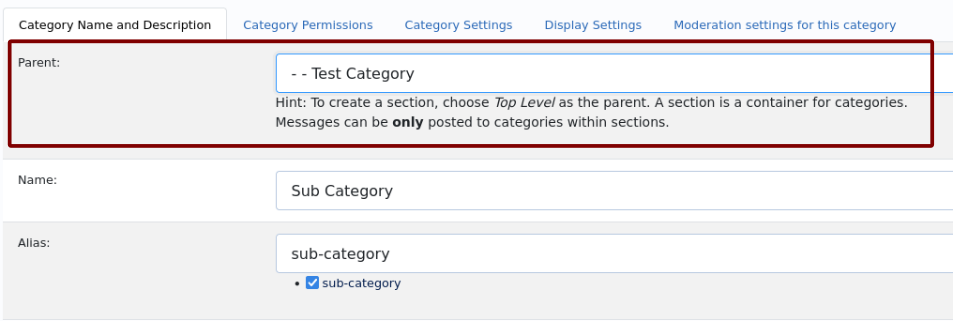
But you can still move the categories. Click on this category and select the section you want to move it to as the parent area (see image).
.
Important! Always create a backup before you make any changes to your website!
Please Log in or Create an account to join the conversation.
- HanKortekaas
-
Topic Author
- Offline
- Premium Member
-
- familiewapen
I have tried several times to move a newly added subcategory (--RC Controleer gegevens) alphabatically into its own section.
Clicking on a line , or the three dots, does not work.
Is there a way to alter this directly in the database?
Han
Please Log in or Create an account to join the conversation.