


- Posts: 37
- Thank you received: 1
Kunena 7.0.9 & Kunena 6.4.14 – Security Updates Released
The Kunena team has announce the arrival of Kunena 7.0.9 [K 7.0.9] in stable which is now available for download as a native Joomla extension for J! 5.4.x/6.0.x./6.1.x. This version addresses most of the issues that were discovered in K 6.2 / K 6.3 / K 6.4 and issues discovered during the last development stages of K 7.0
Solved Turn off Breadcrumbs
4 years 7 months ago #222139
by carnalimr
Turn off Breadcrumbs was created by carnalimr
My site already has a breadcrumbs feature and Kunena for some reason adds breadcrumbs to both the top and bottom of the page:
Is there a way to turn off this feature: imgur.com/a/WoxgOe1
I would prefer that the existing module that generates breadcrumbs does this without Kunena duplicating it.
Is there a way to turn off this feature: imgur.com/a/WoxgOe1
I would prefer that the existing module that generates breadcrumbs does this without Kunena duplicating it.
Please Log in or Create an account to join the conversation.
- 9themestore
-

- Offline
- Premium Member
-

4 years 7 months ago - 4 years 7 months ago #222142
by 9themestore
- Please provide your site url if it has been lived.
- Please share tip if it worked fine with you.
- Don't be shy about using the "Thanks" button below if you found my comment helpful
Replied by 9themestore on topic Turn off Breadcrumbs
Hi,
Open the default.php in the "components\com_kunena\template\aurelia\layouts\page" path and follow the below image to hide the breadcrumb you want.
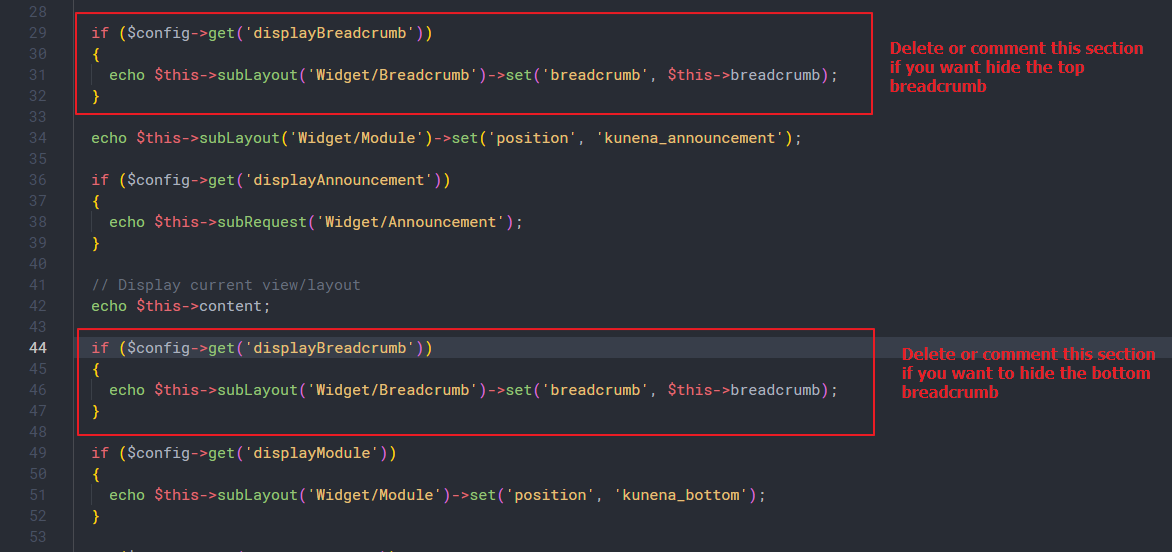
Regards,
Open the default.php in the "components\com_kunena\template\aurelia\layouts\page" path and follow the below image to hide the breadcrumb you want.
Regards,
- Please provide your site url if it has been lived.
- Please share tip if it worked fine with you.
- Don't be shy about using the "Thanks" button below if you found my comment helpful
Last edit: 4 years 7 months ago by 9themestore.
Please Log in or Create an account to join the conversation.


Less
More
- Posts: 12291
- Thank you received: 2538
4 years 7 months ago #222152
by rich
Important! Always create a backup before you make any changes to your website!
Replied by rich on topic Turn off Breadcrumbs
You can disable it in the Aurelia setting (tab Features)..
Important! Always create a backup before you make any changes to your website!
Please Log in or Create an account to join the conversation.
4 years 7 months ago #222153
by carnalimr
Replied by carnalimr on topic Turn off Breadcrumbs
Thanks, I didn't realize there were two places for configurations. This makes sense. Thanks for the response.
Please Log in or Create an account to join the conversation.
Time to create page: 0.228 seconds