
- Posts: 4
- Thank you received: 0
Kunena 7.1.1 & Kunena 6.4.17 – Security Updates Released
The Kunena team has announce the arrival of Kunena 7.1.1 [K 7.1.1] in stable which is now available for download as a native Joomla extension for J! 5.4.x/6.0.x./6.1.x./6.2.x This version addresses most of the issues that were discovered in K 6.2 / K 6.3 / K 6.4 / K7.0 and issues discovered during the last development stages of K 7.1
Just a reminder: K6.4.17 receives only securities fixes until end of 2026, so it's advised for users to upgrade to K7.1.
Question Cannot post img with quicklink inside kunena, while creating post or after edit.
- GadgetmanPrime
-
 Topic Author
- Offline
- New Member
-

Less
More
8 years 4 months ago - 8 years 4 months ago #202424
by GadgetmanPrime
Cannot post img with quicklink inside kunena, while creating post or after edit. was created by GadgetmanPrime
We have been using [attachment [/atachment to post images for years youtube links work automatically, so if we click the add image botton and type the name of the attachment in there after uploading it it won't show up. is there a way to just add an img file and have it upload right away.. anyway no img's will post in the posts now get 404 error using [attachment and [img won't post the images either the syntax comes up like [img image.jpg without the end [/img appearing, anyway the images don't show up in the thread.. the attachments do upload and will show up and will get big if you click on them but people are lazy...
Config report below..
Config report below..
This message contains confidential information
Database collation check: The collation of your table fields are correct
Joomla! SEF: Enabled | Joomla! SEF rewrite: Enabled | FTP layer: Disabled |
This message contains confidential informationhtaccess: Exists | PHP environment: Max execution time: 300 seconds | Max execution memory: 256M | Max file upload: 256M
Kunena menu details:
Warning: Spoiler!
ID Name Menutype Link Path In trash 2320 Forum mainmenu view=home&defaultmenu=2408 forum No 2329 Forum mainmenu view=home&defaultmenu=2320 kunena-2017-05-06 Yes 2408 Forums kunenamenu view=home&defaultmenu=2413 forums No 2413 Browse Topics kunenamenu view=category&layout=list&catid=0 forums/browse-topics No 2322 Recent Topics kunenamenu view=topics&mode=replies forums/recent No 2328 Search kunenamenu view=search forums/search No 2323 New Topic kunenamenu view=topic&layout=create forums/newtopic No 2324 No Replies kunenamenu view=topics&mode=noreplies forums/noreplies No 2325 My Topics kunenamenu view=topics&layout=user&mode=default forums/mylatest No 2326 My Profile kunenamenu view=user forums/myprofile No 2327 Help kunenamenu view=misc forums/help No
Joomla default template details : rt_zephyr | author: RocketTheme, LLC | version: 1.10 | creationdate: March 9, 2017
Kunena default template details : Blue Eagle5 | author: Kunena Team | version: 1.0.3 | creationdate: 2017-02-04
Kunena template params:
Warning: Spoiler!
DefaultCategoryicon profileIconset default DefaultIconset default editorIconset default lightboxColor white bootstrap 0 tooltips 1 borderless 1 SubjectLengthMessage 80 fullactions 0 quick 0 displayMenu 1 displayModule 1 displayBreadcrumb 1 displayAnnouncement 1 displayFooter 1 avatarPosition left avatarType img-polaroid labels 0 whoisonlineName default formRecover 0 topicicontype image fontawesome 0 socialshare 0 socialtheme classic writeaccess 0 IconColor inherit IconColorNew #48a348 forumHeadercolor announcementHeadercolor announcementBoxbgcolor frontstatsHeadercolor whoisonlineHeadercolor inactiveTabcolor activeTabcolor hoverTabcolor topBordercolor inactiveFontcolor activeFontcolor forumLinkcolor enableSkinner 0 video 1 maps 1 emoticons 1 1 ebay 1 link 1 picture 1 hide 1 spoiler 1 table 1 code 1 quote 1 divider 1 1 soundcloud 1 confidential 1 hr 1 listitem 1 supscript 1 subscript 1 numericlist 1 bulletedlist 1 alignright 1 alignleft 1 center 1 underline 1 italic 1 bold 1 strikethrough 1 colors 1 size 1 avatarSizeX 40 avatarSizeY 90 avatarSizeXThumb 36 avatarSizeYThumb 36 avatarSizeXWelcome 42 avatarSizeYWelcome 42 avatarSizeXList 36 avatarSizeYList 36 avatarSizeXPost 144 avatarSizeYPost 144 avatarSizeXProfile 200 avatarSizeYProfile 200 templatebyText templatebyName templatebyLink wysibb bold,italic,underline,strike,sup,sub,justifyleft,justifycenter,justifyright,|,img,video,link,|,bullist,numlist,|,fontcolor,fontsize,fontfamily,|,quote,code,table,removeFormat
Kunena version detailed: Kunena 5.1.1 | 2018-06-10 [ Belinda ]
| Kunena detailed configuration:| Kunena integration settings:Warning: Spoiler!
Kunena config settings: board_offline 0 enablerss 1 threads_per_page 25 messages_per_page 12 messages_per_page_search 15 showhistory 0 historylimit 60 shownew 1 disemoticons 0 template blue_eagle5 showannouncement 1 avataroncat 1 catimagepath category_images/ showchildcaticon 0 rtewidth 450 rteheight 300 enableforumjump 1 reportmsg 1 username 0 askemail 0 showemail 1 showuserstats 1 showkarma 1 useredit 1 useredittime 0 useredittimegrace 600 editmarkup 1 allowsubscriptions 1 subscriptionschecked 1 allowfavorites 1 maxsubject 80 maxsig 1000 regonly 1 pubwrite 0 floodprotection 30 mailmod 1 mailadmin 1 captcha 1 mailfull 1 allowavatarupload 1 allowavatargallery 1 avatarquality 50 avatarsize 2048 imageheight 450 imagewidth 600 imagesize 3000 filetypes txt,rtf,pdf,zip,tar.gz,tgz,mp3,jpg,mov,mp4,png,jpeg,gif filesize 15000 showranking 1 rankimages 1 userlist_rows 30 userlist_online 1 userlist_avatar 1 userlist_posts 1 userlist_karma 1 userlist_email 1 userlist_joindate 1 userlist_lastvisitdate 1 userlist_userhits 1 latestcategory 0 showstats 1 showwhoisonline 1 showgenstats 1 showpopuserstats 1 popusercount 5 showpopsubjectstats 1 popsubjectcount 5 showspoilertag 1 showvideotag 1 showebaytag 0 trimlongurls 1 trimlongurlsfront 30 trimlongurlsback 20 autoembedyoutube 1 autoembedebay 0 ebaylanguagecode en-us sessiontimeout 3600 highlightcode 0 rss_type topic rss_timelimit month rss_limit 100 rss_included_categories rss_excluded_categories rss_specification rss2.0 rss_allow_html 1 rss_author_format name rss_author_in_title 1 rss_word_count 0 rss_old_titles 1 rss_cache 900 defaultpage recent default_sort asc sef 1 showimgforguest 0 showfileforguest 0 pollnboptions 4 pollallowvoteone 1 pollenabled 1 poppollscount 5 showpoppollstats 1 polltimebtvotes 00:15:00 pollnbvotesbyuser 100 pollresultsuserslist 1 maxpersotext 1000 ordering_system replyid post_dateformat datetime post_dateformat_hover datetime hide_ip 1 imagetypes jpg,jpeg,gif,png,pdf checkmimetypes 1 imagemimetypes image/jpg,image/jpeg,image/gif,image/png,image/pdf,video/mp4 imagequality 75 thumbheight 32 thumbwidth 32 hideuserprofileinfo put_empty boxghostmessage 0 userdeletetmessage 2 latestcategory_in 1 topicicons 0 debug 0 catsautosubscribed 0 showbannedreason 1 showthankyou 1 showpopthankyoustats 1 popthankscount 5 mod_see_deleted 0 bbcode_img_secure text listcat_show_moderators 0 lightbox 1 show_list_time -1 show_session_type 0 show_session_starttime 0 userlist_allowed 1 userlist_count_users 0 enable_threaded_layouts 1 category_subscriptions post topic_subscriptions every pubprofile 1 thankyou_max 1000 email_recipient_count 100 email_recipient_privacy bcc captcha_post_limit 3 image_upload registered file_upload registered topic_layout flat time_to_create_page 0 show_imgfiles_manage_profile 1 hold_newusers_posts 3 hold_guest_posts 0 attachment_limit 6 pickup_category 0 article_display intro send_emails 1 fallback_english 1 cache 1 cache_time 60 iptracking 1 rss_feedburner_url autolink 1 access_component 1 statslink_allowed 1 superadmin_userlist 0 legacy_urls 1 attachment_protection 1 categoryicons 1 avatarresizemethod 1 avatarcrop 0 user_report 1 searchtime all teaser 0 ebay_language 0 allow_change_subject 0 max_links 6 read_only 0 ratingenabled 1 url_subject_topic 1 log_moderation 1 attach_start 30 attach_end 14 attachment_utf8 1 autoembedsoundcloud 1 emailheader /media/kunena/email/hero-wide.png user_status 1 signature 1 personal 1 social 1 plain_email 0 moderator_permdelete 0 avatartypes gif, jpeg, jpg, png smartlinking 1 defaultavatar nophoto.png defaultavatarsmall s_nophoto.png quickreply 1 avataredit 0 activemenuitem mainmenu_id home_id index_id moderators_id topiclist_id misc_id profile_id search_id avatar_type 1 sef_redirect 1 allow_edit_poll 1 lazyload 1 recaptcha_publickey 6LeTFsISAAAAADczlNUT_SwEd9bH2uXcVFvNXniY recaptcha_privatekey 6LeTFsISAAAAAHkiI45GQO7T3F2_9xVYxFFMpUzI recaptcha_theme white keywords 0 userkeywords 0 userlist_name 1 usernamechange 1 version_check 1 userlist_usertype 1 sefutf8 0 enablepdf 1 jmambot 1 annmodid 62 changename 0 userlist_username 1 rules_infb 1 help_infb 1 onlineusers 1 | Joomla! detailed language files installed:Warning: Spoiler!Kunena - Finder Enabled
Kunena - AltaUserPoints Disabled
Kunena - Community Builder Disabled
Kunena - Easyblog Disabled
Kunena - Easyprofile Disabled
Kunena - Easysocial Disabled
Kunena - Gravatar Disabled
Kunena - JomSocial Disabled
Kunena - Joomla Enabled: access=1 login=1
Kunena - Kunena Enabled: avatar=1 profile=1
Kunena - UddeIM Enabled: private=1
Warning: Spoiler!
Joomla! languages installed: sy-IQ Syriac (sy-IQ) ta-IN Tamil (India) th-TH Thai (th-TH) tk-TM Turkmen (Turkmenistan) tr-TR Türkçe (Türkiye) ug-CN Uyghur uk-UA Ukrainian (uk-UA) vi-VN Vietnamese (Vietnam) zh-CN Chinese Simplified (zh-CN) zh-TW Chinese (Traditional) bn-BD Bengali (Bangladesh) af-ZA Afrikaans ar-AA Arabic Unitag (العربية الموحدة) az-AZ Azerbaijan (az-AZ) be-BY Беларуская мова bg-BG Български bs-BA Bosnian (bs-BA) ca-ES Catalan (ca-ES) ckb-IQ Central Kurdish (کوردى ناوەڕاست) cs-CZ Czech (cs-CZ) cy-GB Welsh (cy-GB) da-DK Danish (da-DK) de-DE German (DE) dz-BT Dzongkha (Bhutan) el-GR Greek (el-GR) en-AU English (AU) en-CA English (CA) en-GB English (en-GB) en-US English (en-US) eo-XX Esperanto (eo-XX) es-CO Spanish (Colombia) es-ES Spanish (español) et-EE Estonian (et-EE) eu-ES Basque (eu-ES) fa-IR Persian (IR) fi-FI Finnish (fi-FI) fr-CA French Canadian (fr-CA) fr-FR French (FR) ga-IE Irish (Ireland) gl-ES Galician (Galego) he-IL Hebrew hi-IN Hindi hr-HR Croatian (hr-HR) hu-HU Hungarian (hu-HU) hy-AM Armenian (hy-AM) id-ID Bahasa Indonesia it-IT Italian (Italy) ja-JP Japanese (Japan) ka-GE Georgian (Georgia) km-KH ភាសាខ្មែរ (km-KH) ko-KR Korean(Republic of Korea) en-US English (USA) lv-LV Latvian (lv-LV) mk-MK Македонски (MК) ms-MY Bahasa Melayu nb-NO Norwegian bokmål (nb-NO) nl-BE Dutch (Belgium) nl-NL Dutch (nl-NL) nn-NO Nynorsk (New Norwegian) pl-PL Polish (PL) prs-AF Dari (prs-AF) pt-BR Português do Brasil (pt-BR) pt-PT Portuguese (pt-PT) ro-RO Romanian (Romania) ru-RU Русский (Россия) si-LK Sinhala (Sri Lanka) sk-SK Slovak (sk-SK) sl-SI Slovenščina (sl-SI) sq-AL Albanian(sq-AL) sr-RS Serbian Cyrillic sr-YU Serbian Latin srp-ME Montenegrin sv-SE Swedish (sv-SE) sw-KE Swahili (East Africa)
Third-party components: UddeIM 4.0
Third-party SEF components: None
Plugins: Search - Kunena Search 5.1.0
Modules: Kunena Login 5.1.0
Last edit: 8 years 4 months ago by GadgetmanPrime.
Please Log in or Create an account to join the conversation.


Less
More
- Posts: 12299
- Thank you received: 2545
8 years 4 months ago #202442
by rich
Important! Always create a backup before you make any changes to your website!
Replied by rich on topic Cannot post img with quicklink inside kunena, while creating post or after edit.
If you have errors, then update first your Blue Eagle. But I don't understand what you mean. You can upload images via the attachment button, then insert in the message. This images will not displayed?
Important! Always create a backup before you make any changes to your website!
Please Log in or Create an account to join the conversation.
- GadgetmanPrime
-
Topic Author
- Offline
- New Member
-
Less
More
- Posts: 4
- Thank you received: 0
8 years 4 months ago - 8 years 4 months ago #202451
by GadgetmanPrime
Replied by GadgetmanPrime on topic Cannot post img with quicklink inside kunena, while creating post or after edit.
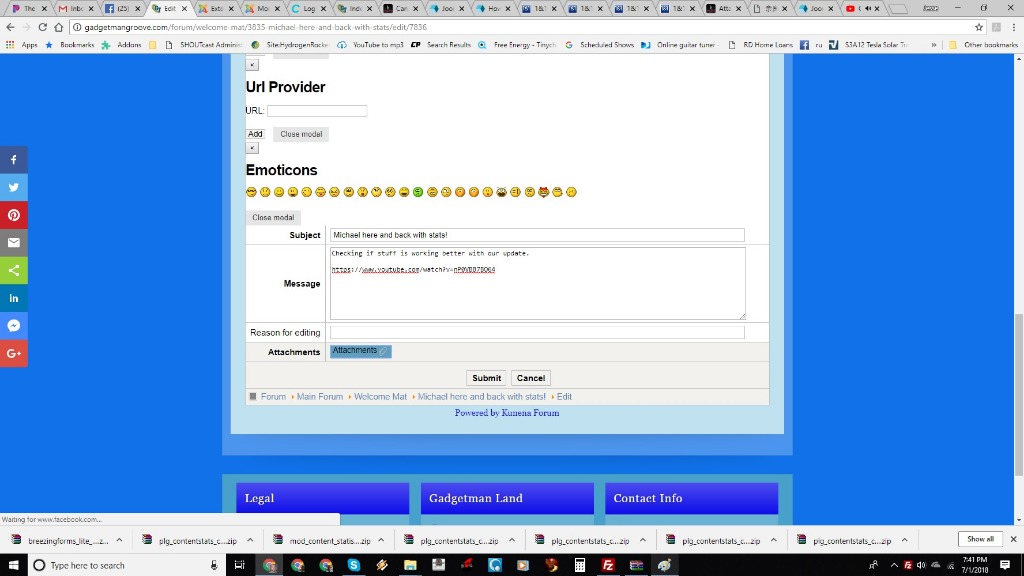
ok we updated the blue eagle template. cannot use attachment button,, it says loading facebook.com or something. video does work just posting link into body ... out kunena doesn't look like this one for sure not the way it posts

This message contains confidential information
Database collation check: The collation of your table fields are correct
Joomla! SEF: Enabled | Joomla! SEF rewrite: Enabled | FTP layer: Disabled |
This message contains confidential informationhtaccess: Exists | PHP environment: Max execution time: 300 seconds | Max execution memory: 256M | Max file upload: 256M
Kunena menu details:
Warning: Spoiler!
ID Name Menutype Link Path In trash 2320 Forum mainmenu view=home&defaultmenu=2408 forum No 2329 Forum mainmenu view=home&defaultmenu=2320 kunena-2017-05-06 Yes 2408 Forums kunenamenu view=home&defaultmenu=2413 forums No 2413 Browse Topics kunenamenu view=category&layout=list&catid=0 forums/browse-topics No 2322 Recent Topics kunenamenu view=topics&mode=replies forums/recent No 2328 Search kunenamenu view=search forums/search No 2323 New Topic kunenamenu view=topic&layout=create forums/newtopic No 2324 No Replies kunenamenu view=topics&mode=noreplies forums/noreplies No 2325 My Topics kunenamenu view=topics&layout=user&mode=default forums/mylatest No 2326 My Profile kunenamenu view=user forums/myprofile No 2327 Help kunenamenu view=misc forums/help No
Joomla default template details : rt_zephyr | author: RocketTheme, LLC | version: 1.10 | creationdate: March 9, 2017
Kunena default template details : Blue Eagle5 | author: Kunena Team | version: 1.5.0-RC3-DEV | creationdate: 2017-08-30
Kunena template params:
Warning: Spoiler!
DefaultCategoryicon profileIconset default DefaultIconset default editorIconset default lightboxColor white bootstrap 0 tooltips 1 borderless 1 SubjectLengthMessage 80 fullactions 0 quick 0 displayMenu 1 displayModule 1 displayBreadcrumb 1 displayAnnouncement 1 displayFooter 1 avatarPosition left avatarType img-polaroid labels 0 whoisonlineName default formRecover 0 topicicontype image fontawesome 0 socialshare 0 socialtheme classic writeaccess 0 IconColor inherit IconColorNew #48a348 forumHeadercolor announcementHeadercolor announcementBoxbgcolor frontstatsHeadercolor whoisonlineHeadercolor inactiveTabcolor activeTabcolor hoverTabcolor topBordercolor inactiveFontcolor activeFontcolor forumLinkcolor enableSkinner 0 editor 1 video 1 maps 1 emoticons 1 1 ebay 1 link 1 picture 1 hide 1 spoiler 1 table 1 code 1 quote 1 divider 1 1 soundcloud 1 confidential 1 hr 1 listitem 1 supscript 1 subscript 1 numericlist 1 bulletedlist 1 alignright 1 alignleft 1 center 1 underline 1 italic 1 bold 1 strikethrough 1 colors 1 size 1 avatarSizeX 40 avatarSizeY 90 avatarSizeXThumb 36 avatarSizeYThumb 36 avatarSizeXWelcome 42 avatarSizeYWelcome 42 avatarSizeXList 36 avatarSizeYList 36 avatarSizeXPost 144 avatarSizeYPost 144 avatarSizeXProfile 200 avatarSizeYProfile 200 templatebyText templatebyName templatebyLink
Kunena version detailed: Kunena 5.1.1 | 2018-06-10 [ Belinda ]
| Kunena detailed configuration:| Kunena integration settings:Warning: Spoiler!
Kunena config settings: board_offline 0 enablerss 1 threads_per_page 25 messages_per_page 12 messages_per_page_search 15 showhistory 0 historylimit 60 shownew 1 disemoticons 0 template blue_eagle5 showannouncement 1 avataroncat 1 catimagepath category_images/ showchildcaticon 0 rtewidth 450 rteheight 300 enableforumjump 1 reportmsg 1 username 0 askemail 0 showemail 1 showuserstats 1 showkarma 1 useredit 1 useredittime 0 useredittimegrace 600 editmarkup 1 allowsubscriptions 1 subscriptionschecked 1 allowfavorites 1 maxsubject 80 maxsig 1000 regonly 1 pubwrite 0 floodprotection 30 mailmod 1 mailadmin 1 captcha 1 mailfull 1 allowavatarupload 1 allowavatargallery 1 avatarquality 50 avatarsize 2048 imageheight 450 imagewidth 600 imagesize 3000 filetypes txt,rtf,pdf,zip,tar.gz,tgz,mp3,jpg,mov,mp4,png,jpeg,gif filesize 15000 showranking 1 rankimages 1 userlist_rows 30 userlist_online 1 userlist_avatar 1 userlist_posts 1 userlist_karma 1 userlist_email 1 userlist_joindate 1 userlist_lastvisitdate 1 userlist_userhits 1 latestcategory 0 showstats 1 showwhoisonline 1 showgenstats 1 showpopuserstats 1 popusercount 5 showpopsubjectstats 1 popsubjectcount 5 showspoilertag 1 showvideotag 1 showebaytag 0 trimlongurls 1 trimlongurlsfront 30 trimlongurlsback 20 autoembedyoutube 1 autoembedebay 0 ebaylanguagecode en-us sessiontimeout 3600 highlightcode 0 rss_type topic rss_timelimit month rss_limit 100 rss_included_categories rss_excluded_categories rss_specification rss2.0 rss_allow_html 1 rss_author_format name rss_author_in_title 1 rss_word_count 0 rss_old_titles 1 rss_cache 900 defaultpage recent default_sort asc sef 1 showimgforguest 0 showfileforguest 0 pollnboptions 4 pollallowvoteone 1 pollenabled 1 poppollscount 5 showpoppollstats 1 polltimebtvotes 00:15:00 pollnbvotesbyuser 100 pollresultsuserslist 1 maxpersotext 1000 ordering_system replyid post_dateformat datetime post_dateformat_hover datetime hide_ip 1 imagetypes jpg,jpeg,gif,png,pdf checkmimetypes 1 imagemimetypes image/jpg,image/jpeg,image/gif,image/png,image/pdf,video/mp4 imagequality 75 thumbheight 32 thumbwidth 32 hideuserprofileinfo put_empty boxghostmessage 0 userdeletetmessage 2 latestcategory_in 1 topicicons 0 debug 0 catsautosubscribed 0 showbannedreason 1 showthankyou 1 showpopthankyoustats 1 popthankscount 5 mod_see_deleted 0 bbcode_img_secure text listcat_show_moderators 0 lightbox 1 show_list_time -1 show_session_type 0 show_session_starttime 0 userlist_allowed 1 userlist_count_users 0 enable_threaded_layouts 1 category_subscriptions post topic_subscriptions every pubprofile 1 thankyou_max 1000 email_recipient_count 100 email_recipient_privacy bcc captcha_post_limit 3 image_upload registered file_upload registered topic_layout flat time_to_create_page 0 show_imgfiles_manage_profile 1 hold_newusers_posts 3 hold_guest_posts 0 attachment_limit 6 pickup_category 0 article_display intro send_emails 1 fallback_english 1 cache 1 cache_time 60 iptracking 1 rss_feedburner_url autolink 1 access_component 1 statslink_allowed 1 superadmin_userlist 0 legacy_urls 1 attachment_protection 1 categoryicons 1 avatarresizemethod 1 avatarcrop 0 user_report 1 searchtime all teaser 0 ebay_language 0 allow_change_subject 0 max_links 6 read_only 0 ratingenabled 1 url_subject_topic 1 log_moderation 1 attach_start 30 attach_end 14 attachment_utf8 1 autoembedsoundcloud 1 emailheader /media/kunena/email/hero-wide.png user_status 1 signature 1 personal 1 social 1 plain_email 0 moderator_permdelete 0 avatartypes gif, jpeg, jpg, png smartlinking 1 defaultavatar nophoto.png defaultavatarsmall s_nophoto.png quickreply 1 avataredit 0 activemenuitem mainmenu_id home_id index_id moderators_id topiclist_id misc_id profile_id search_id avatar_type 1 sef_redirect 1 allow_edit_poll 1 lazyload 1 recaptcha_publickey 6LeTFsISAAAAADczlNUT_SwEd9bH2uXcVFvNXniY recaptcha_privatekey 6LeTFsISAAAAAHkiI45GQO7T3F2_9xVYxFFMpUzI recaptcha_theme white keywords 0 userkeywords 0 userlist_name 1 usernamechange 1 version_check 1 userlist_usertype 1 sefutf8 0 enablepdf 1 jmambot 1 annmodid 62 changename 0 userlist_username 1 rules_infb 1 help_infb 1 onlineusers 1 | Joomla! detailed language files installed:Warning: Spoiler!Kunena - Finder Enabled
Kunena - AltaUserPoints Disabled
Kunena - Community Builder Disabled
Kunena - Easyblog Disabled
Kunena - Easyprofile Disabled
Kunena - Easysocial Disabled
Kunena - Gravatar Disabled
Kunena - JomSocial Disabled
Kunena - Joomla Enabled: access=1 login=1
Kunena - Kunena Enabled: avatar=1 profile=1
Kunena - UddeIM Enabled: private=1
Warning: Spoiler!
Joomla! languages installed: sv-SE Swedish (sv-SE) sw-KE Swahili (East Africa) sy-IQ Syriac (sy-IQ) ta-IN Tamil (India) th-TH Thai (th-TH) tk-TM Turkmen (Turkmenistan) tr-TR Türkçe (Türkiye) ug-CN Uyghur uk-UA Ukrainian (uk-UA) vi-VN Vietnamese (Vietnam) zh-CN Chinese Simplified (zh-CN) zh-TW Chinese (Traditional) af-ZA Afrikaans ar-AA Arabic Unitag (العربية الموحدة) az-AZ Azerbaijan (az-AZ) be-BY Беларуская мова bg-BG Български bn-BD Bengali (Bangladesh) bs-BA Bosnian (bs-BA) ca-ES Catalan (ca-ES) ckb-IQ Central Kurdish (کوردى ناوەڕاست) cs-CZ Czech (cs-CZ) cy-GB Welsh (cy-GB) da-DK Danish (da-DK) de-DE German (DE) dz-BT Dzongkha (Bhutan) el-GR Greek (el-GR) en-AU English (AU) en-CA English (CA) en-GB English (en-GB) en-US English (en-US) eo-XX Esperanto (eo-XX) es-CO Spanish (Colombia) es-ES Spanish (español) et-EE Estonian (et-EE) eu-ES Basque (eu-ES) fa-IR Persian (IR) fi-FI Finnish (fi-FI) fr-CA French Canadian (fr-CA) fr-FR French (FR) ga-IE Irish (Ireland) gl-ES Galician (Galego) he-IL Hebrew hi-IN Hindi hr-HR Croatian (hr-HR) hu-HU Hungarian (hu-HU) hy-AM Armenian (hy-AM) id-ID Bahasa Indonesia it-IT Italian (Italy) ja-JP Japanese (Japan) ka-GE Georgian (Georgia) km-KH ភាសាខ្មែរ (km-KH) ko-KR Korean(Republic of Korea) en-US English (USA) lv-LV Latvian (lv-LV) mk-MK Македонски (MК) ms-MY Bahasa Melayu nb-NO Norwegian bokmål (nb-NO) nl-BE Dutch (Belgium) nl-NL Dutch (nl-NL) nn-NO Nynorsk (New Norwegian) pl-PL Polish (PL) prs-AF Dari (prs-AF) pt-BR Português do Brasil (pt-BR) pt-PT Portuguese (pt-PT) ro-RO Romanian (Romania) ru-RU Русский (Россия) si-LK Sinhala (Sri Lanka) sk-SK Slovak (sk-SK) sl-SI Slovenščina (sl-SI) sq-AL Albanian(sq-AL) sr-RS Serbian Cyrillic sr-YU Serbian Latin srp-ME Montenegrin
Third-party components: CommunityBuilder 2.2.0 | UddeIM 4.0
Third-party SEF components: None
Plugins: Search - Kunena Search 5.1.0
Modules: Kunena Login 5.1.0
Last edit: 8 years 4 months ago by GadgetmanPrime.
Please Log in or Create an account to join the conversation.
- GadgetmanPrime
-
Topic Author
- Offline
- New Member
-
Less
More
- Posts: 4
- Thank you received: 0
8 years 4 months ago - 8 years 4 months ago #202453
by GadgetmanPrime
Replied by GadgetmanPrime on topic Cannot post img with quicklink inside kunena, while creating post or after edit.
Also blue eagle cannot be uninstalled or changed to another template
Last edit: 8 years 4 months ago by GadgetmanPrime.
Please Log in or Create an account to join the conversation.


8 years 4 months ago #202456
by 810
Replied by 810 on topic Cannot post img with quicklink inside kunena, while creating post or after edit.
backend -kunena - templates - blue eagle - Load bootstrap option set to "Yes"
Please Log in or Create an account to join the conversation.
Less
More
- Posts: 12299
- Thank you received: 2545
8 years 4 months ago #202471
by rich
Are there any custom overrides from earlier?
Please try this:
1. Go to "components/com_kunena/template" and download the folder blue_eagle as backup
2. Remove the folder blue_eagle
3. Go in backend to Kunena -> Templates
4. Choose Crypsis and check the forum
5. Install Blue Eagle new and try again
Important! Always create a backup before you make any changes to your website!
Replied by rich on topic Cannot post img with quicklink inside kunena, while creating post or after edit.
It is strange. I see in your configuration report a mix with Kunena 4.0. Also your Blue Eagle configuration shows options which not exist anymore.GadgetmanPrime wrote: Also blue eagle cannot be uninstalled or changed to another template
Are there any custom overrides from earlier?
Please try this:
1. Go to "components/com_kunena/template" and download the folder blue_eagle as backup
2. Remove the folder blue_eagle
3. Go in backend to Kunena -> Templates
4. Choose Crypsis and check the forum
5. Install Blue Eagle new and try again
Important! Always create a backup before you make any changes to your website!
Please Log in or Create an account to join the conversation.
Time to create page: 0.249 seconds