

- Posts: 47
- Thank you received: 0
Kunena 7.0.4 Released
The Kunena team has announce the arrival of Kunena 7.0.4 [K 7.0.4] in stable which is now available for download as a native Joomla extension for J! 5.4.x/6.0.x. This version addresses most of the issues that were discovered in K 6.2 / K 6.3 / K 6.4 and issues discovered during the last development stages of K 7.0
Question Error message after updating to 5.1
7 years 11 months ago #199739
by velieb
Replied by velieb on topic Error message after updating to 5.1
Other joomla mod_menus seem fine in my site. I also tested a kunena menu module on a different page (e.g. blog page) and works fine as well there.
Please Log in or Create an account to join the conversation.
- PetrIvanovich
-

- Offline
- Junior Member
-

Less
More
- Posts: 27
- Thank you received: 4
7 years 11 months ago #199819
by PetrIvanovich
Replied by PetrIvanovich on topic Error message after updating to 5.1
I decided a mistake with the menu.
For this, I deleted all the menu items of the Kunena type and the aliases of the items from all the site menus. Then he deleted the menu of the Kunena.
In the tools, the Kunena menu was restored.
Now the menu is working, there is no error message.
For this, I deleted all the menu items of the Kunena type and the aliases of the items from all the site menus. Then he deleted the menu of the Kunena.
In the tools, the Kunena menu was restored.
Now the menu is working, there is no error message.
Please Log in or Create an account to join the conversation.
7 years 11 months ago #199825
by velieb
Replied by velieb on topic Error message after updating to 5.1
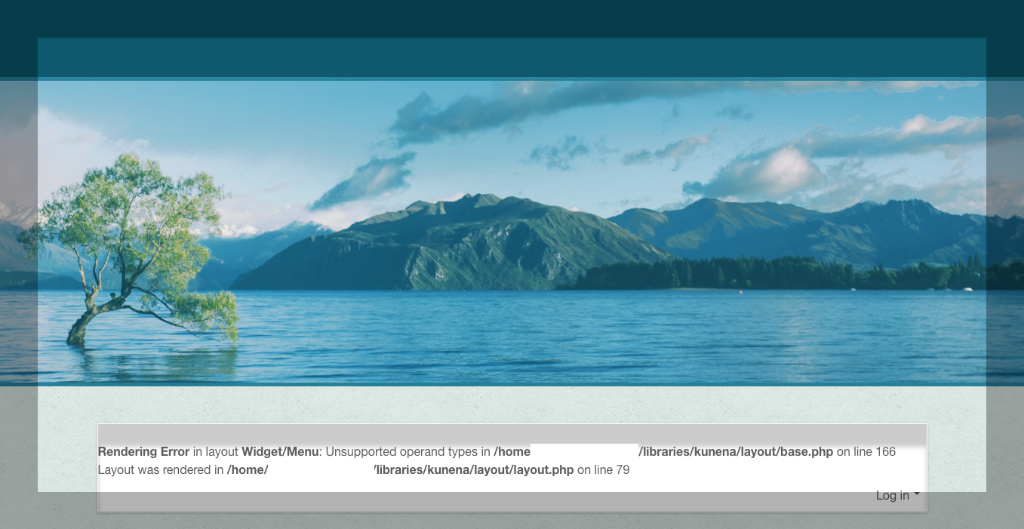
I cannot just ignore this problem.
As you suggested, tried to switch to Protostar template, but I deleted this template before, for some reason I cannot reinstall it. So I downloaded a different template, Sunny Blue Template, from joomla.com and switched to it. I still get the same error message.
Screenshot attached.
As you suggested, tried to switch to Protostar template, but I deleted this template before, for some reason I cannot reinstall it. So I downloaded a different template, Sunny Blue Template, from joomla.com and switched to it. I still get the same error message.
Screenshot attached.
Please Log in or Create an account to join the conversation.
7 years 11 months ago #199826
by velieb
Replied by velieb on topic Error message after updating to 5.1
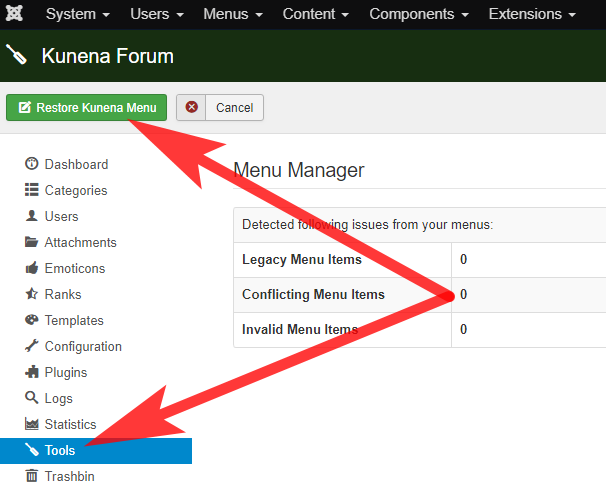
Thanks, Petrovanovich, for sharing. After you deleted all Kunena menu and menu items, where did you restore them? I do not see restore field on Kunena tool page.
Please Log in or Create an account to join the conversation.


7 years 11 months ago #199827
by 810
Replied by 810 on topic Error message after updating to 5.1
backend - kunena - tools - menu manager- restore kunena menu
The only thing you need to do then, is to enable the forum menu item on your main menu.
The only thing you need to do then, is to enable the forum menu item on your main menu.
The following user(s) said Thank You: velieb
Please Log in or Create an account to join the conversation.
- PetrIvanovich
-
- Offline
- Junior Member
-
Less
More
- Posts: 27
- Thank you received: 4
7 years 11 months ago #199839
by PetrIvanovich
Replied by PetrIvanovich on topic Error message after updating to 5.1
I wanted to add a screenshot, but only a quick form of comments worked.velieb wrote: Thanks, Petrovanovich, for sharing. After you deleted all Kunena menu and menu items, where did you restore them? I do not see restore field on Kunena tool page.
The following user(s) said Thank You: velieb
Please Log in or Create an account to join the conversation.
Time to create page: 0.282 seconds