


- Posts: 8
- Thank you received: 0
Kunena 7.0.8 Released
The Kunena team has announce the arrival of Kunena 7.0.8 [K 7.0.8] in stable which is now available for download as a native Joomla extension for J! 5.4.x/6.0.x./6.1.x. This version addresses most of the issues that were discovered in K 6.2 / K 6.3 / K 6.4 and issues discovered during the last development stages of K 7.0
Solved Malfunction of the keys for inserting attachments and images
7 years 6 months ago #207793
by tba
Malfunction of the keys for inserting attachments and images was created by tba
Hi, suddenly the following buttons have stopped working on my forum:
Link image
Link
Video Provider
Video Video
Map
Setting up surveys
Emoticons
and the button to attach file "attachments "....
The template is Gantry 5 and I installed the latest version of Kunena, I created a provisional profile, if you wanted to test the problem you can do it by accessing the site:
www.tbait.altervista.org
With the following credential:
User: Provvisorio
Pw: provvisorio
Thanks for the help, I can not understand what could have happened.....: ' (: ' (: ' (
Link image
Link
Video Provider
Video Video
Map
Setting up surveys
Emoticons
and the button to attach file "attachments "....
The template is Gantry 5 and I installed the latest version of Kunena, I created a provisional profile, if you wanted to test the problem you can do it by accessing the site:
www.tbait.altervista.org
With the following credential:
User: Provvisorio
Pw: provvisorio
Thanks for the help, I can not understand what could have happened.....: ' (: ' (: ' (
Please Log in or Create an account to join the conversation.


Less
More
- Posts: 12288
- Thank you received: 2537
7 years 6 months ago #207794
by rich
Important! Always create a backup before you make any changes to your website!
Replied by rich on topic Malfunction of the keys for inserting attachments and images
Your page loads the script jquery-latest.min.js from the page
code.jquery.com/
This script cause a conflict with the editor.
I think this script checks only if your jquery librarys are up to date. blog.jquery.com/2014/07/03/dont-use-jquery-latest-js/ If you disable it, the editor works.
I think this script checks only if your jquery librarys are up to date. blog.jquery.com/2014/07/03/dont-use-jquery-latest-js/ If you disable it, the editor works.
Important! Always create a backup before you make any changes to your website!
Please Log in or Create an account to join the conversation.
7 years 6 months ago #207842
by tba
Replied by tba on topic Malfunction of the keys for inserting attachments and images
Hi Rich, thanks for your reply, I'd know how to disable jquery-latest. Min. js from my Site? Thank you!
Please Log in or Create an account to join the conversation.
Less
More
- Posts: 12288
- Thank you received: 2537
7 years 6 months ago #207995
by rich
Important! Always create a backup before you make any changes to your website!
Replied by rich on topic Malfunction of the keys for inserting attachments and images
I don't know, which extension use this script on your page, maybe thereis included a option to disable it. But if you can't find this extension, it should also be possible to deactivate the script with this plugin.
extensions.joomla.org/extension/js-css-control/
extensions.joomla.org/extension/js-css-control/
Important! Always create a backup before you make any changes to your website!
Please Log in or Create an account to join the conversation.
7 years 6 months ago #208020
by tba
Replied by tba on topic Malfunction of the keys for inserting attachments and images
Thanks rich, forgive me but I'm not experienced, I installed the plugin but nothing happens.... could you give me some advice? Should I do anything else? Thanks again especially for the patience!
Please Log in or Create an account to join the conversation.
7 years 6 months ago #208021
by tba
Replied by tba on topic Malfunction of the keys for inserting attachments and images
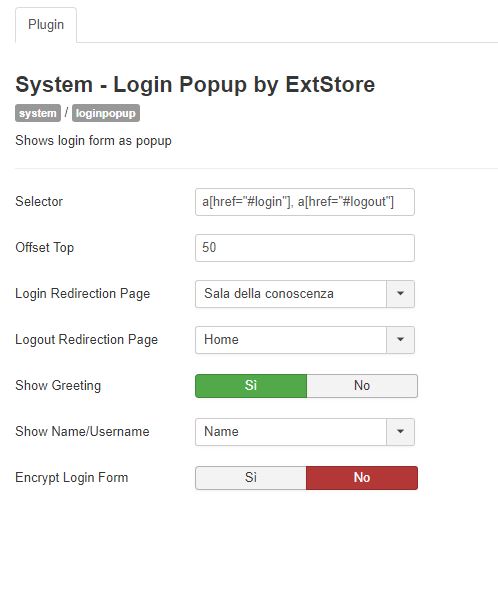
I don't know if this can be a causary extension to the problem
Please Log in or Create an account to join the conversation.
Time to create page: 0.282 seconds