
Kunena 7.0.4 Released
The Kunena team has announce the arrival of Kunena 7.0.4 [K 7.0.4] in stable which is now available for download as a native Joomla extension for J! 5.4.x/6.0.x. This version addresses most of the issues that were discovered in K 6.2 / K 6.3 / K 6.4 and issues discovered during the last development stages of K 7.0
Question After K5 upgrade, forum now 1 big mess because of templates?
- ArnoBrinkman
-
 Topic Author
- Offline
- Junior Member
-

Less
More
9 years 8 months ago #178861
by ArnoBrinkman
TradingTalk
Hi,
I try to upgrade my K4.0.10 with template Blue Eagle to K5
After that i can select the only option Crypsis, but now everything is really one big mess. Also when i try to change settings in Crypsis those seem not to really do anything.
When would the Blue Eagle template become available for K5?
Regards,
Arno
I try to upgrade my K4.0.10 with template Blue Eagle to K5
After that i can select the only option Crypsis, but now everything is really one big mess. Also when i try to change settings in Crypsis those seem not to really do anything.
When would the Blue Eagle template become available for K5?
Regards,
Arno
TradingTalk
Please Log in or Create an account to join the conversation.


9 years 8 months ago #178863
by 810
Replied by 810 on topic After K5 upgrade, forum now 1 big mess because of templates?
Go to backend - kunena - template - crypis - basic - Load bootstrap = Yes
Then everything should work.
Blue eagle is a deprecated template, and will not come to K5.0
Then everything should work.
Blue eagle is a deprecated template, and will not come to K5.0
Please Log in or Create an account to join the conversation.
- ArnoBrinkman
-
Topic Author
- Offline
- Junior Member
-
9 years 8 months ago - 9 years 8 months ago #178866
by ArnoBrinkman
TradingTalk
Replied by ArnoBrinkman on topic After K5 upgrade, forum now 1 big mess because of templates?
Thank for your answer
But this doesn't help, you can see the result here:
" 83.172.164.20/~dttadmin/index.php/forum/trading/2
I want Avatars to be located right next to the message (same as this forum has them on the left side), but changing settings doesn't work
But this doesn't help, you can see the result here:
" 83.172.164.20/~dttadmin/index.php/forum/trading/2
I want Avatars to be located right next to the message (same as this forum has them on the left side), but changing settings doesn't work
TradingTalk
Last edit: 9 years 8 months ago by ArnoBrinkman.
Please Log in or Create an account to join the conversation.
9 years 8 months ago #178867
by 810
Replied by 810 on topic After K5 upgrade, forum now 1 big mess because of templates?
Your joomla template doesn't have all the css classes from bootstrap, so that's why its failing.
I can't see, that you have enable the load bootstrap option, on the crypsis settings.
Because else it should load:
<link rel="stylesheet" href="/media/jui/css/bootstrap.min.css" />
<link rel="stylesheet" href="/media/jui/css/bootstrap-extended.css" />
<link rel="stylesheet" href="/media/jui/css/bootstrap-responsive.min.css" />
I can't see, that you have enable the load bootstrap option, on the crypsis settings.
Because else it should load:
<link rel="stylesheet" href="/media/jui/css/bootstrap.min.css" />
<link rel="stylesheet" href="/media/jui/css/bootstrap-extended.css" />
<link rel="stylesheet" href="/media/jui/css/bootstrap-responsive.min.css" />
Please Log in or Create an account to join the conversation.
- ArnoBrinkman
-
Topic Author
- Offline
- Junior Member
-
9 years 8 months ago #178875
by ArnoBrinkman
TradingTalk
Replied by ArnoBrinkman on topic After K5 upgrade, forum now 1 big mess because of templates?
So the kunena update did not install all files?
I have set Bootstrap in Crysis, see screenshot:
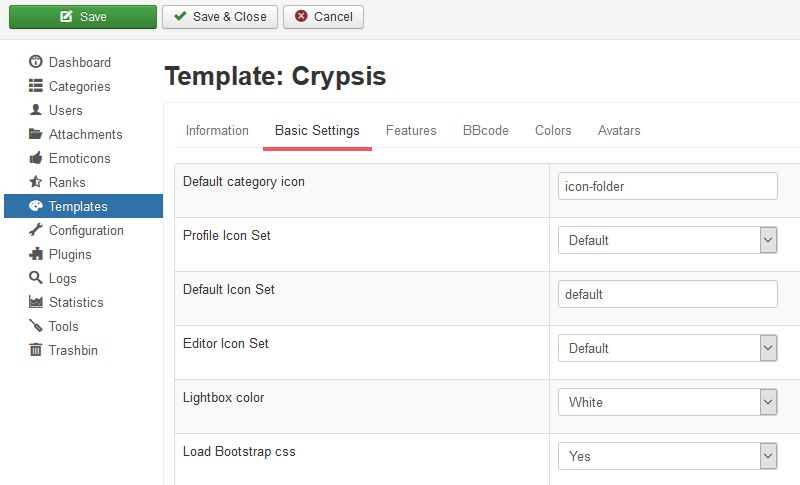
I have set Bootstrap in Crysis, see screenshot:
TradingTalk
Please Log in or Create an account to join the conversation.
9 years 8 months ago #178878
by 810
Replied by 810 on topic After K5 upgrade, forum now 1 big mess because of templates?
the loaded files are from joomla itself, could you try to clean cache.
Please Log in or Create an account to join the conversation.
Time to create page: 0.239 seconds