


- Posts: 5
- Thank you received: 1
Kunena 7.0.9 & Kunena 6.4.14 – Security Updates Released
The Kunena team has announce the arrival of Kunena 7.0.9 [K 7.0.9] in stable which is now available for download as a native Joomla extension for J! 5.4.x/6.0.x./6.1.x. This version addresses most of the issues that were discovered in K 6.2 / K 6.3 / K 6.4 and issues discovered during the last development stages of K 7.0
Solved Category and topics title render problem
9 years 1 month ago #194432
by geoffroy
Category and topics title render problem was created by geoffroy
Hello everybody, i have some issues since i upgraded from Kunena 3.x with my titles of category and topics, you can see the result below.
I was thinking about a Kunena template issue, but every Template is having the same behavior.
Thx for your ansers, and if u got the same issue.
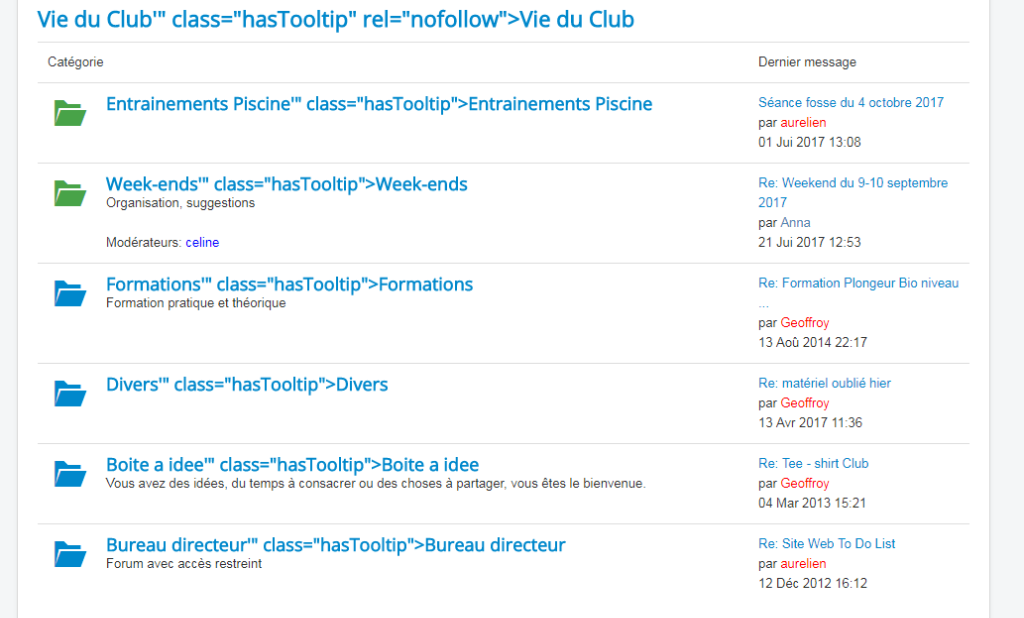
I was thinking about a Kunena template issue, but every Template is having the same behavior.
Thx for your ansers, and if u got the same issue.
Please Log in or Create an account to join the conversation.


Less
More
- Posts: 12291
- Thank you received: 2538
9 years 1 month ago #194443
by rich
Important! Always create a backup before you make any changes to your website!
Replied by rich on topic Category and topics title render problem
You have this issue also with the Joomla default templtate Protostar?
Important! Always create a backup before you make any changes to your website!
Please Log in or Create an account to join the conversation.
9 years 1 month ago #194446
by geoffroy
Replied by geoffroy on topic Category and topics title render problem
Yeah have it with all Template of Joomla and Kunena, combinations tests below :
* protostar + clean
* protostar + Crypsis
* protostar + Crypsisb3
I was thinking reimporting my category table ... any suggestion ?
* protostar + clean
* protostar + Crypsis
* protostar + Crypsisb3
I was thinking reimporting my category table ... any suggestion ?
Please Log in or Create an account to join the conversation.
9 years 1 month ago #194448
by geoffroy
Replied by geoffroy on topic Category and topics title render problem
Here is the source of th e category title when rendered :
it seems there is a span in the title of title attribute.
Code:
<h1 class="heading-style-1 visible-first"><a href="/joomla3/index.php/forum?view=category&catid=11" title="Consulter la catégorie '<span class=" item_title_part_0="" item_title_part_odd="" item_title_part_first_half="" item_title_part_first="" item_title_part_last"="">Divers'" rel="nofollow"><span class="item_title_part_0 item_title_part_odd item_title_part_first_half item_title_part_first item_title_part_last">Divers</span></a></h1>
it seems there is a span in the title of title attribute.
Please Log in or Create an account to join the conversation.
Less
More
- Posts: 12291
- Thank you received: 2538
9 years 1 month ago #194450
by rich
Important! Always create a backup before you make any changes to your website!
Replied by rich on topic Category and topics title render problem
Have you installed a tool which compress scripts or a SEO component? The classes of your source code does not exists in kunena.
The source of k.org
The source of k.org
Code:
<h1> <a href="/forum/94-Kunena---To-Speak" title="View Category 'Kunena - To Speak!'" class="hasTooltip" rel="nofollow">Kunena - To Speak!</a> <small class="hidden-phone nowrap"> (107 topics) </small> </h1>
Important! Always create a backup before you make any changes to your website!
Please Log in or Create an account to join the conversation.
9 years 1 month ago #194461
by geoffroy
Replied by geoffroy on topic Category and topics title render problem
Im going to check my plugins. Additional info : i installed a TemplateMonster template, using bootstrap, do you know if this one may use those kind of tools ?
Please Log in or Create an account to join the conversation.
Time to create page: 0.275 seconds