


- Posts: 90
- Thank you received: 9
Kunena 7.0.11 & Kunena 6.4.16 – Security Updates Released and K7.1 in RC1 2
The Kunena team has announce the arrival of three simultaneous security release : K6.4.16, K7.0.11 and K7.1 RC2. Just a reminder K6.4.16 receives only securities fixes untill end of 2026, so it's advised for users to upgrade to K7.0.11. K7.0.11 is the last release of the K7.0 because it's replaced by K7.1 branch with the stable release in the corner. The translations for K7.1 on crowdin.com/project/kunena-forum-7-1 needs to be checked or improved becasue it has been generated by TM (Translation Machine).
Solved Crypsis: Missing Emoticon and Editor Toolbar - but only in Firefox
10 years 1 week ago #180853
by Goldie
Hi,
I have upgraded to latest Kunena. Of course that demands to use Crypsis instead if bleu Eagle template. Now I have one big problem. While everything works in IE, my users miss Emoticon and Editor toolbar when writing or replying to a thread.
Emoticon tool bar is of course enabled. And as it is shown in IE, it must have something to do with Firefox. I tried with enabling and disabling Bootstrap in Crypsis config.
Any ideas?
I have upgraded to latest Kunena. Of course that demands to use Crypsis instead if bleu Eagle template. Now I have one big problem. While everything works in IE, my users miss Emoticon and Editor toolbar when writing or replying to a thread.
Emoticon tool bar is of course enabled. And as it is shown in IE, it must have something to do with Firefox. I tried with enabling and disabling Bootstrap in Crypsis config.
Any ideas?
Please Log in or Create an account to join the conversation.


10 years 1 week ago #180854
by 810
Replied by 810 on topic Crypsis: Missing Emoticon and Editor Toolbar - but only in Firefox
Do you have a link to your forum - new topic. with demo account so we can check it.
Please Log in or Create an account to join the conversation.
10 years 1 week ago #180855
by Goldie
Replied by Goldie on topic Crypsis: Missing Emoticon and Editor Toolbar - but only in Firefox
Hi,
no need for a forum. It also happens to me here when using Firefox (most current version). See attached picture of using Firefox for reply. No Editor bar and I can also not attach a file. No reaction when clicking on Attachment. But everything okay in IE. Base system is Win 7 Pro EN.
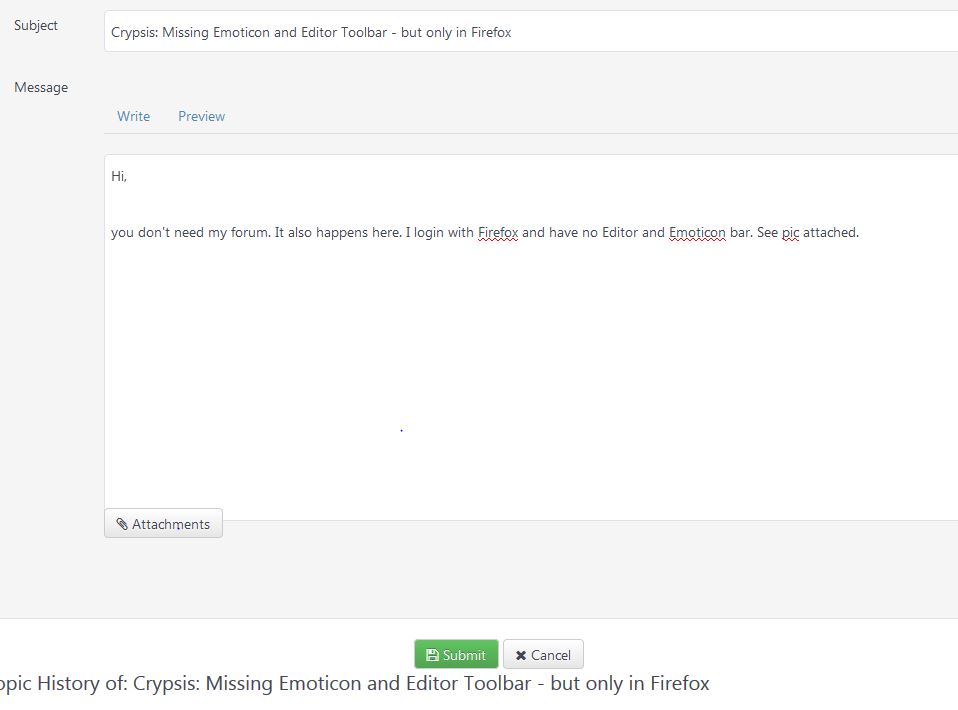
no need for a forum. It also happens to me here when using Firefox (most current version). See attached picture of using Firefox for reply. No Editor bar and I can also not attach a file. No reaction when clicking on Attachment. But everything okay in IE. Base system is Win 7 Pro EN.
Please Log in or Create an account to join the conversation.
10 years 1 week ago #180856
by 810
Replied by 810 on topic Crypsis: Missing Emoticon and Editor Toolbar - but only in Firefox
im typing this message on firefox, and i can see the bbcode row.
Do you use any adblocker or ghostery? maybe you have disabled the view.
Do you use any adblocker or ghostery? maybe you have disabled the view.
The following user(s) said Thank You: Goldie
Please Log in or Create an account to join the conversation.
10 years 1 week ago #180859
by Goldie
Replied by Goldie on topic Crypsis: Missing Emoticon and Editor Toolbar - but only in Firefox
Hi 810,
I have now verified various things:
- Started my Firefox in safe mode with all add-ons disabled: Same missing bar
- Used Firefox om my smartphone: Everything okay
- Used Firefox on my wife's PC: Everything okay!!!
So it boils down to a problem with my PC. I even disabled my firewall and virus protection as a test. Same missing bar on my personal PC.
Many thanks for your quick support and for Kunena anyhow.
I have now verified various things:
- Started my Firefox in safe mode with all add-ons disabled: Same missing bar
- Used Firefox om my smartphone: Everything okay
- Used Firefox on my wife's PC: Everything okay!!!
So it boils down to a problem with my PC. I even disabled my firewall and virus protection as a test. Same missing bar on my personal PC.
Many thanks for your quick support and for Kunena anyhow.
Please Log in or Create an account to join the conversation.
10 years 1 week ago #180861
by 810
Replied by 810 on topic Crypsis: Missing Emoticon and Editor Toolbar - but only in Firefox
try to clean cache, then restore default settings
Please Log in or Create an account to join the conversation.
Time to create page: 0.288 seconds