

- Posts: 8
- Thank you received: 0
Kunena 7.0.4 Released
The Kunena team has announce the arrival of Kunena 7.0.4 [K 7.0.4] in stable which is now available for download as a native Joomla extension for J! 5.4.x/6.0.x. This version addresses most of the issues that were discovered in K 6.2 / K 6.3 / K 6.4 and issues discovered during the last development stages of K 7.0
Solved Akeeba Backup skips a Kunena table. Why
9 years 7 months ago #179742
by rpfacts64
Akeeba Backup skips a Kunena table. Why was created by rpfacts64
Can you tell me what is wrong with the table of Kunena? Because Akeeba is skipping a table because it will give problems during a restoration.
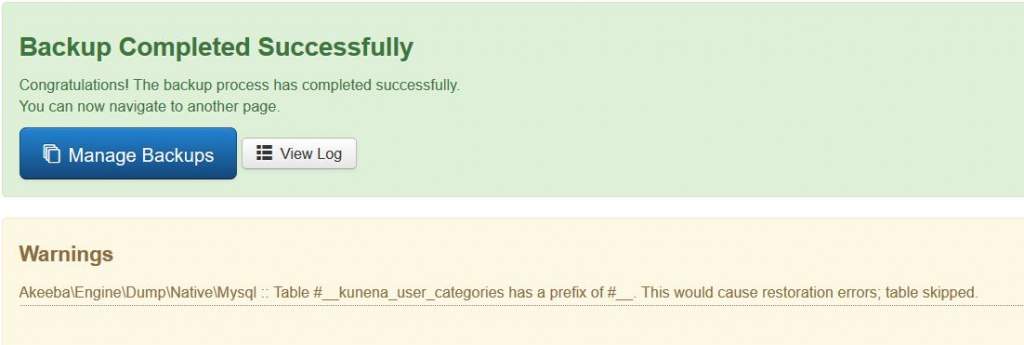
This message contains confidential information
Please Log in or Create an account to join the conversation.


9 years 7 months ago #179743
by 810
Replied by 810 on topic Akeeba Backup skips a Kunena table. Why
with the kunena table is not wrong, could you contact akeeba backup, I think there is a bug on their part. Maybe because the 2 _ in the table itself
Please Log in or Create an account to join the conversation.
9 years 7 months ago #179745
by rpfacts64
Replied by rpfacts64 on topic Akeeba Backup skips a Kunena table. Why
Ok, I will ask them
Thanks for the reaction
Ronald
Thanks for the reaction
Ronald
Please Log in or Create an account to join the conversation.
- anonymous01
-

- Offline
- Premium Member
-

Less
More
- Posts: 271
- Thank you received: 11
9 years 7 months ago #179841
by anonymous01
Replied by anonymous01 on topic Akeeba Backup skips a Kunena table. Why
Strange, I do not have this problem.
Please Log in or Create an account to join the conversation.
9 years 7 months ago #179845
by rpfacts64
Replied by rpfacts64 on topic Akeeba Backup skips a Kunena table. Why
Hello,
Akeeba support told me the following:
Looking at your log file, there are two tables named kunena_user_categories. One has the correct prefix, another has the #_ one.
I think you can safely ignore (or even delete) the one with the #_ prefix. Most likely it is a leftover of a previously installation.
I removed the #_one table and now the problem is solved.
Akeeba support told me the following:
Looking at your log file, there are two tables named kunena_user_categories. One has the correct prefix, another has the #_ one.
I think you can safely ignore (or even delete) the one with the #_ prefix. Most likely it is a leftover of a previously installation.
I removed the #_one table and now the problem is solved.
Please Log in or Create an account to join the conversation.
Time to create page: 0.266 seconds