


- Posts: 839
- Thank you received: 36
Kunena 7.1.1 & Kunena 6.4.17 – Security Updates Released
The Kunena team has announce the arrival of Kunena 7.1.1 [K 7.1.1] in stable which is now available for download as a native Joomla extension for J! 5.4.x/6.0.x./6.1.x./6.2.x This version addresses most of the issues that were discovered in K 6.2 / K 6.3 / K 6.4 / K7.0 and issues discovered during the last development stages of K 7.1
Just a reminder: K6.4.17 receives only securities fixes until end of 2026, so it's advised for users to upgrade to K7.1.
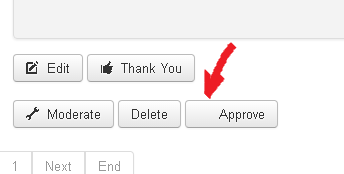
Solved [K.5.0.RC5]Bug: White space in the approve button
10 years 3 months ago #178002
by ssh
[K.5.0.RC5]Bug: White space in the approve button was created by ssh
There is a white space in the approve button
Please Log in or Create an account to join the conversation.


10 years 3 months ago #178007
by 810
Replied by 810 on topic [K.5.0.RC5]Bug: White space in the approve button
looks like missing icon, which icontype do you use, and which kunena template?
Please Log in or Create an account to join the conversation.
10 years 3 months ago #178013
by ssh
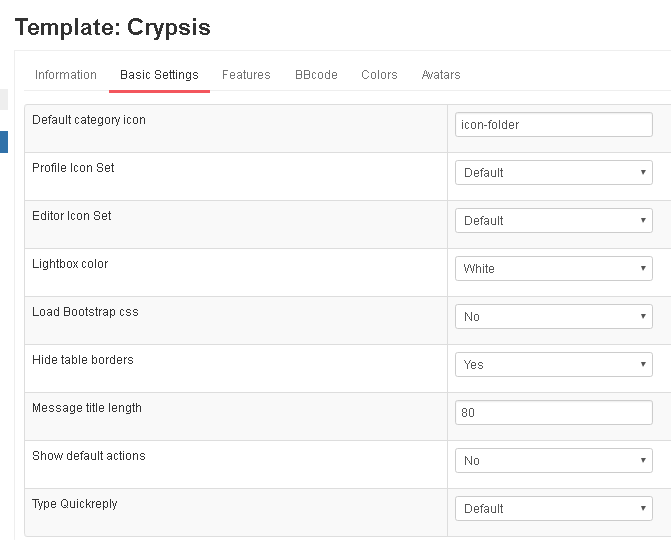
Replied by ssh on topic [K.5.0.RC5]Bug: White space in the approve button
Please Log in or Create an account to join the conversation.


Less
More
- Posts: 12299
- Thank you received: 2545
10 years 3 months ago #178014
by rich
Important! Always create a backup before you make any changes to your website!
Replied by rich on topic [K.5.0.RC5]Bug: White space in the approve button
You see the icons on the next tab (Crypsis -> tab Features). But it seems, you use bootstrap 2 icons and the Joomla template Protostar.
This icon is not defined in the protostar template.css. You can add this code between line 6574 and 6575. Path is "templates -> protostar -> css > template.css"
Or you add following code in the Kunena custom.less
Then you must empty the cache.
This icon is not defined in the protostar template.css. You can add this code between line 6574 and 6575. Path is "templates -> protostar -> css > template.css"
Code:
.icon-ok-circle:before,
Or you add following code in the Kunena custom.less
Code:
.icon-ok-circle:before {
content: "\47";
}
Then you must empty the cache.
Important! Always create a backup before you make any changes to your website!
The following user(s) said Thank You: ssh
Please Log in or Create an account to join the conversation.
10 years 3 months ago #178016
by ssh
Replied by ssh on topic [K.5.0.RC5]Bug: White space in the approve button
Sorry, these options are very new for me
Here is the right screenshot
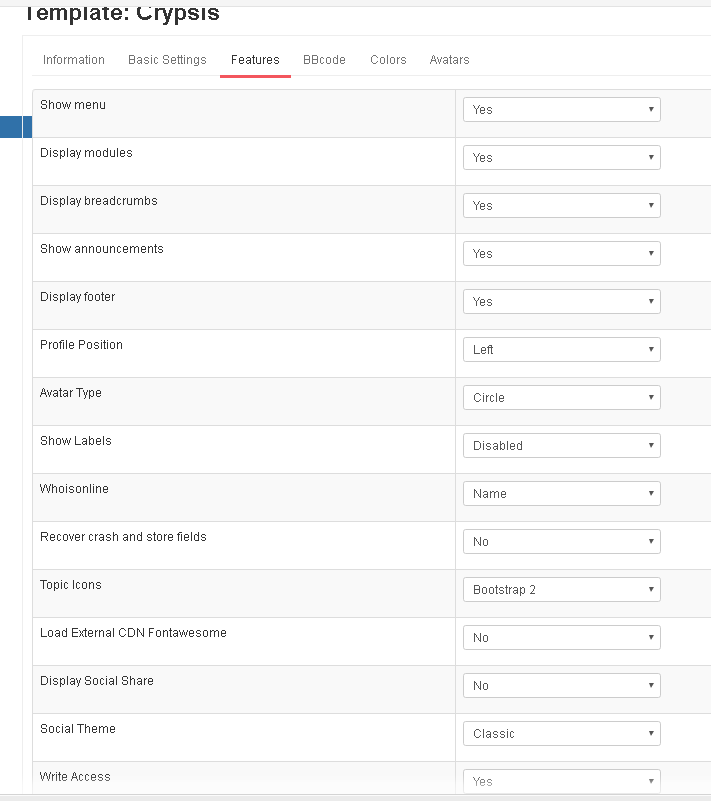
Here is the right screenshot
Please Log in or Create an account to join the conversation.
10 years 3 months ago #178017
by ssh
Yes you are right.
Replied by ssh on topic [K.5.0.RC5]Bug: White space in the approve button
rich wrote: But it seems, you use bootstrap 2 icons and the Joomla template Protostar.
Yes you are right.
Please Log in or Create an account to join the conversation.
Time to create page: 0.117 seconds