


- Posts: 18
- Thank you received: 0
Kunena 7.0.9 & Kunena 6.4.14 – Security Updates Released
The Kunena team has announce the arrival of Kunena 7.0.9 [K 7.0.9] in stable which is now available for download as a native Joomla extension for J! 5.4.x/6.0.x./6.1.x. This version addresses most of the issues that were discovered in K 6.2 / K 6.3 / K 6.4 and issues discovered during the last development stages of K 7.0
Question Kunena layout corupted after moving to a new template
10 years 4 months ago #175663
by shaul_ei
Kunena layout corupted after moving to a new template was created by shaul_ei
I moved
my site
to a new template (Joomspirit 99).
This changed some of the Kunena layout.
I attach a few pictures:
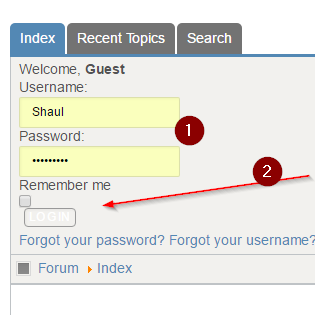
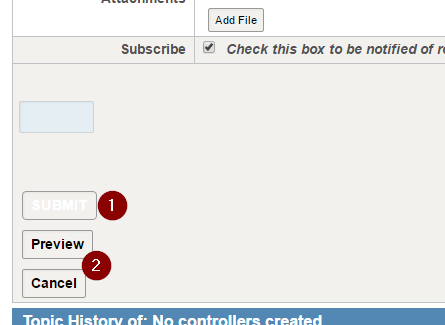
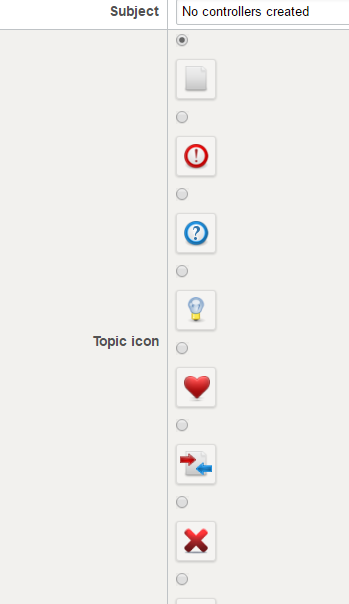
I attach the configuration:
Thank you!
This changed some of the Kunena layout.
I attach a few pictures:
I attach the configuration:
Thank you!
Please Log in or Create an account to join the conversation.


10 years 4 months ago #175665
by sozzled
Blue Eagle vs. Crypsis reference guide
Read my blog and

Replied by sozzled on topic Kunena layout corupted after moving to a new template
There are two things you can do:
1) Use a different Joomla template; or
2) Work through each layout problem by customising the CSS, changing the colours, etc. This will probably take you one or two days if you care proficient with CSS. Alternatively, you could give this job to someone else. Not many people are usually prepared to give up a day or two of their time to work through CSS problems, especially if they're not getting paid for it.
So, option (1) may be the best way to go both in terms of saving your time and saving you money.
The other option is to ask how to fix each problem that you come across here in this forum and wait until someone generously gives their time to give you a detailed solution.
1) Use a different Joomla template; or
2) Work through each layout problem by customising the CSS, changing the colours, etc. This will probably take you one or two days if you care proficient with CSS. Alternatively, you could give this job to someone else. Not many people are usually prepared to give up a day or two of their time to work through CSS problems, especially if they're not getting paid for it.
So, option (1) may be the best way to go both in terms of saving your time and saving you money.
The other option is to ask how to fix each problem that you come across here in this forum and wait until someone generously gives their time to give you a detailed solution.
Blue Eagle vs. Crypsis reference guide
Read my blog and
The following user(s) said Thank You: shaul_ei
Please Log in or Create an account to join the conversation.
- 9themestore
-

- Offline
- Premium Member
-

10 years 4 months ago #175666
by 9themestore
- Please provide your site url if it has been lived.
- Please share tip if it worked fine with you.
- Don't be shy about using the "Thanks" button below if you found my comment helpful
Replied by 9themestore on topic Kunena layout corupted after moving to a new template
Hi,
Send me a test account on your site, I'll try to help you solve that problems.
Send me a test account on your site, I'll try to help you solve that problems.
- Please provide your site url if it has been lived.
- Please share tip if it worked fine with you.
- Don't be shy about using the "Thanks" button below if you found my comment helpful
Please Log in or Create an account to join the conversation.
10 years 4 months ago - 10 years 4 months ago #175671
by shaul_ei
Replied by shaul_ei on topic Kunena layout corupted after moving to a new template
The most important problem - the alignment of the Boxes was solved in the Joomla template file (template.css) - I removed display: block;:
Some buttons were fixed in the kunena template file kunena.default-min.css:
I changed the background color:
and I removed this (in the same file):
Code:
select, textarea, input, .inputbox {
background : transparent url(../images/black-04.png) 0 0 repeat;
background : rgba(217,237,247,0.53) ;
border: 1px solid #ddd;
border-color:rgba(100,100,100,0.20);
border-radius: 2px;
box-shadow: 1px 1px 3px rgba(0, 0, 0, 0.05) inset;
color: #666666;
/*display: block;*/
font-size: 13px;
height: 38px;
line-height: 1.42857;
padding: 6px 12px;
-webkit-transition : all 0.15s ease-in-out 0s;
-moz-transition : all 0.15s ease-in-out 0s;
-ms-transition : all 0.15s ease-in-out 0s;
-o-transition : all 0.15s ease-in-out 0s;
transition: all 0.15s ease-in-out 0s;
width: auto;
}
Some buttons were fixed in the kunena template file kunena.default-min.css:
I changed the background color:
Code:
#Kunena .button, #Kunena .kbutton {
background-color: rgba(83, 136, 180, 0.5);
border-color: #999;
color: #000;
}
and I removed this (in the same file):
Code:
#Kunena td.kprofileboxcnt ul.kprofilebox-welcome li input.kbutton{background: transparent;}
Last edit: 10 years 4 months ago by shaul_ei.
Please Log in or Create an account to join the conversation.
Time to create page: 0.286 seconds