
- Posts: 11
- Thank you received: 0
Kunena 7.1.1 & Kunena 6.4.17 – Security Updates Released
The Kunena team has announce the arrival of Kunena 7.1.1 [K 7.1.1] in stable which is now available for download as a native Joomla extension for J! 5.4.x/6.0.x./6.1.x./6.2.x This version addresses most of the issues that were discovered in K 6.2 / K 6.3 / K 6.4 / K7.0 and issues discovered during the last development stages of K 7.1
Just a reminder: K6.4.17 receives only securities fixes until end of 2026, so it's advised for users to upgrade to K7.1.
Question Only Admins can see online users
- Black Belt Jones
-
 Topic Author
- Offline
- New Member
-

Less
More
10 years 6 months ago #175540
by Black Belt Jones
Replied by Black Belt Jones on topic Only Admins can see online users
Thanks, but it isn't that.
Just noticed in forum config that if I disable 'who is online, statistics etc, everything is still displayed.
Please Log in or Create an account to join the conversation.
- Black Belt Jones
-
Topic Author
- Offline
- New Member
-
Less
More
- Posts: 11
- Thank you received: 0
10 years 6 months ago - 10 years 6 months ago #175542
by Black Belt Jones
Replied by Black Belt Jones on topic Only Admins can see online users
Correction. The issue seems to be rather large delay. I logged in as a test member and could not see my username. Approximately 12 minutes later my user name was visible. I also noticed it took the same amount of time for any changes to the forum to be made via config. For example if I disabled who is online. It took approx 12 minutes for it to take effect.
Last edit: 10 years 6 months ago by Black Belt Jones.
Please Log in or Create an account to join the conversation.


10 years 6 months ago #175555
by sozzled
1) Joomla session length, Global Configuration » System » Session Settings. The initial/default value is 15 minutes.
2) Kunena session length, Forum Configuration » General » Basic Settings. The initial/default value is 1800 seconds, i.e. 30 minutes. It's usual to change this to match the Joomla session length time.
3) Caching, Global Configuration » System » Cache Setting. Turn caching off if you have a particularly busy forum. If you are using caching, the initial/default value is 15 minutes.
These factors may be involved in why you're seeing things happening "approximately 12 minutes later".
Blue Eagle vs. Crypsis reference guide
Read my blog and

Replied by sozzled on topic Only Admins can see online users
Combination of several factors here.Black Belt Jones wrote: The issue seems to be ... [a time lag]. For example,] I logged in as a test member and could not see my username. Approximately 12 minutes later my user name was visible. I also noticed it took the same amount of time for any changes to the forum to be made via config. For example if I disabled who is online. It took approx 12 minutes for it to take effect.
1) Joomla session length, Global Configuration » System » Session Settings. The initial/default value is 15 minutes.
2) Kunena session length, Forum Configuration » General » Basic Settings. The initial/default value is 1800 seconds, i.e. 30 minutes. It's usual to change this to match the Joomla session length time.
3) Caching, Global Configuration » System » Cache Setting. Turn caching off if you have a particularly busy forum. If you are using caching, the initial/default value is 15 minutes.
These factors may be involved in why you're seeing things happening "approximately 12 minutes later".
Blue Eagle vs. Crypsis reference guide
Read my blog and
Please Log in or Create an account to join the conversation.
- Black Belt Jones
-
Topic Author
- Offline
- New Member
-
Less
More
- Posts: 11
- Thank you received: 0
10 years 6 months ago #175570
by Black Belt Jones
Thanks for the reply but sessions time made no difference.
It's a little frustrating that the previous version worked flawlessly in my opinion other than user names not being displayed.
Now I have the existing issue
Changes to configuration taken excessive time.
Poll option disappearing.
The only saving grace is my forum isn't a busy one!
Replied by Black Belt Jones on topic Only Admins can see online users
sozzled wrote:
Combination of several factors here.Black Belt Jones wrote: The issue seems to be ... [a time lag]. For example,] I logged in as a test member and could not see my username. Approximately 12 minutes later my user name was visible. I also noticed it took the same amount of time for any changes to the forum to be made via config. For example if I disabled who is online. It took approx 12 minutes for it to take effect.
1) Joomla session length, Global Configuration » System » Session Settings. The initial/default value is 15 minutes.
2) Kunena session length, Forum Configuration » General » Basic Settings. The initial/default value is 1800 seconds, i.e. 30 minutes. It's usual to change this to match the Joomla session length time.
3) Caching, Global Configuration » System » Cache Setting. Turn caching off if you have a particularly busy forum. If you are using caching, the initial/default value is 15 minutes.
These factors may be involved in why you're seeing things happening "approximately 12 minutes later".
Thanks for the reply but sessions time made no difference.
It's a little frustrating that the previous version worked flawlessly in my opinion other than user names not being displayed.
Now I have the existing issue
Changes to configuration taken excessive time.
Poll option disappearing.
The only saving grace is my forum isn't a busy one!
Please Log in or Create an account to join the conversation.
10 years 6 months ago #175593
by sozzled
Blue Eagle vs. Crypsis reference guide
Read my blog and
Replied by sozzled on topic Only Admins can see online users
I took closer look at your configuration settings. You've made a few changes to the initial/default values. It's always a little risky to make too many changes because they may come back to bite you later on.
Putting aside the issue of poll options "disappearing" which a different issue and deserves its own subject, the time lag could be explained by caching or session lengths.
Eliminating session lengths, this leaves caching.
The initial (default) value of Configuration » General » Caching Settings » Caching is 1. In your configuration report, you've changed this setting to the value of 60. Why did you need to do that?
Blue Eagle vs. Crypsis reference guide
Read my blog and
Please Log in or Create an account to join the conversation.
- Black Belt Jones
-
Topic Author
- Offline
- New Member
-
Less
More
- Posts: 11
- Thank you received: 0
10 years 6 months ago #175601
by Black Belt Jones
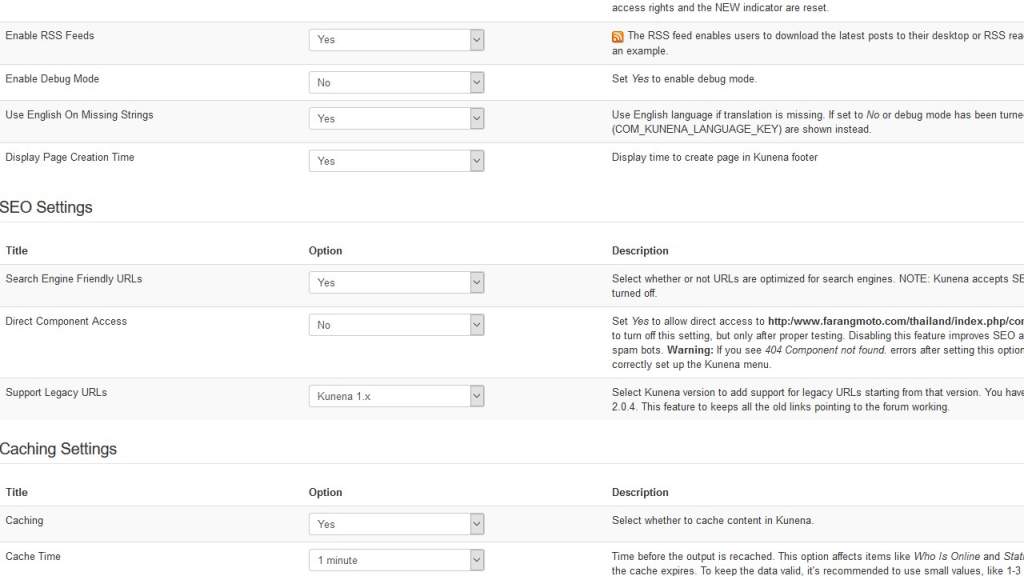
Not sure but here it is set to one. I've only just checked that for the first time as you mentioned it.
Replied by Black Belt Jones on topic Only Admins can see online users
Not sure but here it is set to one. I've only just checked that for the first time as you mentioned it.
Please Log in or Create an account to join the conversation.
Time to create page: 0.150 seconds