
- Posts: 4
- Thank you received: 0
Kunena 7.0.5 & Kunena 6.4.11 – Security Updates Released
The Kunena team has announce the arrival of Kunena 7.0.5 [K 7.0.5] in stable which is now available for download as a native Joomla extension for J! 5.4.x/6.0.x. This version addresses most of the issues that were discovered in K 6.2 / K 6.3 / K 6.4 and issues discovered during the last development stages of K 7.0.
The Kunena team is also pleased to announce the eleventh version of Kunena 6.4, a native Joomla extension for Joomla! 5.0, 5.1, 5.2, 5.3, 5.4 and 6.0.
Solved "orphaned" Kunena Database Tables after uninstall
- Thomsterdam
-
 Topic Author
- Offline
- New Member
-

Less
More
10 years 3 months ago - 10 years 3 months ago #172750
by Thomsterdam
"orphaned" Kunena Database Tables after uninstall was created by Thomsterdam
Hi there,
My client decided she didn't want to use Kunena on her website, so I used the normal Joomla way to uninstall Kunena. When I checked in phpMyAdmin this morning, there were 23 database tables starting with ***_kunena_aliases and ending with ***_kunena_version. (see image)
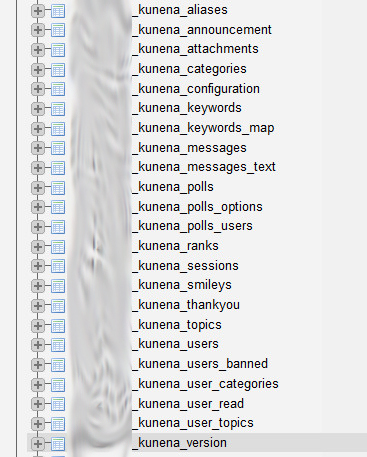
I would like to have a database that is as clean as possible, so is there a way to remove these tables safely without damaging my Joomla! installation? I could just go ahead and remove them, but would that do the trick? Or are there references to these tables in other parts of the database?
Thanx,
Thom
My client decided she didn't want to use Kunena on her website, so I used the normal Joomla way to uninstall Kunena. When I checked in phpMyAdmin this morning, there were 23 database tables starting with ***_kunena_aliases and ending with ***_kunena_version. (see image)
I would like to have a database that is as clean as possible, so is there a way to remove these tables safely without damaging my Joomla! installation? I could just go ahead and remove them, but would that do the trick? Or are there references to these tables in other parts of the database?
Thanx,
Thom
Last edit: 10 years 3 months ago by Thomsterdam.
Please Log in or Create an account to join the conversation.


10 years 3 months ago #172754
by 810
Replied by 810 on topic "orphaned" Kunena Database Tables after uninstall
Then install kunena again, then go to backend - components - kunena - tools - uninstall
This will remove everything from kunena.
This will remove everything from kunena.
Please Log in or Create an account to join the conversation.
- Thomsterdam
-
Topic Author
- Offline
- New Member
-
Less
More
- Posts: 4
- Thank you received: 0
10 years 3 months ago #172755
by Thomsterdam
Replied by Thomsterdam on topic "orphaned" Kunena Database Tables after uninstall
Thanks a lot. It worked.
For your further development: I think there should be a universal way to uninstall extensions, i.e. the one at Extensions > Manage > Uninstall. Nobody wants orphaned database tables which was the result earlier.
Thanx,
Thom
For your further development: I think there should be a universal way to uninstall extensions, i.e. the one at Extensions > Manage > Uninstall. Nobody wants orphaned database tables which was the result earlier.
Thanx,
Thom
Please Log in or Create an account to join the conversation.
- Thomsterdam
-
Topic Author
- Offline
- New Member
-
Less
More
- Posts: 4
- Thank you received: 0
10 years 3 months ago #172781
by Thomsterdam
Replied by Thomsterdam on topic "orphaned" Kunena Database Tables after uninstall
Hi there,
It all went ok yesterday and Kunena was uninstalled, there were no tables left in the database
Today, when I logged into the site I was confronted with an update reminder for Kunena 4.0.9 in the section Extensions > Manage > Update. Apparently Kunena has left something behind... How do I get rid of that?
Thanx,
Thom
It all went ok yesterday and Kunena was uninstalled, there were no tables left in the database
Today, when I logged into the site I was confronted with an update reminder for Kunena 4.0.9 in the section Extensions > Manage > Update. Apparently Kunena has left something behind... How do I get rid of that?
Thanx,
Thom
Please Log in or Create an account to join the conversation.


Less
More
- Posts: 12285
- Thank you received: 2535
10 years 3 months ago #172782
by rich
Important! Always create a backup before you make any changes to your website!
Replied by rich on topic "orphaned" Kunena Database Tables after uninstall
Open the Joomla table *_extensions and remove the column "Kunena Forum Package".
Important! Always create a backup before you make any changes to your website!
Please Log in or Create an account to join the conversation.
- Thomsterdam
-
Topic Author
- Offline
- New Member
-
Less
More
- Posts: 4
- Thank you received: 0
10 years 3 months ago #172786
by Thomsterdam
Replied by Thomsterdam on topic "orphaned" Kunena Database Tables after uninstall
Hey there,
Thanks for your response! In _extensions I found two Kunena references:
Thanx,
Thom
Thanks for your response! In _extensions I found two Kunena references:
- Kunena Media Files
- Kunena Forum Package
Thanx,
Thom
Please Log in or Create an account to join the conversation.
Time to create page: 0.261 seconds