
Kunena 7.1.1 & Kunena 6.4.17 – Security Updates Released
The Kunena team has announce the arrival of Kunena 7.1.1 [K 7.1.1] in stable which is now available for download as a native Joomla extension for J! 5.4.x/6.0.x./6.1.x./6.2.x This version addresses most of the issues that were discovered in K 6.2 / K 6.3 / K 6.4 / K7.0 and issues discovered during the last development stages of K 7.1
Just a reminder: K6.4.17 receives only securities fixes until end of 2026, so it's advised for users to upgrade to K7.1.
Question WhatsApp Icon Not Displaying Correctly
- 9themestore
-
 Topic Author
- Offline
- Premium Member
-

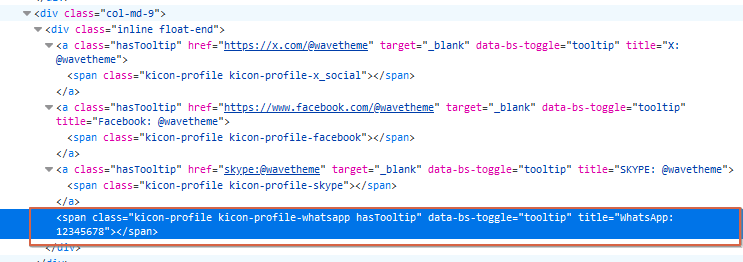
When adding social accounts to the user profile, all icons function properly except for the WhatsApp icon, which does not appear as a clickable link. Other social icons are correctly linked, but the WhatsApp icon fails to render in link form.
Kind regards,
- Please provide your site url if it has been lived.
- Please share tip if it worked fine with you.
- Don't be shy about using the "Thanks" button below if you found my comment helpful

Please Log in or Create an account to join the conversation.


- Posts: 1092
- Thank you received: 195
Please Log in or Create an account to join the conversation.
- 9themestore
-
Topic Author
- Offline
- Premium Member
-
Thank you very much for your code. I tried changing the code as per your suggestion and it works perfectly. I hope Kunena team will fix this bug in the next version.
Thank you
- Please provide your site url if it has been lived.
- Please share tip if it worked fine with you.
- Don't be shy about using the "Thanks" button below if you found my comment helpful
Please Log in or Create an account to join the conversation.
- Posts: 1092
- Thank you received: 195
Please Log in or Create an account to join the conversation.


Doesn't seems to work for me. Mine is fresh install of Joomla 5.2.1 and Kunena 6.3.6 with a default Cassiopeia Site template.Confirmed. Think that line 2224 in libraries/kunena/src/User/KunenaUser.php should be changed from
toCode:'whatsapp' => ['url' => '##VALUE##', 'title' => Text::_('COM_KUNENA_MYPROFILE_WHATSAPP'), 'nourl' => '1'],Code:'whatsapp' => ['url' => 'https://wa.me/##VALUE##', 'title' => Text::_('COM_KUNENA_MYPROFILE_WHATSAPP'), 'nourl' => '0'],
When hover the button link look like this;
whatsapp://send?text=https%3A%2F%2F
Kunena always the best!
Please Log in or Create an account to join the conversation.
- Posts: 1092
- Thank you received: 195
Please Log in or Create an account to join the conversation.