
Kunena 7.0.4 Released
The Kunena team has announce the arrival of Kunena 7.0.4 [K 7.0.4] in stable which is now available for download as a native Joomla extension for J! 5.4.x/6.0.x. This version addresses most of the issues that were discovered in K 6.2 / K 6.3 / K 6.4 and issues discovered during the last development stages of K 7.0
Question Kunena 6.0.1.1 is Including Post Comments with email when set to No


3 years 8 months ago #224162
by purezen
Hello Support
In a previous post, I reported that Kunena 6.0.1.1 is sending Plain Text emails, when it should be sending HTML email notifications.
www.kunena.org/forum/k-6-0-support/16560...unena-6-0-1-1#224094
I have discovered another problem related to the same config section.
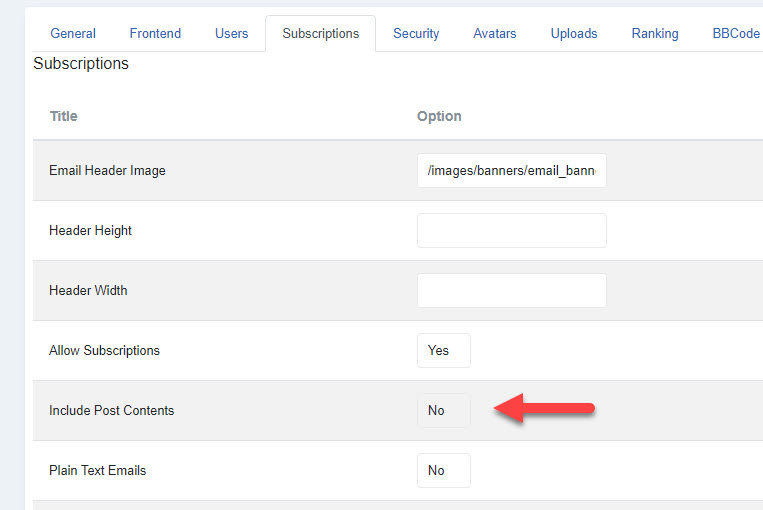
Include Post Comments is set to No, however email notifications are sending the entire post contents with each email.
I already have Kunena 6.0.1.1 working on my live site.
If there is an easy way to edit the code that controls this function, I would appreciate knowing how to fix this now.
Regards
Derek
p.s.
Thank you for the continued help this forum provides.
It is very much appreciated.
In a previous post, I reported that Kunena 6.0.1.1 is sending Plain Text emails, when it should be sending HTML email notifications.
www.kunena.org/forum/k-6-0-support/16560...unena-6-0-1-1#224094
I have discovered another problem related to the same config section.
Include Post Comments is set to No, however email notifications are sending the entire post contents with each email.
I already have Kunena 6.0.1.1 working on my live site.
If there is an easy way to edit the code that controls this function, I would appreciate knowing how to fix this now.
Regards
Derek
p.s.
Thank you for the continued help this forum provides.
It is very much appreciated.
Please Log in or Create an account to join the conversation.


3 years 8 months ago #224165
by Geni
Replied by Geni on topic Kunena 6.0.1.1 is Including Post Comments with email when set to No
There are disturbing multiple configurations.
If you delete {MESSAGE} in system e-mail (search kunena) it works
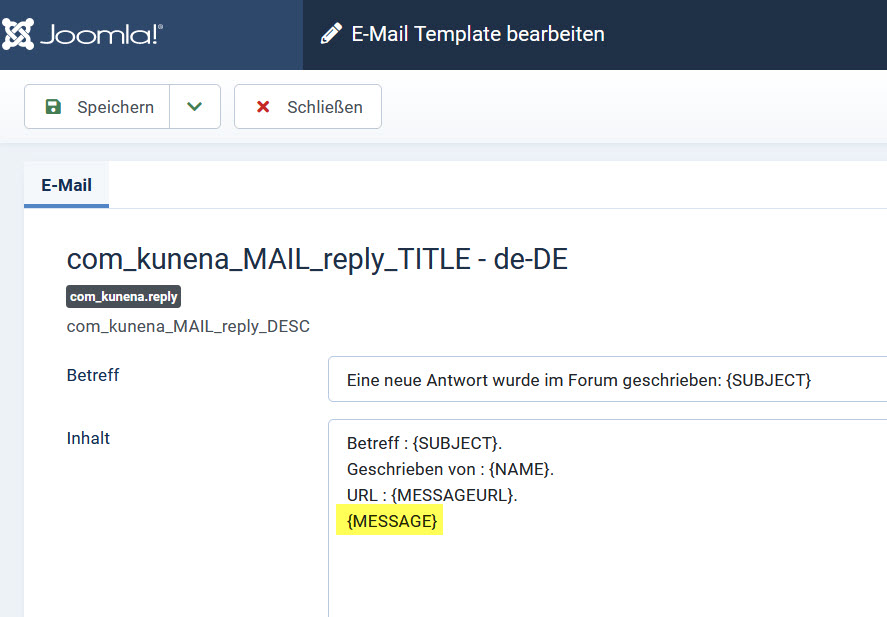
If you delete {MESSAGE} in system e-mail (search kunena) it works
The following user(s) said Thank You: purezen
Please Log in or Create an account to join the conversation.


3 years 8 months ago - 3 years 8 months ago #224166
by Leen
With kind regards
Leen
Replied by Leen on topic Kunena 6.0.1.1 is Including Post Comments with email when set to No
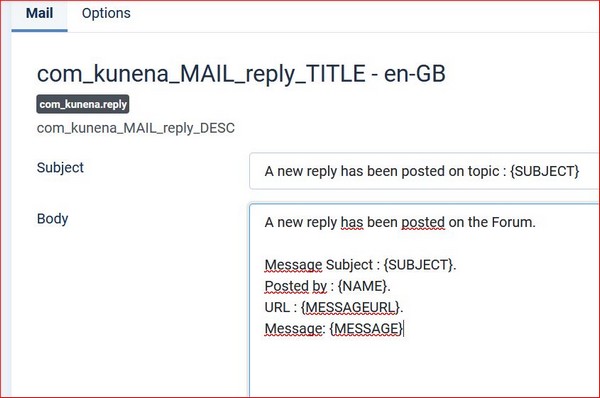
the image of Geni looks slightly different than on my test website's.
I think there should be something more behind message.
And I dont know if you already noticed but if you scroll down there
then can you possibly adjust the HTML Body a bit.
I think there should be something more behind message.
And I dont know if you already noticed but if you scroll down there
then can you possibly adjust the HTML Body a bit.
With kind regards
Leen


Last edit: 3 years 8 months ago by Leen. Reason: plaatje vergeten
Please Log in or Create an account to join the conversation.
3 years 8 months ago #224169
by Geni
Replied by Geni on topic Kunena 6.0.1.1 is Including Post Comments with email when set to No
Hi Leen,
If you delete the placeholder {MESSAGE} the mail will be sent without message if HTML you have to do this also in HTML
If you delete the placeholder {MESSAGE} the mail will be sent without message if HTML you have to do this also in HTML
The following user(s) said Thank You: Leen
Please Log in or Create an account to join the conversation.
3 years 8 months ago #224201
by purezen
Hi Geni
Thank you so much for that information!
Thanks for the speedy reply!
It worked perfectly

Replied by purezen on topic Kunena 6.0.1.1 is Including Post Comments with email when set to No
There are disturbing multiple configurations.
If you delete {MESSAGE} in system e-mail (search kunena) it works
Hi Geni
Thank you so much for that information!
Thanks for the speedy reply!
It worked perfectly
Please Log in or Create an account to join the conversation.
3 years 8 months ago #224204
by Geni
Replied by Geni on topic Kunena 6.0.1.1 is Including Post Comments with email when set to No
I think these 3 items can be eliminated as this is configured in "system e-mail (search kunena)".

Please Log in or Create an account to join the conversation.
Time to create page: 0.233 seconds