


- Posts: 11
- Thank you received: 0
Kunena 7.0.11 & Kunena 6.4.16 – Security Updates Released and K7.1 in RC1 2
The Kunena team has announce the arrival of three simultaneous security release : K6.4.16, K7.0.11 and K7.1 RC2. Just a reminder K6.4.16 receives only securities fixes untill end of 2026, so it's advised for users to upgrade to K7.0.11. K7.0.11 is the last release of the K7.0 because it's replaced by K7.1 branch with the stable release in the corner. The translations for K7.1 on crowdin.com/project/kunena-forum-7-1 needs to be checked or improved becasue it has been generated by TM (Translation Machine).
Question Menu [home page] Default Menu Item choose [Recent topics] different
5 years 4 months ago #217984
by hung
Hi ~
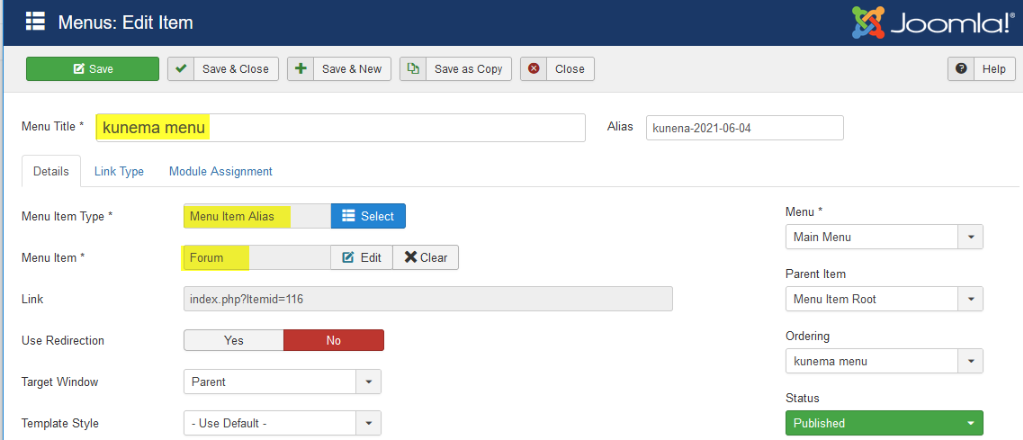
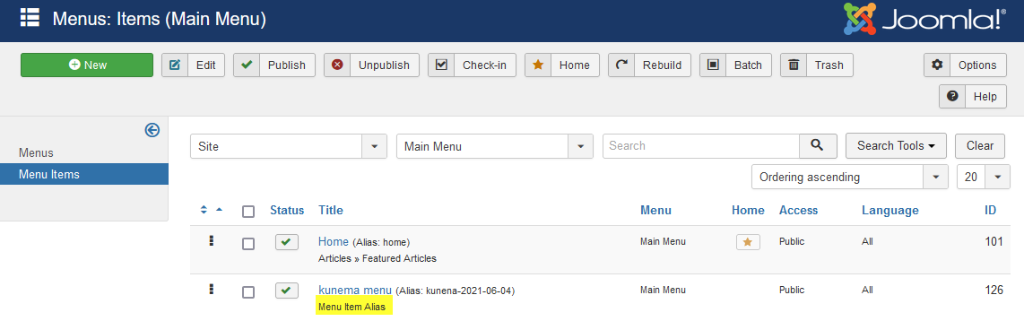
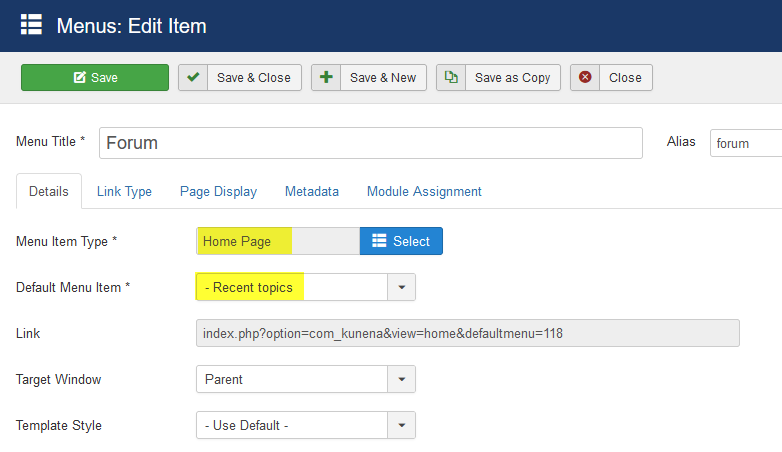
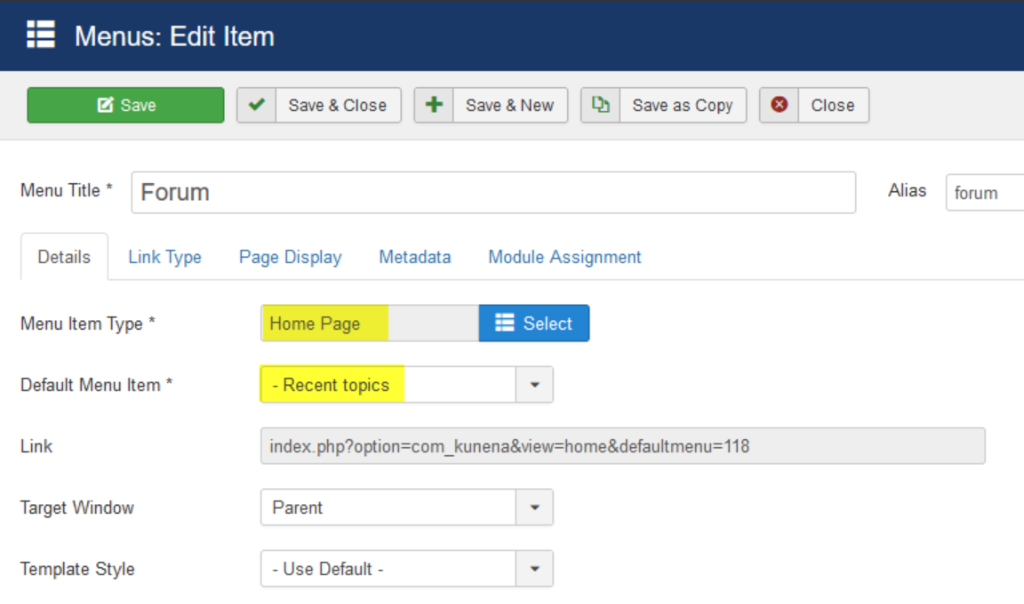
In main menu , there is a Menu Item Alias that Menu Item is Forum
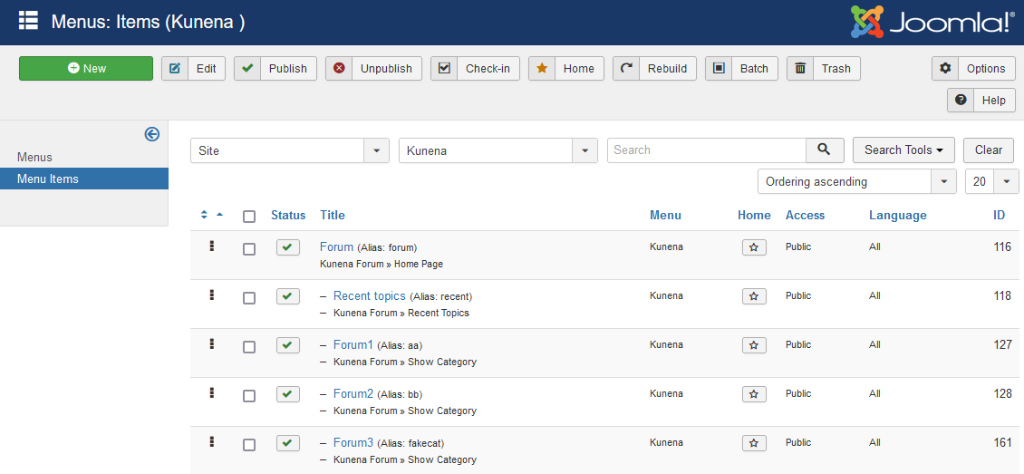
And Forum's setting > [Menu Item Type]:Home Page / [Default Menu Item]:Recent topics
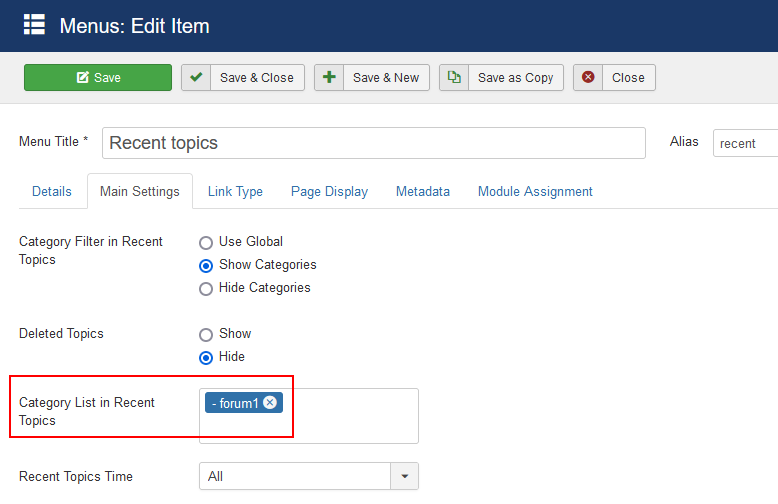
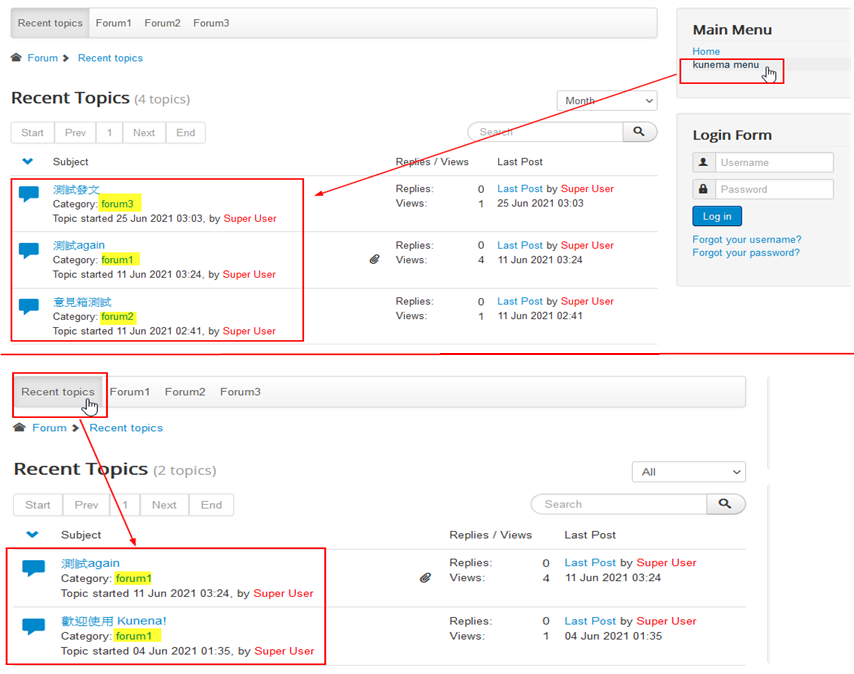
[Recent topics] I just choose to show "Forum1" category.
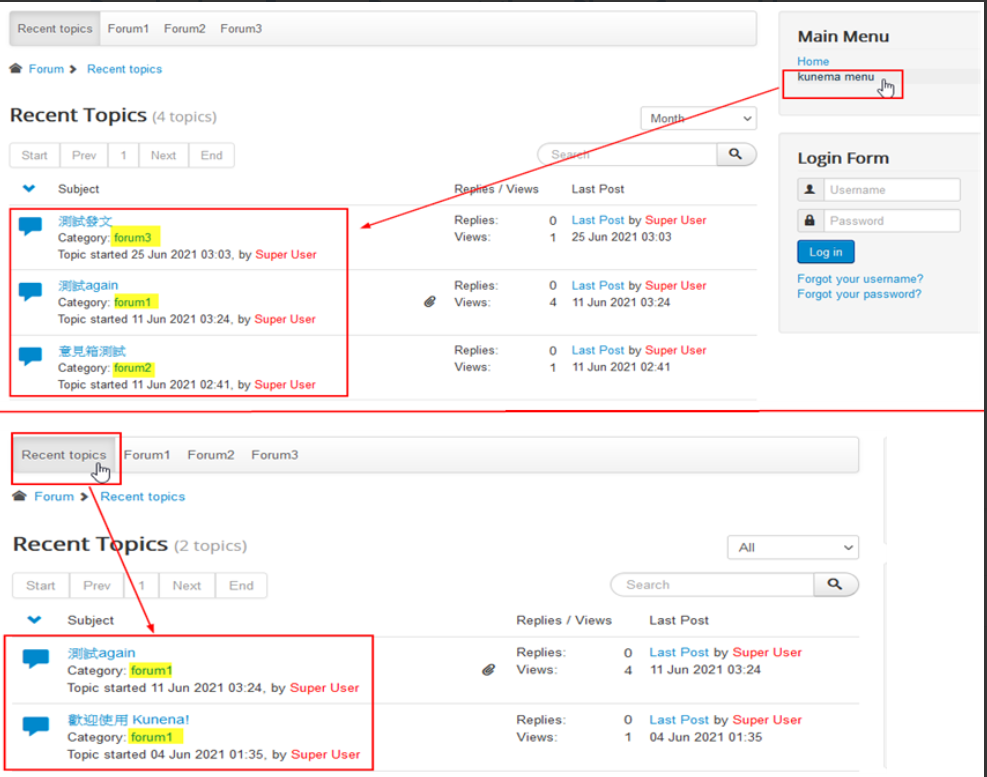
However, in the front site, when I click "kunena menu", it will show "Forum1" + "Forum2" + "Forum3"
and I click "Recent topics" , it will show "Forum1" correctly.
"kunena menu" should equal "Recent topics" , just show "Forum1", but it's not
Please help~ thanks
In main menu , there is a Menu Item Alias that Menu Item is Forum
And Forum's setting > [Menu Item Type]:Home Page / [Default Menu Item]:Recent topics
[Recent topics] I just choose to show "Forum1" category.
However, in the front site, when I click "kunena menu", it will show "Forum1" + "Forum2" + "Forum3"
and I click "Recent topics" , it will show "Forum1" correctly.
"kunena menu" should equal "Recent topics" , just show "Forum1", but it's not
Please help~ thanks

Please Log in or Create an account to join the conversation.


Less
More
- Posts: 12298
- Thank you received: 2544
5 years 4 months ago #217993
by rich
Important! Always create a backup before you make any changes to your website!
Replied by rich on topic Menu [home page] Default Menu Item choose [Recent topics] different
Your setting is contrary. You have selected in the configuration:
Category List in Recent Topics = Show all Categories
and in the menu item Recent Topics:
Show Forum 1
Category List in Recent Topics = Show all Categories
and in the menu item Recent Topics:
Show Forum 1
Important! Always create a backup before you make any changes to your website!
Please Log in or Create an account to join the conversation.
5 years 4 months ago #218059
by hung
Replied by hung on topic Menu [home page] Default Menu Item choose [Recent topics] different
My setting is the same like what you say~ (the pictures are from my first post)
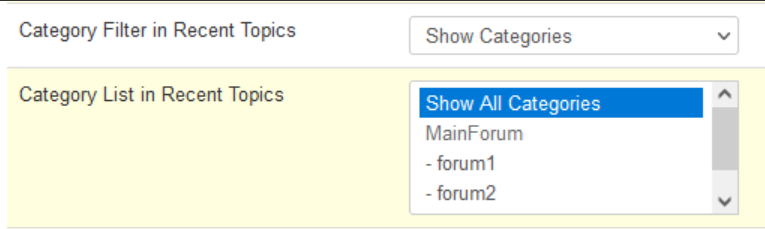
configuration:
Category List in Recent Topics = Show all Categories
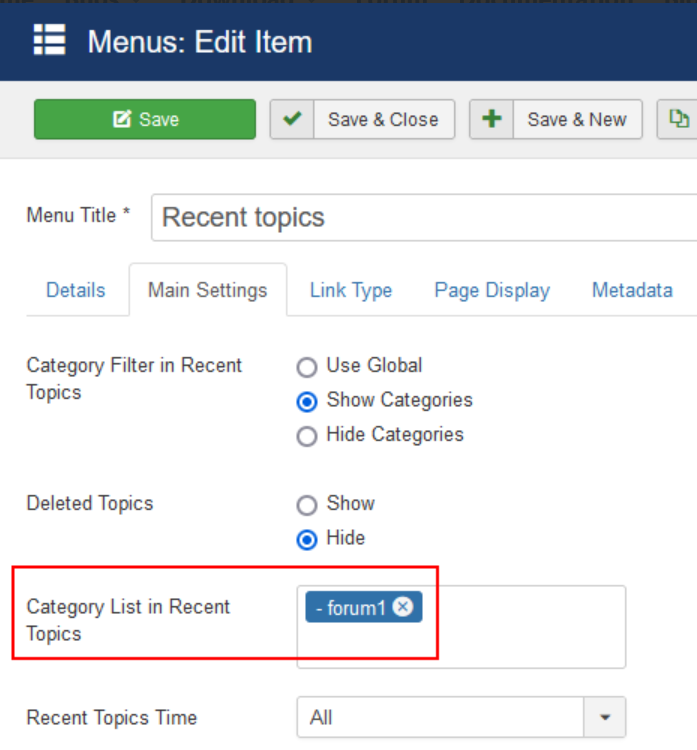
in the menu item Recent Topics:
Show Forum 1
My question is the menu choose to show Kunena Home Page
and home page's default menu item is Recent topics
Why Home Page doesn't just show Forum1 like Recent topics ?
configuration:
Category List in Recent Topics = Show all Categories
in the menu item Recent Topics:
Show Forum 1
My question is the menu choose to show Kunena Home Page
and home page's default menu item is Recent topics
Why Home Page doesn't just show Forum1 like Recent topics ?
Please Log in or Create an account to join the conversation.
Less
More
- Posts: 12298
- Thank you received: 2544
5 years 4 months ago #218076
by rich
If you want additional a menu item where you can see all topics, then make a duplicate of the menu item Recent Topics and choose all categories.
Important! Always create a backup before you make any changes to your website!
Replied by rich on topic Menu [home page] Default Menu Item choose [Recent topics] different
Yes, but I also wrote that this is contrary. You must set for both the same.My setting is the same like what you say~ (the pictures are from my first post)
If you want additional a menu item where you can see all topics, then make a duplicate of the menu item Recent Topics and choose all categories.
Important! Always create a backup before you make any changes to your website!
Please Log in or Create an account to join the conversation.
5 years 4 months ago - 4 years 10 months ago #218084
by hung
Replied by hung on topic Menu [home page] Default Menu Item choose [Recent topics] different
Because there are many sets of kunena forums in my site, so I don't understand how to "set for both the same"I change my question , I hope my site's forum like below, how could I set it? Thanks!

Last edit: 4 years 10 months ago by hung.
Please Log in or Create an account to join the conversation.
Less
More
- Posts: 12298
- Thank you received: 2544
5 years 4 months ago #218092
by rich
Important! Always create a backup before you make any changes to your website!
Replied by rich on topic Menu [home page] Default Menu Item choose [Recent topics] different
If I understand correctly, when you click on "Kunena Menu" you only want to display the latest topics from forum 1. I'm right? So you need this setting also in the configuration. That's I meant with "You must set for both the same".
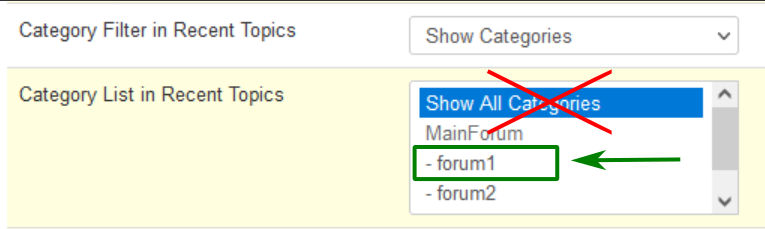
Important! Always create a backup before you make any changes to your website!
Please Log in or Create an account to join the conversation.
Time to create page: 0.135 seconds