
Kunena 7.0.4 Released
The Kunena team has announce the arrival of Kunena 7.0.4 [K 7.0.4] in stable which is now available for download as a native Joomla extension for J! 5.4.x/6.0.x. This version addresses most of the issues that were discovered in K 6.2 / K 6.3 / K 6.4 and issues discovered during the last development stages of K 7.0
Question Editor not loading after upgrade to Kunena 5.2.2


5 years 4 months ago #215237
by purezen
Editor not loading after upgrade to Kunena 5.2.2 was created by purezen
Hi there
I have just upgraded Kunena from 5.2.1 to 5.2.2 on my test site.
The new editor is not loading after upgrade.
When I inspect the page, there are numurous errors.
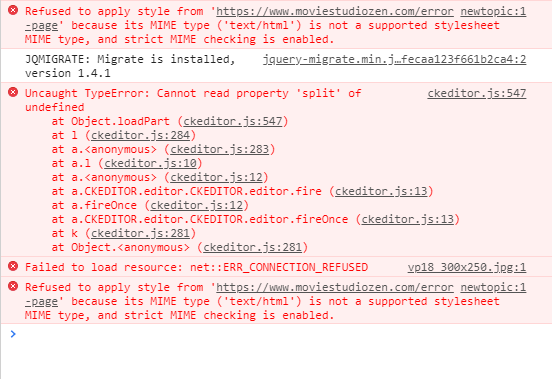
Here is a guest account you can use to login and try creating a new topic, to see problem.
This is my test site, so you can do whatever you like.
www.moviestudiozen.com/msz_test1/forum/index
Regards
Derek
I have just upgraded Kunena from 5.2.1 to 5.2.2 on my test site.
The new editor is not loading after upgrade.
When I inspect the page, there are numurous errors.
Here is a guest account you can use to login and try creating a new topic, to see problem.
This is my test site, so you can do whatever you like.
www.moviestudiozen.com/msz_test1/forum/index
This message contains confidential information
Regards
Derek
Please Log in or Create an account to join the conversation.


5 years 4 months ago - 5 years 4 months ago #215246
by adi77
Replied by adi77 on topic Editor not loading after upgrade to Kunena 5.2.2
I have the same Problem!
Last edit: 5 years 4 months ago by adi77.
Please Log in or Create an account to join the conversation.


5 years 4 months ago - 5 years 4 months ago #215266
by xillibit
I don't provide support by PM, because this can be useful for someone else.
Replied by xillibit on topic Editor not loading after upgrade to Kunena 5.2.2
Hello,
@purezen: i have just tried on your test site, in dveloppement console of brower i have a different error :
For me it's related to the new setting added in Kunena 5.2.2 to be able to define it's own skin in CKeditor
In the file : /media/kunena/core/js/ckeditor_config.js , just comment these lines at end, untill that your third party template will be updated or if i make a workaround :
@purezen: i have just tried on your test site, in dveloppement console of brower i have a different error :
Code:
Uncaught TypeError: CKEDITOR.skinName is undefined
For me it's related to the new setting added in Kunena 5.2.2 to be able to define it's own skin in CKeditor
In the file : /media/kunena/core/js/ckeditor_config.js , just comment these lines at end, untill that your third party template will be updated or if i make a workaround :
Code:
if (Joomla.getOptions('com_kunena.ckeditor_skiname') !== null)
{
config.skin = Joomla.getOptions('com_kunena.ckeditor_skiname');
}
I don't provide support by PM, because this can be useful for someone else.
Last edit: 5 years 4 months ago by xillibit.
The following user(s) said Thank You: purezen
Please Log in or Create an account to join the conversation.


5 years 4 months ago #215268
by xreliable
Replied by xreliable on topic Editor not loading after upgrade to Kunena 5.2.2
having same problem. I commented out that section of code then the editor loaded.
Please Log in or Create an account to join the conversation.

5 years 4 months ago #215271
by Bigmoose
Replied by Bigmoose on topic Editor not loading after upgrade to Kunena 5.2.2
The problem is only with the Chrome and Edge browsers. There is no problem in Firefox. Commented the last lines in ckeditor_config.js and the issue is solved.
Please Log in or Create an account to join the conversation.
5 years 4 months ago #215273
by purezen
Replied by purezen on topic Editor not loading after upgrade to Kunena 5.2.2
Thank you @xillibit
I use a 9themestore template.
9themestore has now released a new template version which is compatible with Kunena 5.2.2
After installing the new template version, the editor is now displaying correctly.
Thank you once again for your speedy reply and solution !!!
I use a 9themestore template.
9themestore has now released a new template version which is compatible with Kunena 5.2.2
After installing the new template version, the editor is now displaying correctly.
Thank you once again for your speedy reply and solution !!!
Please Log in or Create an account to join the conversation.
Time to create page: 0.219 seconds