


- Posts: 1218
- Thank you received: 174
Kunena 7.0.4 Released
The Kunena team has announce the arrival of Kunena 7.0.4 [K 7.0.4] in stable which is now available for download as a native Joomla extension for J! 5.4.x/6.0.x. This version addresses most of the issues that were discovered in K 6.2 / K 6.3 / K 6.4 and issues discovered during the last development stages of K 7.0
Solved No icons
4 years 4 months ago #221163
by Leen
With kind regards
Leen
I think your website and extensions may not be quite the last .
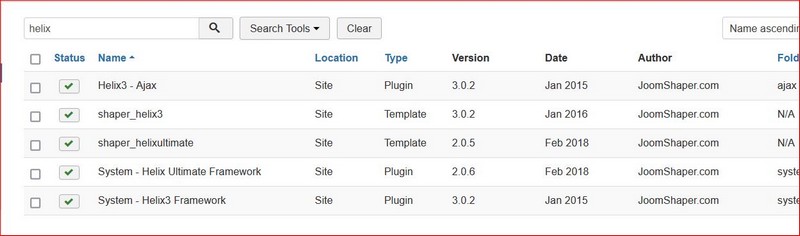
my example is from Joomla! 3.10.4 with the shaper_helixultimate - Default template and Kunena Version: 5.2.8
my example is from Joomla! 3.10.4 with the shaper_helixultimate - Default template and Kunena Version: 5.2.8
With kind regards
Leen
Please Log in or Create an account to join the conversation.


4 years 4 months ago #221181
by Django29
I just updated Kunena to the last version (5.2.8 / 2022-01-01) and now, no more selection of bootstrap version in the field for the icons types.
Only Font Awesome. But no icons Font Awesome displayed anywhere. Not sure it's a problem for me.
The changelog of Kunena 5.2.8 contains :
Bug fix : Fixed icons disappearing in Kunena 5.2.7 (#8634)
My Joomla is also 3.10.4.
Only Font Awesome. But no icons Font Awesome displayed anywhere. Not sure it's a problem for me.
The changelog of Kunena 5.2.8 contains :
Bug fix : Fixed icons disappearing in Kunena 5.2.7 (#8634)
My Joomla is also 3.10.4.
Please Log in or Create an account to join the conversation.
4 years 4 months ago #221192
by Leen
With kind regards
Leen
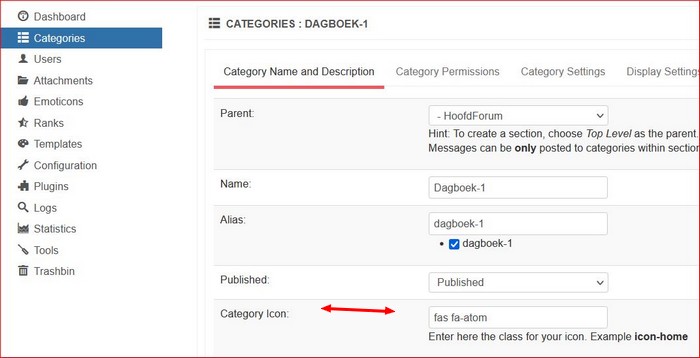
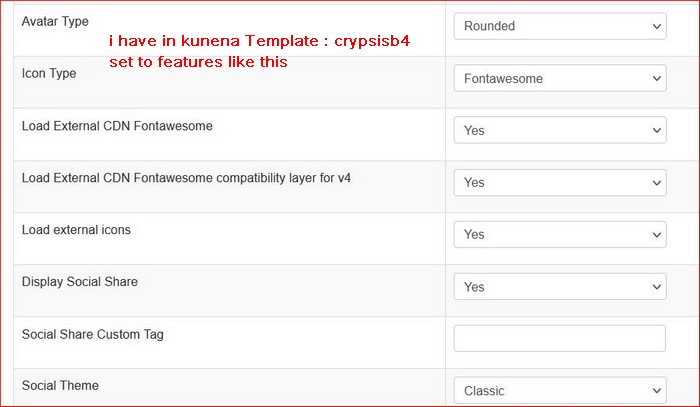
okay can you join the kunena category as a test Category Icon: eg enter fas fa-atom and see if that works
got that from here when you click on start using this icon the correct code comes up
sample icoon code
got that from here when you click on start using this icon the correct code comes up
sample icoon code
With kind regards
Leen

Please Log in or Create an account to join the conversation.
4 years 4 months ago #221198
by Leen
With kind regards
Leen
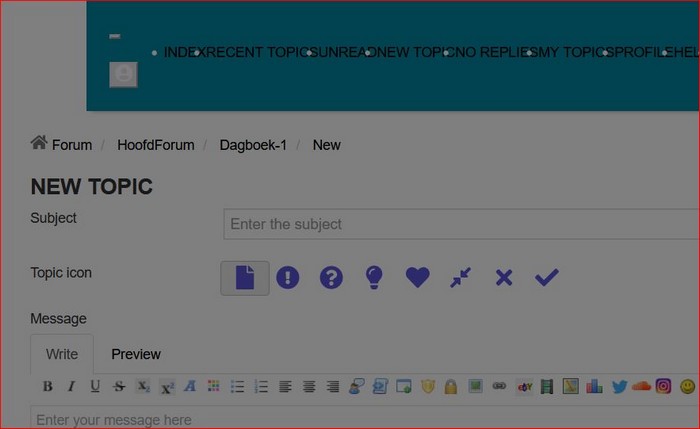
ok i will come back to my attempts with Helix Ulimate template indeed does not allow all edit icons in the editor .
If I install a lempate eg Phoca POS as a test and set it up a bit, I can see the icons.
so i think it would be wiser to look for another template
If I install a lempate eg Phoca POS as a test and set it up a bit, I can see the icons.
so i think it would be wiser to look for another template
With kind regards
Leen
Please Log in or Create an account to join the conversation.
4 years 4 months ago #221201
by Django29
Last minute : Now it works, with Helix Ultimate and my Joomshaper template.
After my last update of Kunena, I entered a wrong Font Awesome code.
Problem solved. Thanks for your help.
After my last update of Kunena, I entered a wrong Font Awesome code.
Problem solved. Thanks for your help.
Please Log in or Create an account to join the conversation.
Time to create page: 0.230 seconds